Downloadable Files
You can download HardCorrupt for free from the end of this page.
Create Glitch Effects That Feel Truly Broken
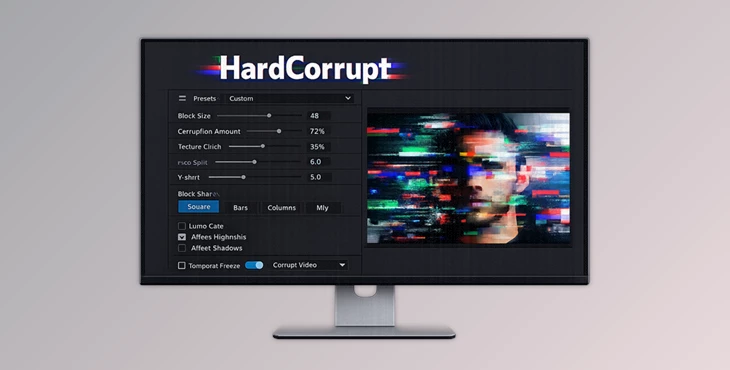
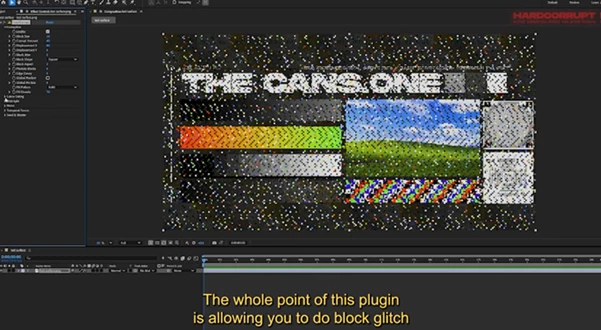
Glitch effects have become a popular visual style in a variety of content across the web. To create glitches that feel realistic, designers often have to apply a variety of different effects to their footage. HardCorrupt simplifies this process by incorporating a block-based corruption engine into After Effects.
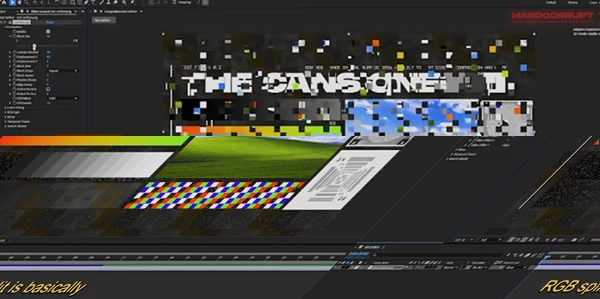
With HardCorrupt, users can generate glitch effects such as digital corruption, block tearing, RGB distortion, frozen macroblocks, and various artifacts by simply adjusting a few parameters. This effect is useful in a variety of projects, from title sequences to dynamic intros and even music videos.
What is HardCorrupt?
HardCorrupt is a professional glitch effect plugin for Adobe After Effects on Windows.
Within the plugin, your footage gets divided into blocks. Then, digital corruption can be applied to these blocks by moving the pixels within the block, splitting the RGB values of the block, adding noise, and freezing the blocks.
Only the corrupted blocks are affected by the effect. This gives the glitch effect a much more realistic look.
The plugin is keyframeable. Additionally, the Auto Seed mode will automatically animate each frame of your composition without the need for manual animation.
This After Effects plugin will significantly reduce your production time and give you much more natural glitch animations for your projects.
Why HardCorrupt Makes Motion Design Easier
Digital corruption can be a complicated effect to create manually for your footage. HardCorrupt combines a variety of digital corruption techniques into a single effect, making it easier for motion designers to create digital glitches of their choosing.
For instance, users can create digital corruption that affects only the brightest areas in their footage using the Luma Gating feature. Additionally, users can freeze certain blocks of their footage to simulate damaged video compression.
Overall, the effect provides users with a variety of features that allow them to simulate a variety of glitch effects, all while maintaining full control over their projects.
Features
Powerful Block Corruption Engine
The core corruption system allows complete control over:
- Adjustable Block Size
- Corrupt Amount
- Horizontal and Vertical Displacement
- Block Jitter
Multiple block layouts:
- Square
- Horizontal Strips
- Vertical Columns
- Mixed
- Optional block pixelation
- Edge feathering
- Global pixelation
Multiple fill patterns including:
- Solid
- Cross
- Diamond
- Checkerboard
- Dot
- Outline
- Scatter
These controls make it easy to create anything from subtle codec damage to complete digital destruction.
Luma Gating
Luma Gating limits corruption based on image brightness. Its controls include:
- Brightness threshold
- Edge feathering
- Invert option
This makes it possible to corrupt only highlights, only shadows, or smoothly blend corruption across selected luminance ranges for much more refined results.
RGB Split
HardCorrupt provides independent X and Y offsets for:
- Red
- Green
- Blue
Since RGB separation affects only corrupted blocks, the clean portions of your footage remain untouched, producing much cleaner and more professional glitch effects.
Advanced Noise Controls
Noise generation includes:
- Luminance Noise
- Independent Red Noise
- Independent Green Noise
- Independent Blue Noise
Separate chromatic noise values create richer and more colorful digital artifacts compared to standard monochrome noise.
Temporal Freeze
Temporal Freeze recreates classic video codec freezing. Instead of changing every frame, blocks with matching luma signatures remain locked into fixed corruption patterns, creating realistic frozen macroblocks that persist over time. This feature is ideal for:
- Broadcast simulation
- VHS-inspired visuals
- Compression artifacts
- Experimental glitch animation
Seed & Master Controls
Users can choose between:
- Manual Seed for repeatable results
- Auto Seed for automatic per-frame animation
Master Opacity lets you blend the entire effect with the original footage for complete creative control.
Output Modes
HardCorrupt includes three output modes:
- Normal
- Show Mask
- Corrupt Only
Show Mask generates a clean matte of corrupted areas, while Corrupt Only outputs damaged pixels on a transparent background for easier compositing.
Professional Tips
Start with moderate corruption before increasing displacement values. Small adjustments often create more convincing digital failures than extreme settings.
Use Luma Gating to focus corruption on bright screens, reflections, or shadow regions. This produces more intentional and cinematic results.
Combine RGB Split with Temporal Freeze to simulate damaged video compression found in old broadcasts and streaming artifacts.
Enable Auto Seed whenever you need continuously evolving glitches without creating dozens of keyframes.
Experiment with different Fill Patterns to build unique graphic styles instead of relying solely on random corruption.
Finally, use the Corrupt Only output mode to composite glitch elements over multiple layers while maintaining maximum flexibility during editing.
Final Thoughts
HardCorrupt offers a fast and highly controllable way to add glitch and digital corruption effects to your projects in After Effects.
The ability to control the various parameters of the corruption engine, the RGB channels, the noise, temporal freezing, and the ability to output the effect in different modes will give you everything you need to design convincing digital glitches.
From cinematic titles to music videos and social media content, HardCorrupt will make it easier to add these visual effects while maintaining full control over your project.

Files Password : gfxplugin.com OR 123456