Downloadable Files
You can download Shape Transfer for free from the end of this page.
Make Character Customization Faster
If you have ever created different body shapes for a character in Blender, you probably know how time-consuming it can be to make clothes follow those same shape keys. Rebuilding or manually adjusting every clothing item for each body variation quickly becomes repetitive and frustrating.
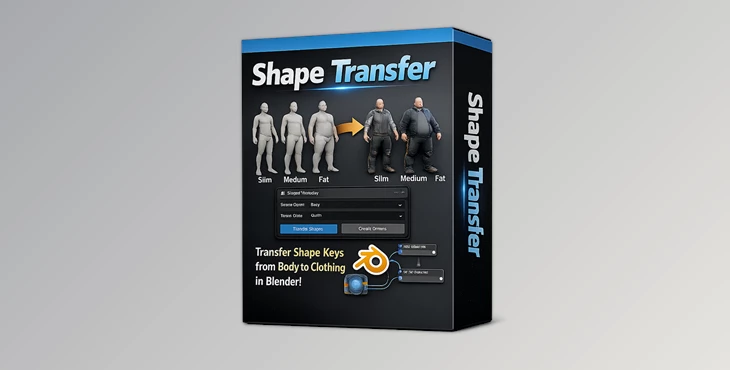
Shape Transfer is designed to solve exactly that problem. It lets you transfer shape keys from a source object, such as a character body, to a target object like clothing, making character customization much faster and far more efficient. Whether you’re building game characters, animation assets, or digital humans, this addon helps you spend less time on repetitive work and more time creating.
What Is Shape Transfer?
Shape Transfer is a Blender addon for Blender 3.6 and 4.x that automatically transfers shape keys from one mesh to another. In most workflows, the source object is a character body containing multiple body-shape morphs, while the target object is a piece of clothing that should react to those same shape changes.
Instead of recreating every morph manually, the addon copies the deformation behavior so the clothing moves naturally with the character.
This significantly improves production speed because every matching shape key is generated automatically, allowing artists to maintain consistent character variations across multiple outfits.
Features
Fast Shape Key Transfer
Transfer shape keys from a body mesh to clothing with just a few clicks using the Shape Transfer panel located in Blender’s right-side Tools panel.
Easy Source and Target Selection
Simply specify:
- Source object (the mesh containing the original shape keys)
- Target object (the mesh that will receive the new shape keys)
The addon handles the transfer process automatically.
Linked Shape Key Controls
After the transfer is complete, adjusting a shape key slider on the source object automatically updates the corresponding shape key on the target object. This creates a much smoother workflow while testing different character body types.
Shape Key Cleanup
If needed, generated shape keys can be removed quickly using the built-in Shape Keys Clean function.
Supports Different Mesh Topology
The target clothing does not need to share identical topology with the body mesh, making the addon flexible for a wide variety of character assets.
Example Blender File Included
The addon comes with a sample Blender project containing a source body and target clothing, making it easy to understand the workflow and start using the tool immediately.
Compatible with Blender 3.6 and 4.x
Designed specifically for modern Blender versions, ensuring compatibility with current production pipelines.
Real Workflow Examples
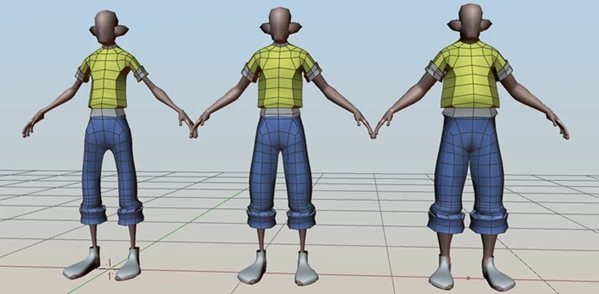
Imagine creating a character that includes:
- Slim body
- Medium body
- Heavy body
Normally, every shirt, jacket, armor piece, or dress would require matching shape keys created by hand.
With Shape Transfer, the body already contains those shape keys, and the clothing inherits them automatically. As you move the body shape slider, the clothing follows along without requiring manual adjustments.
This can save hours of repetitive work on projects that include multiple outfits or character variations.
Tips for Better Results
- Ensure that your source mesh has the required shape keys already created and working before attempting to transfer them.
- Ensure that your source mesh does not have any overlapping vertices (doubles).
- Avoid concave geometry on your source mesh when using Shape Transfer .
- After the transfer, test the shape keys on your target mesh to ensure smooth deformation.
- Use the example project file to become familiar with the workflow to produce your project.
- Use the built-in Shape Keys Clean function on your project file after using the tool to avoid cluttering your project.
Final Thoughts
There should never be a time when you have to create clothing for every body type your character has. Shape Transfer will make it easier to automate the process for your project with a few clicks.
Whether you are producing game characters or digital humans, this addon will make it easier for you to maintain the same deformations on your characters, produce them at a faster rate, and avoid having to manually edit their shape keys. For anyone who works on customizable characters, Shape Transfer will greatly benefit your project.

Files Password : gfxplugin.com OR 123456
![Blender - Download Lazy Shapekeys [Shape Keys Folder & Utility] v1.9.0](https://dls4.gfxplugin.ir/Download_Files/27522/SearchSmall/banner02.png)