Downloadable Files
You can download MotionAmigo for free from the end of this page.
Let AI Handle the Heavy Lifting
Creating motion graphics typically starts with an idea. However, turning that idea into animations takes hours of manual work in After Effects.
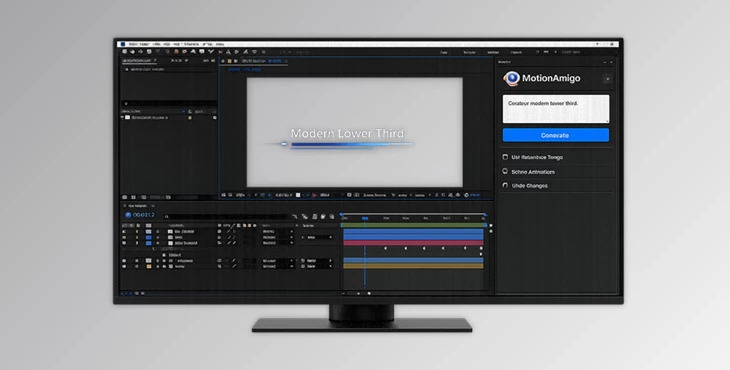
MotionAmigo changes the game by allowing AI agents to work directly within After Effects. Simply describe the motion graphic project that you envision in natural language. MotionAmigo handles the rest - it will generate editable After Effects content for you.
Whether you are after a social media animation, an explainer video, motion for UI designs, or even kinetic typography projects, MotionAmigo will help you get from idea to animation much faster.
What Is MotionAmigo?
MotionAmigo is an After Effects plugin that gives you access to your favorite AI models (Claude, ChatGPT) within After Effects.
Rather than creating an animation outside of After Effects, MotionAmigo will generate the following within After Effects:
- Compositions
- Shape layers
- Text layers
- Keyframes
- Expressions
- Masks
- Motion paths
- Layouts
All of this will remain within After Effects and be fully editable for you to work on as needed.
MotionAmigo works directly within After Effects, so there is no need to export your projects to another application.
Why MotionAmigo Makes Motion Design Easier
MotionAmigo understands After Effects deeply. It uses hundreds of scripts within After Effects to build projects automatically.
The result is that MotionAmigo gives you the following benefits:
- Creates motion graphics faster
- Saves time creating layouts manually
- Uses pre-set typographic and color styles to maintain brand elements
- Uses built-in animation principles for more natural movement
- Keeps all generated elements fully editable
- Allows for faster experimentation with different motion graphics ideas
Instead of spending hours manually creating text layers and effects, simply describe your motion graphic idea to MotionAmigo, and it will build everything for you.
Features
AI Motion Generation from Natural Language
Describe your animation in plain English, and this tool translates your request into fully editable After Effects elements.
The AI can automatically generate:
- Animations
- Layer structures
- Shape designs
- Expressions
- Motion graphics
- Timeline organization
Fully Editable After Effects Projects
Unlike many AI tools that render finished videos, MotionAmigo creates native AE objects. You can freely edit:
- Text
- Shapes
- Masks
- Keyframes
- Expressions
- Layers
- Compositions
This gives artists complete creative control after the AI finishes its work.
Works with Your Existing AI Subscription
MotionAmigo connects directly to your own Claude or ChatGPT subscription.
This means you don’t need separate API billing or additional cloud rendering services.
Smart Typography System
Create reusable typography styles with settings such as:
- Font family
- Weight
- Size
- Tracking
- Leading
The AI references these predefined styles to generate visually consistent text animations throughout your project.
Professional Color Management
Build your own palette of color swatches that the AI automatically applies while generating graphics.
This helps maintain visual consistency across branding projects, presentations, and motion graphics.
Intelligent Animation Controls
This tool allows you to define exactly how objects should move. Animation properties include:
- Position
- Scale
- Rotation
- Opacity
Motion styles can include:
- Bounce
- Anticipation
- Squash & Stretch
You can even describe the emotional feeling of the movement using simple text notes.
Advanced Keyframe Timing
Automatically apply professional ease-in and ease-out settings to generated keyframes.
Instead of manually adjusting graph editors, the AI produces smoother and more polished animation timing from the beginning.
Built-In Classic Animation Principles
MotionAmigo includes dedicated controls for:
- Anticipation
- Overshoot
- Settle
- Bounce
These classic animation techniques make movement feel significantly more natural and dynamic than simple linear keyframes.
Procedural Layout Generation
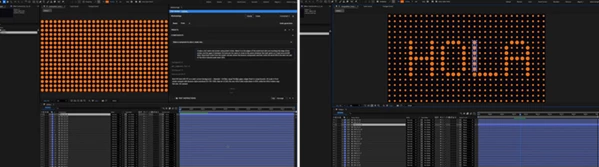
Generate structured layouts automatically using algorithms like:
- Grid
- Radial
- Spiral
- Hex
- Halftone
- Wave
- Brick
- Cluster
- Lissajous
The AI places layers according to these layouts, making it much easier to build complex motion graphics compositions.
Custom Motion Paths
Draw your own Bezier path and allow the AI to animate layers along that trajectory. This is especially useful for:
- Logo reveals
- Character motion
- Product showcases
- Camera movement
- Organic object animation
Physics-Based Motion
Configure realistic physical properties such as:
- Gravity
- Friction
- Bounce
- Air resistance
- Mass
These settings help the AI create more believable and physically convincing animations.
Sketch Playground
The Sketch component provides a flexible sandbox where the AI can render interactive visuals using technologies like:
- HTML
- SVG
- React
- PixiJS
This makes it possible to prototype visuals that native After Effects cannot easily generate.
Storyboard Drawing
Instead of describing every animation verbally, you can sketch ideas directly inside MotionAmigo. Your drawings become visual references for the AI, allowing it to better understand composition, movement, and timing. This makes early concept development much faster.
Practical Examples
This product can dramatically speed up many real-world projects, including:
- Animated social media advertisements
- YouTube intro sequences
- Kinetic typography videos
- Brand identity animations
- UI and app motion prototypes
- Infographics
- Product launch videos
- Explainer animations
- Interactive visual concepts
- Educational motion graphics
Because everything remains editable, designers can continue polishing every detail after generation.
Pro Tips for Better Results
Use the following tips for MotionAmigo to generate the best results for your projects:
- Use clear and specific language when generating your projects.
- Define your typographic and color palettes before generation for brand projects.
- Use motion paths to create more natural movement than straight-line animation.
- Use anticipation and overshoot features to create more professional animations.
- Use storyboard drawings to illustrate your most complex ideas.
- Generate your project first, then refine the elements created by MotionAmigo.
- Use procedural layouts to create more unique animations than the default presets.
These will improve the quality of your motion graphics projects and save you time in the production phase.
Final Thoughts
This tool changes the way motion graphic designers work within After Effects.
It is not intended to replace motion graphic designers but to build projects automatically and save them from repetitive tasks.
All projects created by MotionAmigo can be edited within After Effects to give motion graphic designers full creative control.
MotionAmigo is ideal for those looking to create professional motion graphics projects or simply speed up their After Effects processes.
For anyone looking to automate their After Effects processes, MotionAmigo is definitely worth exploring.
 MotionAmigo (v1.2.1).rar (Size: 54.7 MB - Date: 10/13/2026 1:28:37 PM)
- MotionAmigo (v1.2.0).rar (Size: 85.1 MB - Date: 10/6/2026 7:13:34 AM)
- MotionAmigo (v1.1.35).rar (Size: 85.1 MB - Date: 9/27/2026 11:23:37 AM)
- MotionAmigo - AI agents in workflow for AE by Aescripts (v1.1.28).rar (Size: 30.8 MB - Date: 7/22/2026 10:35:50 AM)
- Aescripts - MotionAmigo v1.1.20.rar (Size: 49.4 MB - Date: 7/15/2026 2:54:53 PM)
Files Password : gfxplugin.com OR 123456