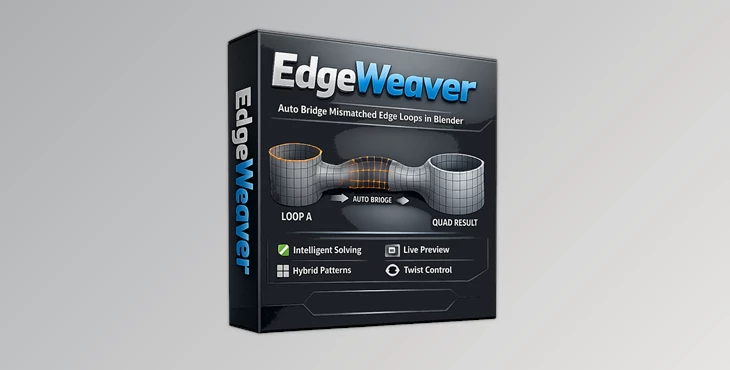
Downloadable Files
You can download the Edgeweaver for free from the end of this page.
Make Complex Topology Connections Feel Effortless
When attempting to connect two mesh loops that have a different number of vertices in Blender, it can become frustrating to manually fix the errors that arise during the process.
Edgeweaver was created to remove that frustration from your modeling experience. With Edgeweaver, you can avoid the back-and-forth process of adding or removing vertices from your models. Instead, Edgeweaver will automatically generate quad bridges between your mesh loops for a smoother modeling experience.
What Is Edgeweaver?
Edgeweaver is a topology workflow optimization tool that helps artists bridge edge loops with different resolutions while maintaining clean quad topology.
Normally, connecting meshes with unequal vertex counts requires careful planning and manual adjustments. This process becomes even more difficult when working on complex hard-surface models or detailed organic characters.
Edgeweaver introduces an intelligent geometry negotiation system that automatically solves density differences between edge loops. Rather than manually inserting extra vertices, the addon calculates an optimized solution and generates mathematically balanced quad connections.
This leads to cleaner topology, better subdivision behavior, and fewer modeling errors later in the production pipeline.
Why It Makes Modeling Easier
Professional modeling often depends on maintaining clean edge flow. Poorly connected topology can introduce shading artifacts, subdivision issues, and unnecessary cleanup work.
Edgeweaver helps improve the entire workflow by allowing artists to:
- Connect edge loops with different vertex densities automatically.
- Maintain a clean quad-based topology.
- Preview bridge flow before creating geometry.
- Reduce manual vertex matching.
- Spend more time designing and less time fixing topology.
Whether you’re creating vehicles, props, creatures, or product visualizations, these improvements translate into faster modeling and more predictable results.
Features
Intelligent Density Solving
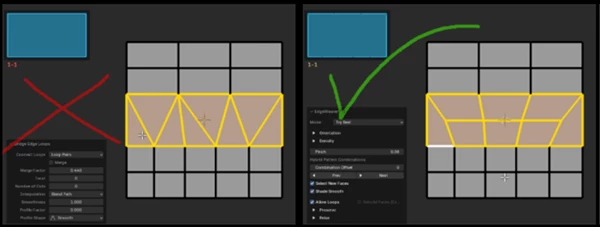
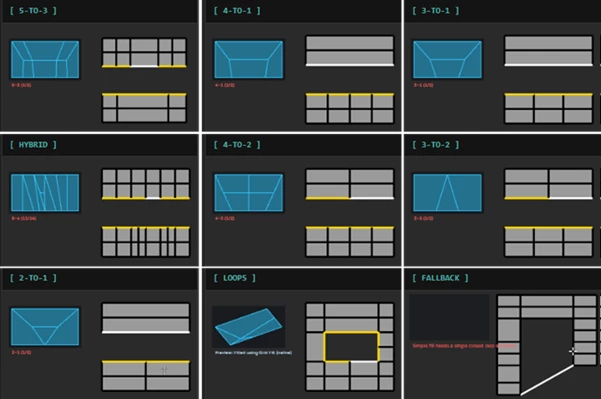
Edgeweaver automatically resolves vertex count mismatches between edge loops, eliminating the need for manual adjustments while producing clean quad bridges.
Geometry Negotiation Engine
The addon analyzes surrounding geometry before generating connections, creating bridges that follow logical edge flow instead of random polygon placement.
Real-Time GLSL Preview Overlay
A lightweight viewport overlay lets you inspect bridge direction before applying changes. You can easily:
- Preview topology flow
- Detect possible twists
- Verify bridge connections
- Avoid unnecessary Undo/Redo cycles.
Optimized Quad Bridges
Instead of producing messy polygons, Edgeweaver focuses on creating mathematically balanced quad topology that behaves naturally during subdivision and sculpting.
Faster Creative Workflow
By removing repetitive topology corrections, artists can continue modeling without constantly stopping to solve technical problems.
Real Project Examples
Edgeweaver fits naturally into many professional modeling workflows. For example:
- Connecting armor pieces on a game character.
- Bridging mechanical components in hard-surface designs.
- Merging complex vehicle panels.
- Building concept art with fast topology iteration.
- Creating clean subdivision-ready meshes for rendering.
Instead of spending several minutes manually rebuilding topology, Edgeweaver can solve these transitions almost instantly.
Pro Tips for Better Results
Edgeweaver works best with certain practices and techniques when working within your modeling project in Blender. For best results with Edgeweaver, model with these techniques:
- Always use the real-time overlay to preview the flow of the mesh bridge before Edgeweaver creates it.
- Always work to keep the surrounding mesh loops as clean as possible.
- Always check the subdivision mesh after Edgeweaver creates a bridge.
- Always use Edgeweaver during the early stages of your modeling project.
- Always use Edgeweaver in conjunction with the modeling tools native to Blender.
These techniques will provide you with the best experience with Edgeweaver and allow you to significantly improve your modeling speed and mesh quality.
Final Thoughts
Creating a mesh topology that allows your textures and meshes to properly render can be frustrating. Edgeweaver was made to remove the tedious process of manually connecting two mesh loops that have a different number of vertices.
By using Edgeweaver to automatically create quad mesh bridges between your mesh loops, your modeling workflow will be significantly improved. Whether you are modeling mechanical items, characters, or concept art, Edgeweaver will allow you to create the meshes you need with less effort.

Files Password : gfxplugin.com OR 123456