Downloadable Files
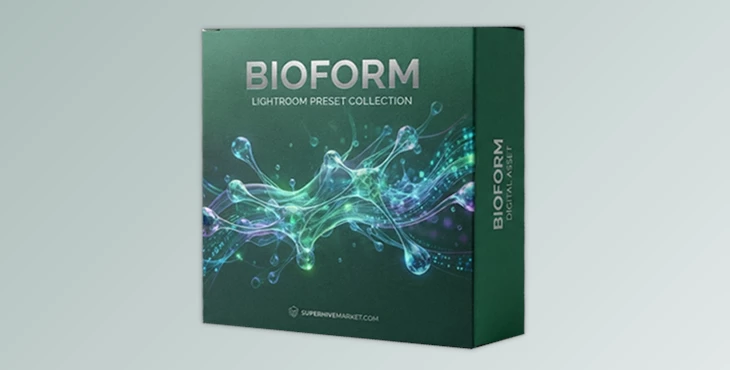
You can download Bioform for free from the end of this page.
Create Biological Materials That Hold Up in Close-Up Renders
Creating realistic biological materials is one of the biggest challenges in 3D production. Most biological materials fail when rendered from close up, usually because of their reliance on baked textures.
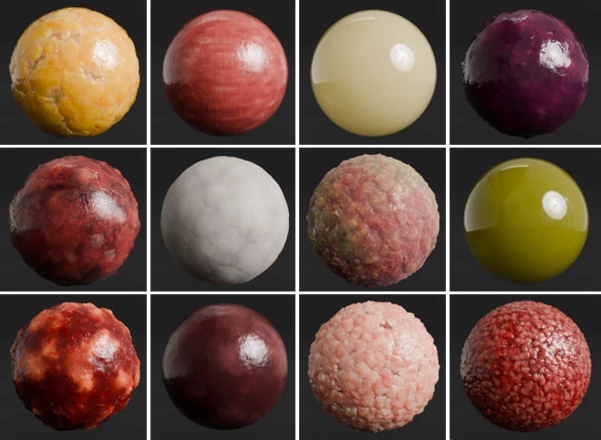
Bioform was created to solve this problem. It contains a library of procedural biological materials that maintain their quality at the highest levels of zoom. Whether creating medical illustrations, creatures for films, or concept art for the game industry, Bioform allows for the creation of realistic biological materials.
What is Bioform and Why Is It Different?
Bioform is a professional library of procedural biological materials for Blender.
Where most biological material libraries use baked textures to simulate the look of biological materials, the materials within the library of Bioform are all procedurally generated. This means that no baking of textures is required. It also means that the materials will remain crisp and clear when zoomed in. Additionally, since all materials are procedurally generated, they can be customized to fit almost any project without the need to bake any new textures.
For instance, if an artist is creating an illustration of human anatomy, Bioform allows for the quick addition of realistic materials for skin, blood vessels, cartilage, and more.
Features
Fully Procedural Biological Materials
Every material inside Bioform is completely procedural.
Because there are no baked image textures, you can zoom in as much as you want while maintaining fine detail. This makes the materials ideal for close-up rendering, cinematic sequences, and scientific visualization.
Large Library of Organic Materials
Bioform includes a growing collection of biological materials, including:
- Skin
- Blood
- Cartilage
- Bone
- Fascia
- Liver
- Kidney
- Pancreas
- Thyroid
- Spleen
- Nail
- Mucus
- Synovial Fluid
- Adipose Tissue
- Venous Wall
- Arterial Wall
- Various pathological and tumor materials
This variety allows artists to build highly detailed biological scenes without creating every material from scratch.
Procedural Skin Engine (Dermaform)
One of Bioform’s biggest highlights is the built-in Dermaform Skin Engine.
Instead of using a single skin material, the engine generates procedural human skin with adjustable controls for:
- Subsurface scattering
- Skin pores
- Vascularity
- Skin tone
- Undertone
- Blemishes
- Surface imperfections
These controls make it much easier to match different characters, ages, and lighting environments while maintaining realistic results.
Procedural Tumour Engine (Teraform)
Bioform also includes the Teraform Tumour Engine, which generates procedural pathological tissue.
Artists can create unlimited variations of tumors by adjusting parameters such as:
- Size
- Growth pattern
- Surface irregularity
- Vascularization
- Necrosis
- Spread
This is particularly useful for medical education, scientific visualization, VFX productions, horror creatures, and cinematic close-up shots.
Clinically Inspired Material Design
The materials are designed around how real biological tissue actually appears instead of relying on artistic approximations.
Because of this, organs, skin, lesions, and pathological tissues feel significantly more believable under realistic lighting and subsurface scattering.
True Displacement Support
Rather than relying only on normal maps, Bioform uses displacement-based shaders.
This creates genuine surface depth, making pores, tissue structures, and irregular organic forms appear much more convincing during close-up rendering.
Compatible with Eevee and Cycles
The library is compatible with both of Blender’s main rendering engines:
- Eevee
- Cycles
Real Project Examples
Bioform fits naturally into many professional workflows, including:
- Medical visualization
- Anatomy education
- Surgical animation
- Scientific illustration
- Creature design
- Horror character creation
- Cinematic VFX
- Biological concept art
- High-end product visualization involving medical devices
Instead of spending hours building procedural tissue shaders manually, artists can begin with production-ready materials and customize them to fit each project.
Tips for More Realistic Results
Working with procedural biological materials becomes even more effective when you keep a few practical techniques in mind.
- Use proper scale. Biological details such as pores, vessels, and tissue patterns look much more convincing when your Blender scene uses accurate real-world dimensions.
- Take advantage of subsurface scattering. Organic materials rarely look realistic without proper subsurface lighting, especially skin and soft tissue.
- Adjust displacement carefully. Small displacement values often create more believable surfaces than exaggerated ones.
- Combine different materials. Mixing skin, blood, fascia, cartilage, and vascular materials can create much richer anatomical models.
- Render with high-quality lighting. Soft area lights and HDR environments help reveal the subtle details generated by Bioform’s procedural shaders.
Ensure your lighting is high quality for best results
For procedural biological materials, use high-quality lighting (like HDR lighting) to properly display their features.
Why Bioform Is Worth Trying
If any of your projects involve realistic biological materials, then Bioform might be worth trying.
With its procedural nature, skin and tumor engines, clinically inspired designs, and displacement support, Bioform is a valuable tool for any digital artist involved in special effects, animation, or visual effects production.

Files Password : gfxplugin.com OR 123456