Downloadable Files
You can download Interior Design Prestes for free from the end of this page.
Transform Every Property Photo with Just a Few Clicks
Have you ever taken a photo of a property that wasn’t bright enough or looked quite ordinary despite its beauty in real life? Many property photographers struggle with lighting and color casts in their photos.
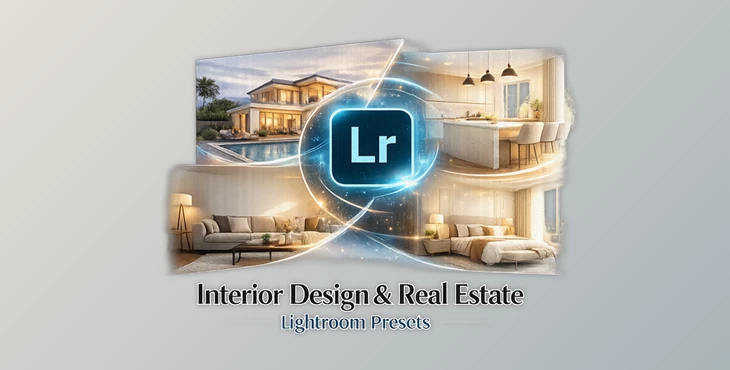
The Interior Design & Real Estate collection from PresetDB features professionally crafted presets and AI tools that will help you fix these issues with a few clicks of the mouse.
What Is Interior Design Prestes?
Interior Design Presets is a collection of professionally crafted Lightroom presets created for real estate agents, interior designers, architects, Airbnb hosts, and anyone else who takes close-up photographs of property interiors and exteriors.
The tools in this collection feature presets specifically created to solve the most common problems encountered in architectural photography, such as enhancing skies, restoring grass and water tones, and correcting lighting within interiors.
These tools will allow you to produce realistic-looking images of property interiors with less editing time than with any traditional editing methods.
Ideal for real estate agents, interior designers, Airbnb hosts, and architects, the Interior Design Presets collection allows you to quickly and easily edit your architectural photography.
Meet the Tool That Makes Property Editing Faster
Interior Design Presets has been completely redesigned for version 2.0 with additional professional Lightroom presets and AI editing tools that use the latest Adobe Sensei AI technology to enhance your architectural photography with a few clicks.
Whether you edit luxury properties, modern apartments, commercial interiors or exteriors, Interior Design & Real Estate will provide you with all the tools you need to produce stunning, professional-looking results from your architectural photography.
Features
30 Professional Interior & Real Estate Presets
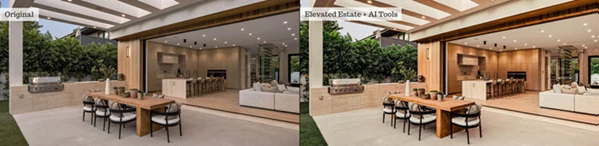
The collection includes thirty carefully designed looks covering a wide variety of architectural styles and lighting conditions.
Some standout presets include:
- Architecture Clean 2.0
- Architecture Warm 2.0
- Architecture Cool 2.0
- Balanced Interior
- Bright Foundation
- Gallery Ready
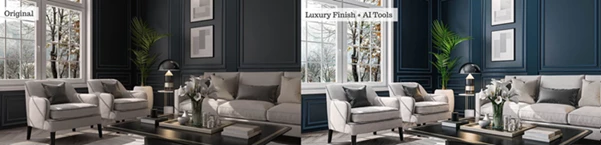
- Luxury Finish
- Modern Listing
- Premier Property
- White Room Bright 2.0
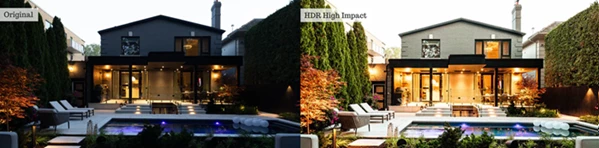
- HDR Harmonized
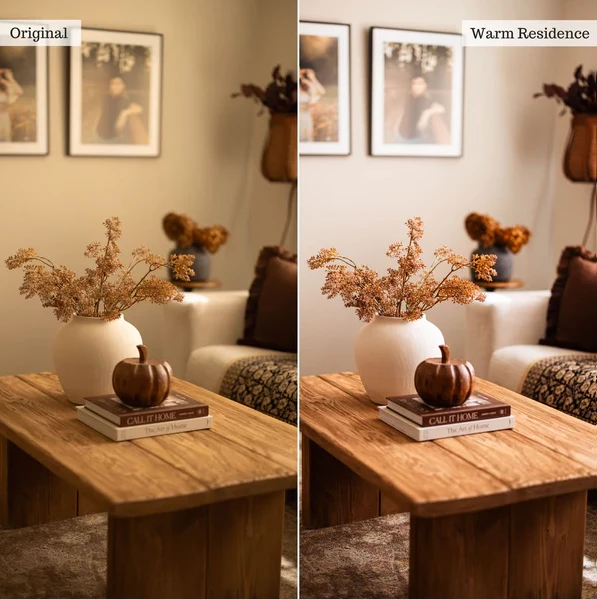
- Rich Wood Tones 2.0
These presets help create brighter interiors, balanced colors, cleaner whites, improved wood textures, and attractive property listings.
45 Powerful Editing & AI Tool Presets
Beyond creative looks, the package includes professional correction tools for everyday editing. These tools allow you to:
- Automatically balance colors
- Fix warm or cool lighting
- Remove unwanted color casts
- Recover blown highlights
- Improve shadow detail
- Add realistic directional lighting
- Enhance skies
- Improve grass colors
- Restore water tones
- Reduce image noise
- Remove people and distractions
- Eliminate window reflections
- Automatically level architecture
- Correct perspective distortion
These intelligent adjustments reduce editing time while maintaining realistic results.
AI-Based Property Enhancements
One of the strongest parts of this collection is its AI-powered editing workflow. With compatible Lightroom versions, users can quickly improve:
- Sky appearance
- Grass color
- Water quality
- Window reflections
- Dust spots
- Unwanted people
- Distracting objects
Instead of manually masking every area, AI targets specific regions automatically, making complex edits much faster.
20 Local Adjustment Brushes
For Lightroom Classic users, the collection also includes twenty adjustment brushes that offer more precise control. These brushes can enhance:
- Furniture
- Wood textures
- Brick surfaces
- Flowers
- Highlights
- Shadows
- Sky details
- Grass
- Water
- Local color adjustments
This allows photographers to refine specific areas without affecting the entire image.
Real-World Examples
Imagine photographing a luxury living room with mixed daylight and artificial lighting. Using the included tools, you can:
- Remove unwanted yellow color casts.
- Brighten dark corners.
- Recover window highlights.
- Enhance wood flooring.
- Make furniture textures sharper.
- Improve the outdoor grass visible through the windows.
- Create a balanced, magazine-quality final image.
Or imagine preparing exterior property photos for an online listing. With just a few clicks, you can:
- Deepen blue skies.
- Refresh clouds.
- Improve lawn colors.
- Straighten architectural lines.
- Increase overall clarity.
- Create a cleaner, more premium presentation that attracts buyers.
Tips for Better Results
Although the Interior Design Presets editing suite from PresetDB was designed to work with a single click of the mouse, a few editing techniques will further enhance your architectural photography projects.
Use the editing suite after properly exposing the photograph.
The Interior Design Presets editing suite works best with architectural photography projects that have a balanced exposure. Avoid using these editing tools with heavily underexposed or overexposed photographs of real estate properties.
Use the AI editing tools first to enhance the skies above the property, remove any unwanted people from the photograph, and even enhance the grass features in the photograph.
Then apply the various presets and local adjustment brushes to enhance the property itself.
Ensure that the preset you choose matches the architecture and design of the property you are editing.
Luxury properties will look best with warm color schemes from the presets, while modern buildings may look better with the more neutral color corrections.
After using the various preset editing tools, use the 20 local adjustment brushes to enhance specific features of the photographed property.
Use the local adjustment brushes to enhance wooden flooring, furniture, grass, and other features as needed.
Avoid enhancing the photograph in a way that is too artificial or overly processed to maintain the realistic look of the real estate photography project.
Final Thoughts
Professional property photography plays a major role in attracting buyers, clients, and customers. Interior Design Presets provides an efficient workflow that combines creative presets, intelligent AI corrections, and practical adjustment tools into one complete editing package.
Whether you’re editing luxury homes, apartments, hotels, restaurants, offices, or architectural portfolios, this collection helps produce cleaner, brighter, and more professional images while saving valuable editing time.
If you’re looking for a faster way to create polished interior and exterior photographs, this toolkit is definitely worth exploring.

Files Password : gfxplugin.com OR 123456