Downloadable Files
You can download the Purplechrome LUT for free from the end of this page.
Discover a Bold New Color Style
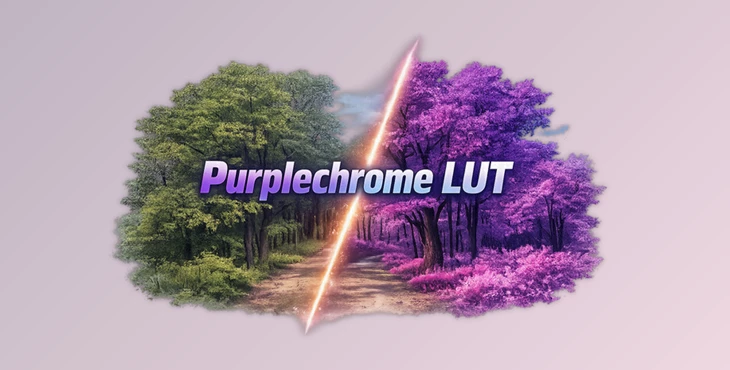
Looking for a great way to transform your ordinary photos into works of art? Purplechrome LUT is a great place to start. Inspired by the color of Lomography’s Lomochrome Purple 35mm film, this LUT will transform your colors to give you a surreal look that is inspired by infrared film.
What Is Purplechrome LUT?
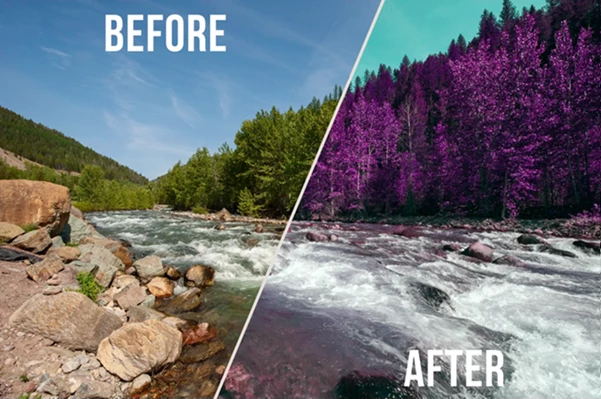
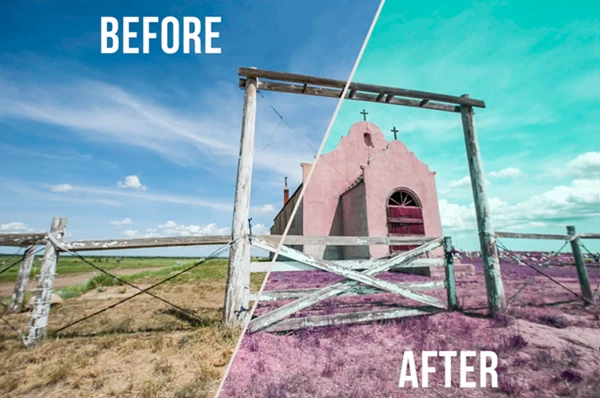
Purplechrome LUT is a professional color grading LUT designed to recreate the dreamy and psychedelic look of Lomochrome Purple film. Instead of simply increasing saturation or changing contrast, it intelligently remaps colors to produce dramatic purple foliage, vibrant skies, and stylized landscapes.
This makes it perfect for photographers, filmmakers, and content creators who want to create visually striking images without spending hours manually adjusting colors.
Some practical examples include:
- Turning green forests into surreal purple landscapes.
- Creating cinematic travel photography with a unique artistic mood.
- Producing creative Instagram and social media content.
- Giving music videos or short films an experimental color style.
- Building fantasy-inspired promotional visuals with minimal editing.
Because the LUT applies a carefully crafted color transformation, it delivers a consistent creative look while saving significant editing time.
Meet Purplechrome LUT
Instead of building an infrared-inspired grade from scratch, Purplechrome LUT instantly gives your footage or photos the distinctive Purplechrome look.
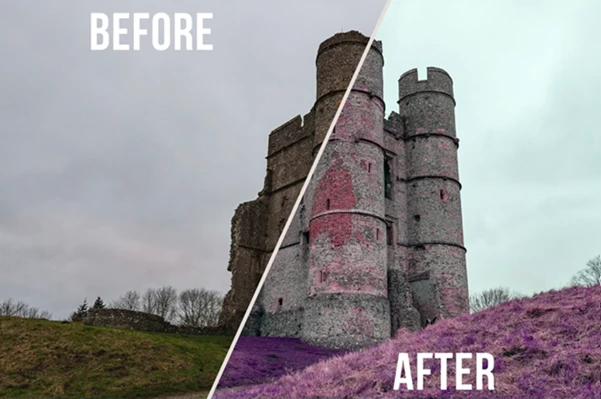
Designed around vibrant outdoor scenes, it performs especially well with colorful landscapes, parks, forests, mountains, and nature photography. However, experimenting with portraits, architecture, and urban environments can also produce surprisingly artistic results.
Features
Inspired by Lomochrome Purple Film
Recreate the famous purple film aesthetic with rich magenta foliage and creative color shifts.
Psychedelic Infrared Look
Produces a surreal visual style that immediately stands out from traditional color grading.
Perfect for Vibrant Landscapes
Works exceptionally well with forests, gardens, mountains, fields, and colorful outdoor environments.
Fast Professional Color Grading
Apply a dramatic cinematic look within seconds instead of manually adjusting dozens of color controls.
Great for Creative Experimentation
The LUT isn’t limited to landscapes—you can experiment with portraits, travel photography, architecture, street photography, or artistic video projects for unique visual results.
Consistent Visual Style
Purplechrome LUT will maintain your content’s visual style so you don’t have to spend time reapplying the LUT to each media file. For example, you can use the Purplechrome LUT to transform your travel photos so that your forest locations feature vibrant purple foliage. Or, add the LUT to your music videos to give them an additional visual dimension.
Tips for Getting Even Better Results
- A few tips will help you get the most impressive results from Purplechrome LUT.
- Use colorful outdoor scenes so that the colors pop and transform perfectly.
- Ensure your footage or photos are properly exposed to enhance the LUT’s colors.
- Use the opacity slider to reduce the intensity of the LUT for a more balanced output.
- Use Purplechrome LUT for anything other than landscape content, such as flowers and architecture.
- Experiment with contrast settings for even better results.
Turn Everyday Photos into Creative Art
Use Purplechrome LUT to instantly give your photos or videos a new look. Inspired by the color of the famous Lomochrome Purple film, this LUT allows you to add a unique color grading style to your projects that will capture the viewer’s attention.
If you are looking for a new way to experiment with color grading for your videos or digital projects, or if you are a landscape photographer looking for a unique way to stand out from others online, then Purplechrome LUT is a tool worth trying out!

Files Password : gfxplugin.com OR 123456