Downloadable Files
You can download Plumebus for free at the end of this page.
Create Cinematic 3D Smoke Without Leaving After Effects
Adding realistic smoke and fire effects to motion graphics or VFX shots usually requires exporting your project to external software, waiting for simulations to finish, and importing everything back into After Effects. That workflow can be slow and frustrating, especially when you’re trying to experiment with different looks.
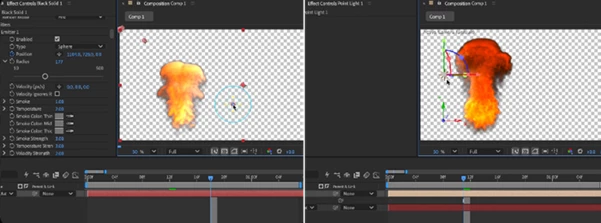
Plumebus changes the entire process by bringing real-time volumetric smoke and fire simulation directly into your After Effects timeline. Instead of waiting for pre-rendered simulations, you can instantly see every adjustment while designing your shot, making creative decisions much faster and with greater confidence.
What Is Volumetric Smoke Simulation?
Volumetric smoke simulation recreates the natural movement of smoke and fire in three-dimensional space. Unlike simple overlays or 2D smoke footage, volumetric simulations respond to lighting, depth, movement, and surrounding objects, producing much more realistic visual effects.
Imagine creating smoke flowing around a logo, rising from animated text, or drifting through a cinematic scene. Because the smoke exists in 3D space, it reacts naturally to cameras, lights, and motion, making the final composition look significantly more believable.
This approach also gives artists complete creative freedom. Instead of searching for the perfect stock footage, you can build exactly the smoke behavior your project requires.
Meet Plumebus
If you’re looking for a professional way to create high-quality smoke effects directly inside Adobe After Effects, Plumebus offers an impressive all-in-one workflow.
Everything—from particle emission and fluid simulation to lighting and rendering—is controlled inside the familiar After Effects Effect Controls panel. There are no complicated export pipelines, no external simulation software, and no lengthy cache generation before previewing your work.
Because the simulation runs on your GPU, changes appear almost instantly, allowing artists to iterate quickly while maintaining full creative control.
Features
Real-Time GPU Smoke Simulation
Plumebus performs true GPU-powered fluid simulation using Navier-Stokes physics, allowing smoke to update interactively as you adjust parameters or scrub through your timeline.
Fully Keyframeable Controls
Every important setting—including emission, simulation behavior, rendering quality, and environmental forces—can be animated using standard After Effects keyframes.
Native After Effects Workflow
The plugin behaves like a native After Effects effect. It works directly inside your composition without requiring external rendering software or complicated file management.
Interactive Timeline Playback
Instead of baking simulations before previewing, Plumebus recalculates smoke while you move through the timeline, providing immediate visual feedback.
Professional Volumetric Rendering
Choose between fast raymarched previews for quick design work or physically based path-traced rendering for final production-quality output with realistic light scattering and self-shadowing.
Advanced Lighting Support
Smoke responds naturally to your existing After Effects lights, colored lighting, HDRI environments, and scene cameras, making integration into live-action footage much more convincing.
Powerful Emitters
Generate smoke from:
- Text layers
- Shape layers
- Masks
- Animated 3D layers
- Tracked Null Objects
- Multiple emitters simultaneously
Collisions and Physical Forces
Control smoke using wind, turbulence, vortices, and collision objects. You can even use After Effects layers and 3D geometry as colliders, allowing smoke to wrap naturally around scene elements.
OpenVDB Workflow
Import OpenVDB sequences created in Blender, Houdini, or EmberGen, and export your Plumebus simulations back to VDB for use in professional VFX pipelines.
Built-In Preset Library
Quickly start with production-ready presets such as:
- Fog
- Explosion
- Cigarette Smoke
- Tire Burn
- Atmospheric Smoke
These presets provide an excellent starting point before fine-tuning the simulation for your own project.
Dedicated Real-Time Editor
For even faster interaction, Plumebus includes a separate Real-Time Editor where you can shape simulations independently before sending the results back into your After Effects composition.
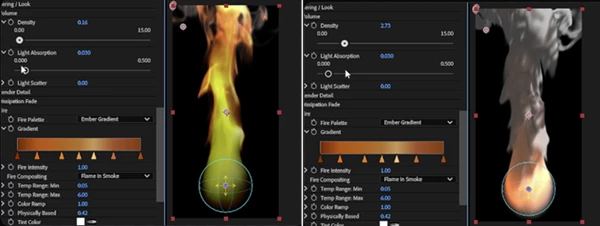
Tips for Better Results
Start with lower simulation quality while designing your scene and switch to path tracing only for the final render. This keeps your workflow fast without sacrificing final image quality.
Use subtle wind and turbulence values instead of extreme settings. Small adjustments usually produce much more natural-looking smoke movement.
When emitting smoke from text or logos, animate the emission gradually rather than generating everything at once. This creates smoother reveals and more cinematic motion.
Take advantage of After Effects lights to enhance depth and atmosphere. Proper lighting dramatically improves the realism of volumetric smoke. If you’re compositing over live footage, match the smoke density to the lighting conditions of your scene. Slightly softer volumes often blend more naturally than overly dense smoke.
Experiment with multiple emitters instead of increasing the size of a single one. Layering different smoke sources creates richer and more believable simulations.
Final Thoughts
Creating realistic smoke effects has traditionally required complex workflows involving multiple applications and long rendering times. Plumebus simplifies the entire process by bringing powerful GPU-accelerated volumetric simulation directly into Adobe After Effects.
Whether you’re producing cinematic title sequences, motion graphics, visual effects, commercials, or atmospheric backgrounds, Plumebus provides a fast, interactive, and highly flexible workflow that allows you to focus on creativity instead of technical limitations.
With professional fluid simulation, advanced lighting, OpenVDB compatibility, real-time previews, and seamless After Effects integration, Plumebus is an excellent solution for artists who want high-end volumetric smoke without leaving their favorite editing environment.