Downloadable Files
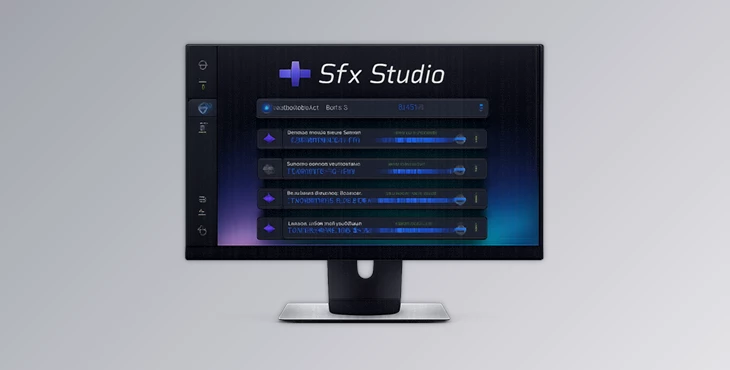
You can download Sfx Studio for free at the end of this page.
Make Sound Design Part of Your Editing Flow
Every video editor knows how much time is wasted searching for the perfect sound effect. Opening browser tabs, downloading files, organizing folders, and importing everything back into Adobe Premiere Pro can quickly interrupt your creative workflow.
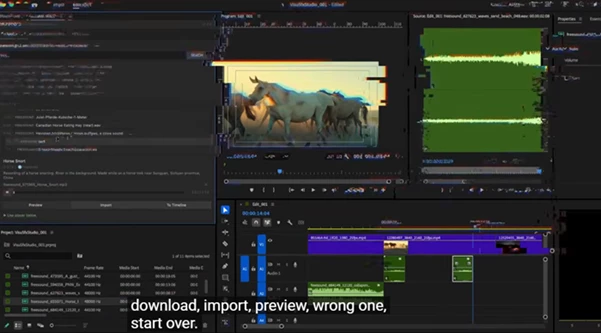
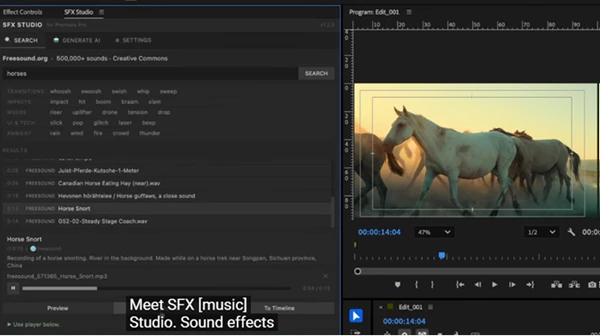
Sfx Studio changes that experience by bringing both sound effect searching and AI-powered sound generation directly into Premiere Pro. Instead of leaving your project every few minutes, you can discover, preview, generate, and place sound effects exactly where you need them without ever leaving your timeline.
Whether you’re editing YouTube videos, cinematic trailers, commercials, documentaries, social media content, or motion graphics, Sfx Studio helps you work faster while keeping your creative focus on editing.
What Is Sfx Studio and Why Is It Useful?
Sound effects are one of the most important elements of modern video production. Even a simple transition becomes far more engaging when supported by the right whoosh, impact, ambience, or UI click.
Traditionally, editors spend a surprising amount of time searching external libraries before importing audio into Premiere Pro. This constant switching between applications slows down production and breaks concentration.
Sfx Studio solves this problem by integrating the entire sound effects workflow inside Premiere Pro itself.
Instead of leaving your project, you can:
- Search more than 500,000 Creative Commons sound effects.
- Preview sounds instantly.
- Import them directly into your project.
- Place them on your timeline with one click.
- Generate completely new sound effects using AI whenever existing libraries aren’t enough.
For example, imagine you’re creating a fast-paced gaming montage. Rather than searching multiple websites for transition sounds, you simply search inside the panel, preview several options, and place the best one directly at the playhead. If you need something unique, AI can generate a custom sound from a simple text description in seconds.
This streamlined workflow allows editors to stay focused on creativity instead of file management.
Meet Sfx Studio
Sfx Studio is a native Adobe Premiere Pro panel designed to simplify every stage of sound effect creation and management.
The panel connects directly to Freesound.org for an enormous collection of searchable audio assets while also supporting ElevenLabs AI to generate completely original sound effects from natural language prompts.
Because everything happens inside Premiere Pro, editors no longer need separate websites, download folders, or third-party audio players.
Features
Massive Sound Library
Search through more than 500,000 Creative Commons sound effects, including:
- Whooshes
- Impacts
- Risers
- Foley
- Ambient environments
- Interface sounds
- Cinematic effects
- Transition audio
Every sound can be previewed instantly before importing.
AI Sound Effect Generation
When you cannot find exactly what you’re looking for, simply describe it in English. For example:
- Fast cinematic whoosh
- Heavy metallic impact
- Sci-fi energy pulse
- Magical sparkle
- Robotic UI click
ElevenLabs AI generates completely new sound effects based on your description. You can adjust duration, creative fidelity, and generate multiple variations until you find the perfect result.
Built-In Audio Preview
Listen to every sound directly inside the panel without opening any external media player. This makes comparing multiple sound effects much faster.
One-Click Timeline Import
Import audio directly into your Premiere project or place it instantly on your timeline at the current playhead position. No manual file browsing. No dragging from download folders.
Quick Category Tags
Frequently used categories are available immediately, including:
- Transitions
- Impacts
- Risers
- UI Sounds
- Ambient Effects
This helps editors locate common sound effects much faster.
Adjustable AI Controls
Customize generated sounds by changing parameters such as:
- Duration
- Creative fidelity
- Multiple generated variations
This gives editors greater creative flexibility while maintaining full control over the final result.
Generated Sound Library
Previously generated sounds remain available inside the panel, making it easy to compare versions or reuse successful effects later in your project.
Custom Download Folder
Choose exactly where imported and generated sounds should be stored for a cleaner project organization.
Native Premiere Pro Integration
Sfx Studio behaves like any other Premiere Pro panel, docking naturally inside your workspace for a seamless editing experience.
Cross-Platform Compatibility
The plugin works on:
- Windows
- macOS
- Adobe Premiere Pro 2022 and newer
Tips for Better Results
Describe AI-generated sounds as specifically as possible. Including details such as material, speed, intensity, atmosphere, or movement usually produces much more accurate results.
Preview several sound variations before importing. Small differences between similar effects can dramatically change how a scene feels.
Organize downloaded effects into dedicated folders so future projects become even faster to edit.
Layer multiple subtle sound effects together instead of relying on a single loud effect. Combining ambience, impacts, and transitions often creates a richer and more cinematic mix.
For motion graphics and UI animations, use shorter, cleaner sounds to maintain clarity without distracting the viewer.
Final Thoughts
Sfx Studio removes one of the most frustrating parts of the editing process: sound effect search and import.
With Sfx Studio, editors have instant access to more than 500,000 searchable sound effects, the ability to generate new sounds directly within their editing projects using AI technology, and all the tools required to preview sounds and import them directly to their timelines in Premiere Pro.
This sound design tool will help editors who work on YouTube videos, cinematic trailers, commercials, documentaries, social media videos, and more.

Files Password : gfxplugin.com OR 123456