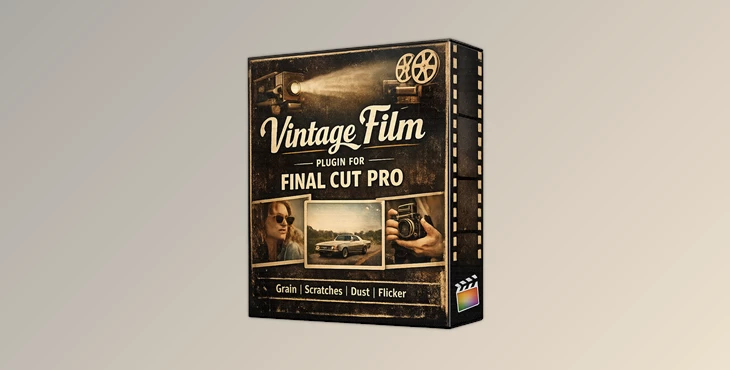
Downloadable Files
You can download the Vintage Film Plugin for Final Cut Pro for free at the end of this page.
Bring Authentic Vintage Film Style to Your Videos
Modern digital footage is incredibly sharp, but sometimes it lacks the warmth and character of classic film. If you’re looking to recreate the timeless look of old movies without spending hours stacking multiple effects, Vintage Film Plugin for Final Cut Pro offers a simple and highly customizable solution.
Instead of combining several filters, overlays, and adjustment layers, Vintage Film Plugin for Final Cut Pro lets you apply a realistic vintage film effect with a single drag-and-drop workflow while still giving you full creative control over every important detail.
What Makes Vintage Film Effects So Appealing?
Film effect plugins allow for your digital videos to have a variety of the same imperfections that were commonly seen from traditional film cameras and film reels from old movies. These imperfections are what give the video a more authentic, emotional, and cinematic feel than digital videos without these effects.
Such effects include film grain, brightness flicker, film scratches and dust particles, film hair artifacts, film jitter, and focus and saturation adjustments.
These effects are used to simulate the fact that traditional, vintage film was imperfect by nature. These imperfections in film footage are what allowed it to appear more authentic and natural to audiences viewing these films on older televisions or film projectors. For these reasons, vintage film effects are often used in documentaries, wedding films, travel videos, music videos, and cinematic films.
Vintage Film Editing Made Simple
Instead of manually building a vintage look from multiple effects, Vintage Film Plugin for Final Cut Pro combines everything inside one professional plugin.
The included Vintage Film Plugin features 16 adjustable parameters, allowing editors to fine-tune nearly every aspect of the effect. Whether you want a subtle analog atmosphere or a heavily aged film appearance, you can easily customize the look to match your creative vision.
Because the plugin works with projects at any resolution, it integrates smoothly into both HD and 4K editing workflows without requiring additional preparation.
Features
One Drag-and-Drop Vintage Film Effect
Simply apply the plugin to your footage and instantly transform clean digital video into classic film-inspired visuals.
16 Adjustable Parameters
Fine control over multiple film characteristics allows you to personalize every project instead of relying on fixed presets.
Realistic Film Grain
Natural-looking grain adds texture and helps reduce the overly digital appearance of modern footage.
Adjustable Brightness Flicker
Simulate the slight exposure fluctuations found in vintage film projectors for a more believable analog aesthetic.
Film Scratches, Dust, and Hair Effects
Authentic imperfections recreate the appearance of aged film stock, making the effect significantly more convincing.
Focus and Saturation Controls
Quickly adjust image softness and color intensity to create everything from faded archival footage to rich cinematic vintage styles.
Film Jitter Controls
Introduce subtle frame movement that mimics mechanical film projection and enhances realism.
Compatible with Any Resolution
Use the plugin confidently in HD, 2K, 4K, or larger production workflows without worrying about project size limitations.
Easy Installation
The plugin includes installation instructions and works with Final Cut Pro 10.4.7 or newer, making setup straightforward even for less experienced users.
Real-World Creative Uses
This effect can be used in a variety of different editing projects.
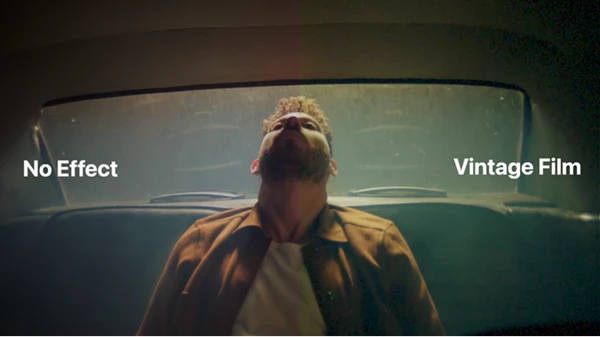
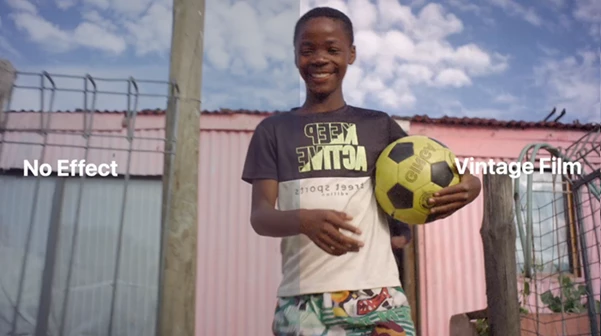
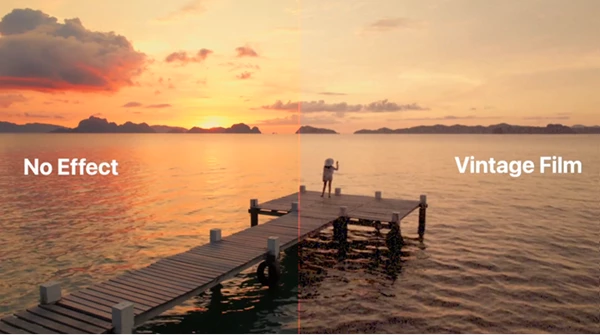
For travel content, time travel to recreate nostalgic vacation memories. Use it for wedding films to add to the emotional feel of the wedding highlights videos. Use it for documentaries to simulate old film footage. Use it in your music videos for authentic retro aesthetics or to provide YouTube creators and content producers with a unique look for their videos.
Pro Tips for Better Vintage Film Results
Less is often more when creating believable vintage footage. Start with moderate grain and flicker settings, then gradually increase them until the image feels natural.
Avoid using maximum scratch intensity throughout an entire project. Instead, vary the strength depending on the scene to keep the effect realistic.
If you’re working with modern, high-contrast footage, slightly lowering saturation before increasing grain often produces a much more authentic film appearance.
Combining gentle focus adjustments with subtle jitter creates a far more convincing analog look than using either effect alone.
Finally, keep the visual style consistent across your project so every scene feels like it belongs to the same film stock.
Final Thoughts
For those looking to add the timeless beauty of old movies to their editing projects, the Vintage Film Plugin for Final Cut Pro could be of great benefit to editors of any experience level.
With features that include realistic grain, scratches, brightness flicker, film jitter, focus adjustments, and 16 different adjustable parameters, this effect provides editors and filmmakers with the tools that they need to create both subtle and strong retro editing effects.
Whether editing documentaries, wedding films, travel videos, music videos, or cinematic short films, Vintage Film Plugin for Final Cut Pro will significantly increase the productivity of editors looking to provide their footage with the warmth and personality of vintage films.

Files Password : gfxplugin.com OR 123456