Downloadable Files
You can download Leons Modeling Toolkit for free at the end of this page.
Build Complex Models Without Slowing Down
Have you ever started modeling a simple architectural scene in Blender and realized that most of your time wasn’t spent being creative? Instead, you found yourself repeatedly cutting geometry, aligning vertices, fixing UVs, adjusting object origins, or creating cables and stairs manually.
Those repetitive tasks can quickly interrupt your workflow, especially when working on architectural visualization, game environments, modular assets, or level blockouts.
Leons Modeling Toolkit was designed to solve exactly this problem. Rather than replacing Blender’s workflow, it expands it with dozens of professional modeling and UV tools inspired by industry favorites like Maya, 3ds Max, and Hammer Editor. The result is a smoother, faster, and far more enjoyable modeling experience.
Why This Toolkit Makes Modeling Easier
At its core, Leons Modeling Toolkit is a productivity addon that combines advanced modeling, UV editing, hotspot texturing, vertex painting, and origin management into one unified workflow.
Instead of relying on several separate addons, artists can perform nearly every common environment modeling task from a single toolkit.
This dramatically improves productivity because:
- Fewer repetitive manual operations
- Cleaner geometry with fewer mistakes
- Faster architectural blockouts
- More consistent UV layouts
- Better trim sheet and hotspot texturing
- Faster iteration during environment production
For example, instead of manually creating staircases, cable systems, mirrored objects, bevel setups, and panel cutouts, these operations become interactive tools that require only a few clicks.
Likewise, UV workflows become significantly faster with built-in hotspot mapping, Gridify projection, Fast Tex editing, and texel density controls, allowing artists to texture large scenes with consistent quality.
Meet Leons Modeling Toolkit
Whether you’re making architectural interiors, game environments, industrial models, or props, this toolkit was created for modeling professionals to make the modeling process as fast and easy as possible.
Features
Interactive Modeling Tools
The toolkit introduces powerful viewport-based modeling tools, including:
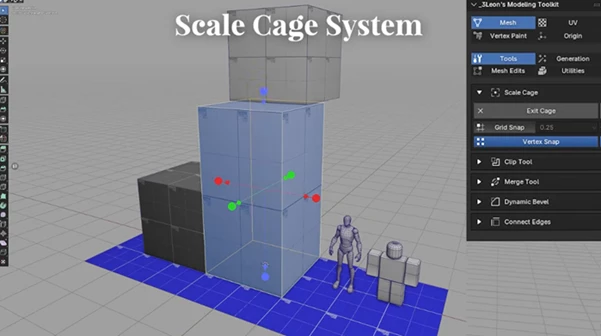
- Scale Cage for interactive proportional scaling
- Clip Tool for fast mesh cutting and splitting
- Maya-style Merge Tool
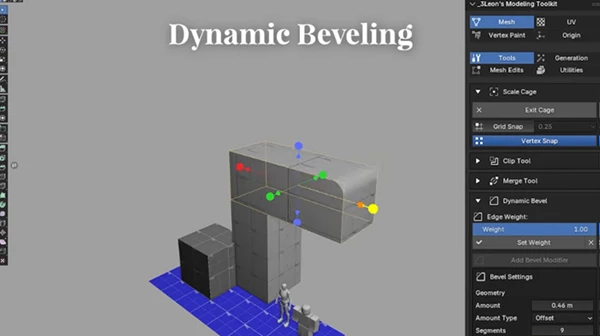
- Dynamic Bevel workflow
- 3ds Max style Connect Edges
- Interactive Mirror Tool
- Arch Tool
- Panel Maker
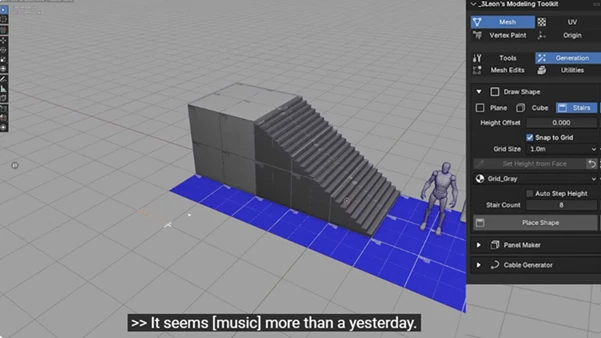
- Draw Shape system for planes, cubes, and procedural stairs
These tools eliminate many repetitive edit-mode operations while providing a much more visual workflow.
Architectural Environment Creation
Environment artists will appreciate tools specifically designed for architectural production. Highlights include:
- Procedural staircase creation
- Interactive wall drawing
- Cable Generator with realistic sag simulation
- Multi-object editing
- Grid snapping with multiple presets
- Accurate measurement-based modeling
This makes it much easier to create buildings, interiors, industrial scenes, sci-fi environments, and game levels.
Advanced UV Workflow
One of the strongest parts of the addon is its professional UV toolset. It includes:
- Fast Tex interactive UV scaling
- Gridify projection
- Triplanar material projection
- Automatic texel density management
- World-space and object-space projection
- Interactive UV handles
- UV snapping tools
These features dramatically reduce the time spent manually adjusting UV islands while producing cleaner and more consistent texture layouts.
Professional Hotspot & Trimsheet System
The integrated Hotspot Editor rivals dedicated hotspot texturing addons. Artists can:
- Build custom hotspot atlases
- Import and export atlas data
- Automatically place UV islands
- Match the texel density
- Create trimsheet regions
- Scale atlas regions interactively
- Randomize variations to reduce visible repetition
This is particularly valuable for game environment artists who rely on reusable texture atlases.
Smarter Material Blending
The Blend Materials system supports advanced heightmap-based blending inspired by modern game engines. Features include:
- Multiple texture layers
- Height-based transitions
- Vertex color blending
- Normal map support
- ORM workflow
- Emission maps
- Roughness and Metallic controls
This allows artists to build highly flexible materials without constructing complex shader networks manually.
Origin & Object Utilities
Managing object origins becomes significantly easier thanks to dedicated tools for:
- Interactive origin placement
- Grid snapping
- Rotation alignment
- Bounding box reset
- Center of mass positioning
- 3D Cursor positioning
- World alignment
These utilities are especially useful when preparing assets for animation, game engines, or modular workflows.
Additional Workflow Improvements
The addon also includes numerous production helpers such as:
- Vertex painting tools
- LOD Group creation for Unreal Engine exports
- Transform preservation
- Mesh cleanup utilities
- Triangulation while preserving quads
- Bridge Edge Loops
- Live editing systems
- GPU previews
- Interactive viewport gizmos
Together, these small improvements significantly reduce production time across large projects.
Real-World Uses
Leons Modeling Toolkit is ideal for many types of production work, including:
- Architectural visualization
- Interior design
- Exterior building modeling
- Game environments
- Modular asset creation
- Unreal Engine level production
- Unity environments
- Sci-fi scenes
- Industrial modeling
- Environment blockouts
- Hard-surface modeling
- Trim sheet workflows
- Large texture atlas projects
Its combination of modeling, UV, and material tools makes it valuable throughout an entire production pipeline rather than for just one specific task.
Pro Tips for Better Results
To get the most from Leons Modeling Toolkit, keep these tips in mind:
- Use Grid Snap whenever creating architectural assets to maintain accurate dimensions.
- Build modular pieces first, then use Hotspot mapping to texture entire asset collections consistently.
- Keep texel density consistent across all assets for a more professional appearance.
- Combine Gridify with Fast Tex to speed up UV adjustments dramatically.
- Use the Cable Generator with subtle randomness to create more believable wires and ropes.
- Take advantage of procedural stairs and panel tools instead of modeling them manually.
- Organize hotspot atlases early in production to simplify texturing later.
Following these practices can save countless hours on larger environmental projects.
Final Thoughts
If you are looking to significantly increase your modeling speed in Blender without sacrificing quality and precision, then Leons Modeling Toolkit is the package for you.
It combines several of the most important modeling, UV, texturing, and environment tools into one popular addon that will eliminate the repetitive tasks that get in the way of your creativity.
Whether you are an architectural or game modeling artist, this addon will provide you with valuable tools that you can use to significantly increase your productivity.
Once you start using its many tools and features, you will find yourself spending less time struggling with modeling tasks and more time focusing on the creative side of Blender modeling.

Files Password : gfxplugin.com OR 123456