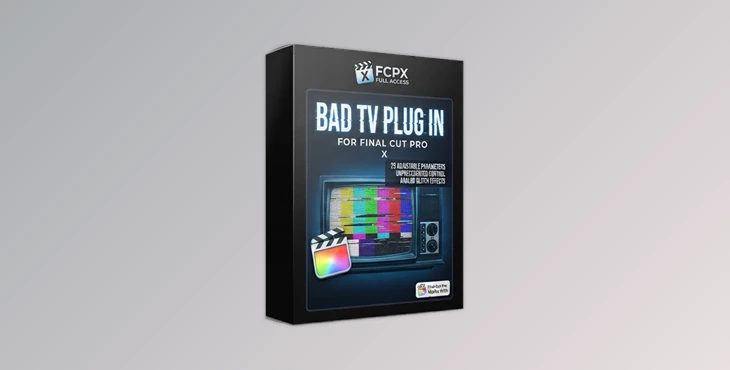
Downloadable Files
You can download the Bad TV Plug In for Final Cut Pro for free at the end of this page.
Give Your Videos a Classic Glitch Look
Sometimes a clean transition isn’t enough. Whether you’re editing a music video, a cinematic trailer, a gaming montage, or a retro-inspired commercial, adding realistic TV distortion can instantly make your footage more dynamic and memorable.
Bad TV Plug In for Final Cut Pro expands the built-in Bad TV effect with a huge range of additional controls, allowing you to create completely unique analog television glitches, signal interference, and distortion effects. Instead of relying on a few basic settings, you gain precise control over almost every aspect of the effect, making it suitable for both subtle vintage looks and aggressive digital breakdowns.
What Is Bad TV Plug In for Final Cut Pro?
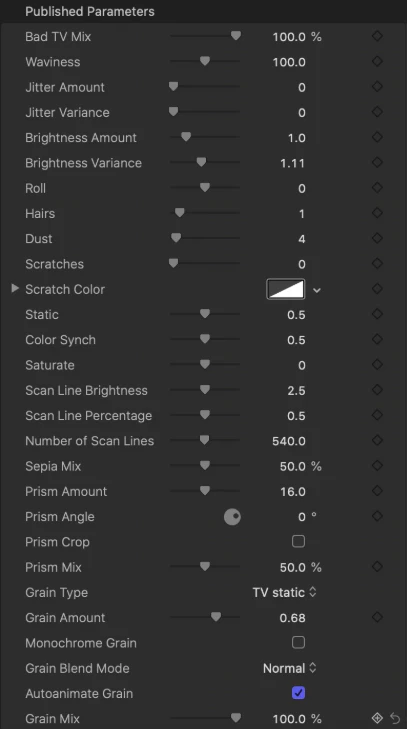
The Bad TV Plug In for Final Cut Pro is an enhancement plugin designed exclusively for Final Cut Pro users. It dramatically increases the customization options of the standard Bad TV effect, expanding it from only 4 adjustable parameters to 28 professional controls.
This extra flexibility allows editors to create highly customized glitch effects that match the mood of each project instead of using generic presets. For example:
- Create realistic VHS tracking errors for retro edits.
- Add digital interference during scene transitions.
- Simulate damaged television broadcasts.
- Produce unique glitch effects for gaming videos.
- Design futuristic cyberpunk visual styles.
Having more adjustable parameters means you can fine-tune every effect rather than settling for a one-size-fits-all result, giving your edits a far more polished and professional appearance.
Unlock More Creative Freedom
Rather than replacing the familiar Bad TV effect, this plugin enhances it by unlocking significantly more controls while keeping the workflow simple inside Final Cut Pro. Whether you want barely noticeable analog imperfections or extreme screen distortion, everything can be adjusted quickly without complicated workflows.
Features
28 Fully Adjustable Parameters
Expand the original effect from just four settings to twenty-eight adjustable controls for much finer creative control.
Unique TV Distortion Styles
Build custom glitch effects that look different from standard presets, helping your videos stand out.
Designed Exclusively for Final Cut Pro
Built specifically for Final Cut Pro, ensuring a smooth editing experience without requiring external applications.
One Easy-to-Install Plugin
The package includes a single plugin along with clear installation instructions for fast setup.
Compatible with Every Project Resolution
Use the effect on HD, Full HD, 4K, or other project sizes without changing your workflow.
Beginner-Friendly Workflow
Even with many additional controls, the interface remains easy enough for beginners while providing enough flexibility for experienced editors.
Where This Plugin Shines
The expanded controls make this plugin suitable for many different creative projects, including:
- Music videos with stylized glitch sequences.
- YouTube intros and gaming content.
- Sci-fi and cyberpunk productions.
- Horror and psychological films.
- Retro VHS-inspired edits.
- Commercial advertisements.
- Social media content.
- Digital art and motion graphics.
Instead of repeating identical glitch presets across projects, you can create a completely different visual style every time.
Pro Tips for Better Results
Getting the best-looking glitch effects often comes down to subtle adjustments rather than maximum distortion.
- Use lighter distortion during dialogue scenes to avoid distracting viewers.
- Animate parameter values instead of keeping them static to create more natural signal interference.
- Combine the effect with film grain, scanlines, or chromatic aberration for a convincing analog television appearance.
- Apply stronger glitches during transitions or beat drops for greater visual impact.
- Save your favorite parameter combinations as presets to speed up future editing sessions.
- Test the effect at full playback resolution before exporting to ensure the timing feels natural.
Small adjustments usually produce more cinematic results than pushing every parameter to its limit.
Final Thoughts
You can download the Bad TV Plug In for Final Cut Pro for free at the end of this page.
Give Your Videos a Classic Glitch Look
Sometimes a clean transition isn’t enough. Whether you’re editing a music video, a cinematic trailer, a gaming montage, or a retro-inspired commercial, adding realistic TV distortion can instantly make your footage more dynamic and memorable.
Bad TV Plug In for Final Cut Pro expands the built-in Bad TV effect with a huge range of additional controls, allowing you to create completely unique analog television glitches, signal interference, and distortion effects. Instead of relying on a few basic settings, you gain precise control over almost every aspect of the effect, making it suitable for both subtle vintage looks and aggressive digital breakdowns.
What Is Bad TV Plug In for Final Cut Pro?
The Bad TV Plug In for Final Cut Pro is an enhancement plugin designed exclusively for Final Cut Pro users. It dramatically increases the customization options of the standard Bad TV effect, expanding it from only 4 adjustable parameters to 28 professional controls.
This extra flexibility allows editors to create highly customized glitch effects that match the mood of each project instead of using generic presets. For example:
- Create realistic VHS tracking errors for retro edits.
- Add digital interference during scene transitions.
- Simulate damaged television broadcasts.
- Produce unique glitch effects for gaming videos.
- Design futuristic cyberpunk visual styles.
Having more adjustable parameters means you can fine-tune every effect rather than settling for a one-size-fits-all result, giving your edits a far more polished and professional appearance.
Unlock More Creative Freedom
Rather than replacing the familiar Bad TV effect, this plugin enhances it by unlocking significantly more controls while keeping the workflow simple inside Final Cut Pro. Whether you want barely noticeable analog imperfections or extreme screen distortion, everything can be adjusted quickly without complicated workflows.
Features
28 Fully Adjustable Parameters
Expand the original effect from just four settings to twenty-eight adjustable controls for much finer creative control.
Unique TV Distortion Styles
Build custom glitch effects that look different from standard presets, helping your videos stand out.
Designed Exclusively for Final Cut Pro
Built specifically for Final Cut Pro, ensuring a smooth editing experience without requiring external applications.
One Easy-to-Install Plugin
The package includes a single plugin along with clear installation instructions for fast setup.
Compatible with Every Project Resolution
Use the effect on HD, Full HD, 4K, or other project sizes without changing your workflow.
Beginner-Friendly Workflow
Even with many additional controls, the interface remains easy enough for beginners while providing enough flexibility for experienced editors.
Where This Plugin Shines
The expanded controls make this plugin suitable for many different creative projects, including:
- Music videos with stylized glitch sequences.
- YouTube intros and gaming content.
- Sci-fi and cyberpunk productions.
- Horror and psychological films.
- Retro VHS-inspired edits.
- Commercial advertisements.
- Social media content.
- Digital art and motion graphics.
Instead of repeating identical glitch presets across projects, you can create a completely different visual style every time.
Pro Tips for Better Results
Getting the best-looking glitch effects often comes down to subtle adjustments rather than maximum distortion.
- Use lighter distortion during dialogue scenes to avoid distracting viewers.
- Animate parameter values instead of keeping them static to create more natural signal interference.
- Combine the effect with film grain, scanlines, or chromatic aberration for a convincing analog television appearance.
- Apply stronger glitches during transitions or beat drops for greater visual impact.
- Save your favorite parameter combinations as presets to speed up future editing sessions.
- Test the effect at full playback resolution before exporting to ensure the timing feels natural.
Small adjustments usually produce more cinematic results than pushing every parameter to its limit.
Final Thoughts
The Bad TV Plug In for Final Cut Pro will elevate the built-in Bad TV effect to a powerful editing tool that can help you create custom glitch edits for your projects.
Whether you are editing cinematic videos, music videos, gaming videos, or retro-inspired edits, this Bad TV effect will give you the creative freedom to design videos to your heart’s content.
If you are looking for a simple edit and an easy-to-use program for your video projects, this Bad TV effect will be an excellent addition to your editing suite.

Files Password : gfxplugin.com OR 123456