Downloadable Files
You can download Ripple Pro Modifier for free from the end of this page.
🌊 Create Realistic Water Ripples Without Heavy Fluid Simulations
If you are looking to create realistic water ripples within 3ds Max, there are some limitations with the built-in ripple tools that may make them unsuitable for your project requirements.
Enter Ripple Pro Modifier.
Ripple Pro allows almost any 3ds Max object to be transformed into a realistic representation of water with various ripple features. This allows artists to create realistic water ripples with minimal simulation software installation and setup.
Whether you are creating 3ds Max animations for games, movies, or special effects, the ripple modifier allows artists to create realistic water representations that can be easily integrated into their projects.
💧 What is Ripple Pro Modifier?
Ripple Pro Modifier is a professional native modifier for 3ds Max that replaces the classic Ripple modifier with a far more advanced procedural ripple and wave system.
Unlike traditional ripple effects that generate only simple circular waves, Ripple Pro allows ripples to originate from multiple source types, including points, meshes, splines, textures, particle systems, and animated maps. It also offers two completely different working modes—procedural patterns and physically inspired wave simulation.
This flexibility makes it possible to simulate everything from gentle pond ripples to boat wakes, rainfall, moving characters crossing shallow water, and animated water surfaces with very little setup.
Because the modifier works directly on your geometry, artists can iterate much faster while maintaining full creative control over the final appearance.
🚀 Features
Two Powerful Working Modes
Ripple Pro includes both Pattern Mode and Simulation Mode.
Pattern Mode creates fast, deterministic procedural ripples that remain perfectly consistent every time you scrub the timeline. It’s ideal for motion graphics, stylized animations, and art-directed water effects.
Simulation Mode solves realistic wave propagation using a height-field simulation based on the wave equation. Waves travel naturally, collide, reflect from edges, lose energy, and generate convincing interference patterns without requiring expensive fluid simulations.
Multiple Ripple Sources
One of the biggest strengths of Ripple Pro is the variety of ripple generators available. You can create waves from:
- Points
- Mesh objects
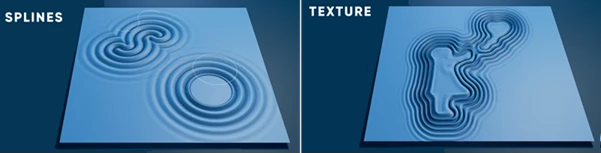
- Splines
- Particle systems
- Images
- Animated textures
- Procedural maps
- OSL shaders
For example, a moving boat can generate ripples from its actual outline instead of a simple circular gizmo, while animated textures can produce flowing directional wakes that follow the artwork’s movement.
UV Space Ripple Simulation
Instead of forcing waves to move only in world space, Ripple Pro can simulate ripples directly inside the mesh’s UV layout.
This allows waves to naturally follow curved surfaces, wrapped geometry, organic models, and complex shapes, producing significantly more believable results on objects like spheres, terrain, pipes, and folded meshes.
Automatic Edge Detection
Ripple Pro automatically recognizes mesh boundaries.
Instead of manually building collision objects, waves can reflect directly from the edges of your water surface, making ponds, rivers, lakes, and contained water bodies feel much more realistic.
Advanced Texture-Driven Ripples
Any supported 3ds Max map can become a ripple source. Supported inputs include:
- Bitmaps
- Animated image sequences
- Noise maps
- Cellular maps
- Gradient maps
- Checker maps
- OSL materials
Since maps are evaluated every frame, animated textures can drive moving wave patterns that react naturally throughout the animation.
Procedural Rain & Splash System
Ripple Pro can generate highly detailed rain interactions. Each particle impact can automatically produce:
- Splash crowns
- Central rebound jets
- Landing rings
- Detached water droplets
- Randomized splash variations
The procedural system creates natural-looking rainfall without manually animating every individual impact.
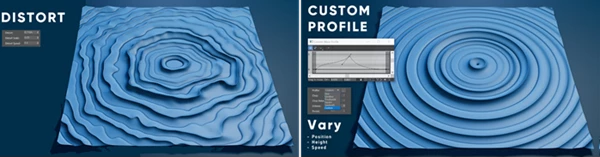
Advanced Wave Shaping
Artists can completely customize the appearance of the water surface. Available wave profiles include:
- Sine
- Gerstner
- Trochoidal
- Square
- Saw
- Custom curves
Additional controls such as choppiness, FBM layering, procedural distortion, and multi-scale detail allow surfaces to range from perfectly calm water to rough, organic wave formations.
Realistic Object Interaction
Moving objects can dynamically affect the simulated surface. Ripple Pro supports:
- Boat wakes
- Character movement
- Rotating objects
- Deforming geometry
- Floating object behavior
- Reflection from scene obstacles
This makes it suitable for scenes where water needs to react naturally to animation rather than remaining static.
Production-Ready Performance
Despite its advanced simulation capabilities, Ripple Pro is designed for efficient production work. It offers:
- Multi-threaded processing
- RAM frame caching
- Motion blur support
- Animation without keyframes
- HTML documentation
- Native compatibility with 3ds Max 2024–2027
These optimizations allow artists to preview and render complex ripple animations much faster than traditional fluid simulation workflows.

🎯 Tips for Better Results
If you want your water simulations to look even more convincing, these practical tips can help.
- Combine multiple ripple sources instead of relying on a single emitter. Mixing mesh, particle, and texture sources creates far richer water interaction.
- Use Simulation Mode for moving objects. Boats, characters, and animated geometry benefit greatly from physically simulated wakes.
- Increase surface detail gradually. FBM layers and distortion add realism, but small adjustments usually produce the most natural-looking results.
- Take advantage of edge reflections when creating ponds or lakes, as reflected waves significantly improve realism.
- Experiment with animated textures to create stylized or magical water effects without manually animating every ripple.
- Cache long simulations before final rendering for smoother viewport playback and faster iteration.
🌟 Final Thoughts
For those looking to create realistic water within their projects, Ripple Pro Modifier for 3ds Max may be an excellent tool to consider adding to their software installation.
Compared to other 3ds Max ripple and water simulation programs, the features offered by Ripple Pro are more realistic, easier to use, and offer performance optimizations that benefit the artists who use it daily.
Regardless of the type of project that you are creating, whether it is for the game or film industry, the ripple modifier will significantly reduce the amount of effort required to simulate water within 3ds Max projects.

Files Password : gfxplugin.com OR 123456