Downloadable Files
You can download the MB Panel V8 for free at the end of this page.
Speed Up Your Photoshop Workflow Like Never Before
Photo editing can quickly become repetitive when you’re constantly creating masks, adjusting colors, correcting exposure, sharpening images, exporting files, and repeating the same tasks over and over again.
MB Panel V8 was created to eliminate those repetitive steps and give photographers a much faster and more enjoyable editing workflow. Instead of searching through dozens of Photoshop menus, this powerful UXP panel keeps professional editing tools available inside a single interface, allowing you to complete complex edits with only a few clicks.
Whether you specialize in landscape photography, portraits, macro photography, street photography, reportage, or still life, MB Panel V8 helps you spend less time editing and more time creating.
What Is MB Panel V8?
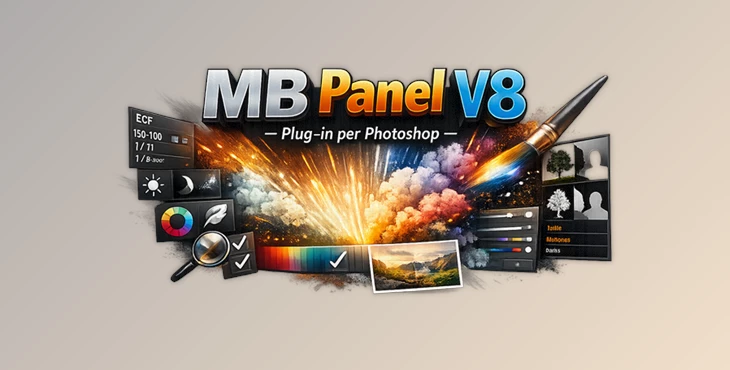
MB Panel V8 – Plug-in per Photoshop is a professional Photoshop UXP extension that integrates directly into Adobe Photoshop as a permanent dockable panel.
Unlike traditional Photoshop scripts that must be launched every time you need them, MB Panel V8 always stays available inside your workspace. It combines dozens of advanced editing tools into one organized interface, making professional post-production significantly faster.
The panel automates many common editing operations, including:
- Color correction
- Luminosity masking
- Tonemapping
- Exposure enhancement
- Focus stacking
- Dodge & Burn
- AI Sky tools
- Selective saturation
- Final sharpening
- Automatic exporting
- Image resizing
- Watermark placement
For example, instead of manually creating complicated luminosity masks before adjusting exposure, MB Panel V8 can generate them instantly, allowing you to focus entirely on the creative side of editing.
Features That Make Editing Much Easier
Professional Masking Tools
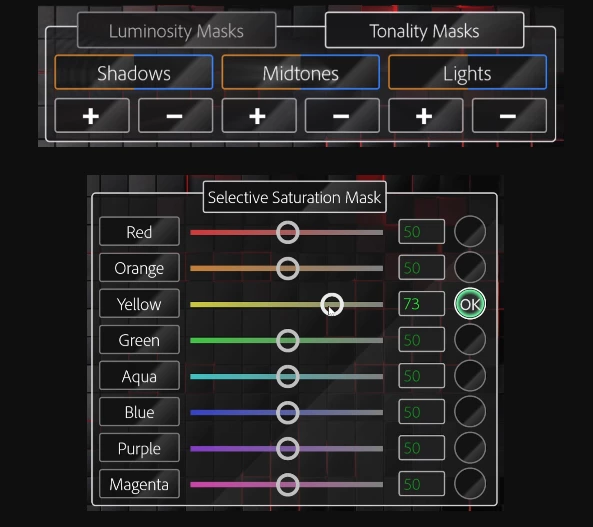
One of the strongest parts of MB Panel V8 is its intelligent masking system. The plugin includes:
- Luminosity Masks
- Tonality Masks
- Selective Saturation Masks
- Pipette Color Range Selection
- Selective Color Masks
These tools allow you to edit only specific brightness levels or color ranges without affecting the entire image, producing cleaner and much more natural adjustments.
Advanced Color Correction
Color balance is one of the biggest challenges in photography, especially in landscapes and night photography. MB Panel V8 includes specialized correction tools such as:
- Remove Color Cast
- Blue Haze Removal
- Green Light Correction
- Pale Yellow Correction
- Dominant Color Correction
- Warm Tonality Filter
- Reduce Cold Daylight
- Reduce Blue Hour
- Selective Color Correction
- HSL Color Panel
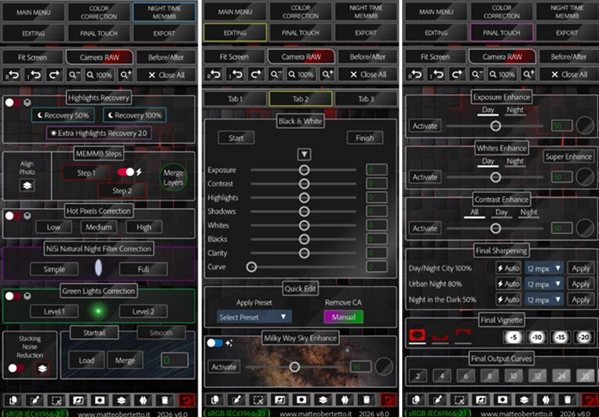
Instead of spending several minutes manually correcting unwanted color shifts, these tools automatically analyze the image and apply targeted corrections while allowing full control through adjustable sliders.
Powerful Exposure & Tonemapping Tools
Recovering shadows and highlights becomes much easier with the built-in exposure tools. The plugin offers:
- Exposure Compensation (EV)
- Tonemapping
- Chromatic Tonemapping
- Highlights Recovery
- Exposure Enhance
- Whites Enhance
- Contrast Enhance
These features help reveal hidden details in difficult lighting situations while maintaining realistic image quality. Landscape photographers can especially benefit from these tools when editing sunrise, sunset, or high dynamic range scenes.
Creative Enhancement Effects
Besides technical corrections, MB Panel V8 also provides creative finishing tools. These include:
- Orton Effect
- Extra Light Enhancement
- Polarizer Effect
- Advanced Black & White
- Final Output Curves
- Final Vignette
- Auto Final Sharpening
These finishing touches help images achieve a polished, professional appearance suitable for portfolios, exhibitions, client work, or social media.
Specialized Night Photography Tools
Night photographers receive several dedicated utilities that solve common problems. Examples include:
- Star-Trails Merge
- Smooth Star Trails
- Smooth Traffic Trails
- Milky Way Enhancement
- Noise Reduction Stacking
- Green Light Removal
- NISI Natural Night Filter Correction
These tools simplify workflows that would otherwise require multiple manual Photoshop operations.
Automation & Export Workflow
After you complete your edits, MB Panel V8 helps prepare images for publishing. Useful export tools include:
- Automatic Web Resizing
- Smartphone Resizing
- Instagram 4:5 Resizing
- Automatic sRGB Conversion
- Watermark & Logo Placement
- Quick Automatic Export
- EXIF Removal
- Cache Cleaning
This makes preparing images for websites, social media, and client delivery much faster.
Built-in Productivity Features
The plugin isn’t only about editing—it also improves your overall Photoshop workflow. Additional productivity features include:
- Before / After comparison
- EXIF information viewer
- Zoom controls
- Quick Edit shortcuts
- Action Recorder
- Manual Resizing
- Automatic Photo Alignment
- Focus Stacking
- MEMMB quick buttons
Everything stays inside one dockable Photoshop panel, minimizing interruptions during editing.
Tips for Getting Better Results
- Start with color corrections first: Fix unwanted color casts before applying contrast or sharpening to achieve cleaner final images.
- Use luminosity masks instead of global adjustments: Targeted edits preserve natural transitions and prevent over-processing.
- Keep sharpening until the final step: Apply Auto Final Sharpening only after all color and exposure adjustments are complete.
- Use selective saturation carefully: Increasing saturation only in the necessary color channels produces richer yet realistic colors.
- Resize images according to the destination: Use the built-in export presets for web, smartphone, or Instagram instead of resizing manually.
- Take advantage of the action recorder: Save frequently used editing workflows to automate repetitive projects.
Final Thoughts
Photography and editing skills require dozens of repetitive editing tasks.
The MB Panel V8 - Plug-in per Photoshop was created to give editors and photographers an impressive collection of editing tools in one panel within Photoshop that will significantly speed up their editing process.
Regardless of what type of photography you enjoy editing, whether it is landscape, portrait, wedding, or even social media photography, the MB Panel V8 - Plug-in per Photoshop will help to simplify your editing process.
Photographers who are looking to speed up their editing processes without losing quality will want to consider this editing tool for Photoshop.

Files Password : gfxplugin.com OR 123456