Downloadable Files
You can download Cinematic Volumetric Light Rays & Atmospheric Effects Toolkit for free from the end of this page.
Bring Your Scenes to Life with Cinematic Atmosphere
Creating the perfect cinematic mood involves more than color grading your footage. Elements like realistic light rays, soft fog, floating dust particles, glowing bokeh, and natural movement of light are all crucial to creating an immersive viewing experience.
This project (Videohive 64086931) was specifically created to make adding these effects to your videos much simpler. No more having to build complex lighting effects from the ground up. Simply click a few times to instantly add a professional atmosphere to your projects, then tweak the settings to make the atmosphere perfectly match your footage.
What Makes Atmospheric Effects So Powerful?
Atmospheric effects simulate how light behaves in the real world. Tiny dust particles catch sunlight, fog softens harsh environments, and light leaks introduce warmth and cinematic character.
Using these effects can instantly improve the depth and realism of your compositions because they:
- Add natural-looking volumetric light rays.
- Increase visual depth and separation.
- Create mood and emotion.
- Make scenes feel larger and more immersive.
- Help direct the viewer’s attention toward important subjects.
For example, a wedding ceremony becomes more magical with soft light rays filtering through windows, while a travel video gains a dreamy cinematic look using fog and light leaks. Product commercials can feel more premium by adding subtle breathing light animation and floating dust for extra atmosphere.
Features of Cinematic Volumetric Light Rays & Atmospheric Effects Toolkit
This toolkit (Videohive 64086931) is built specifically for Adobe After Effects and provides an organized collection of professional atmospheric effects without requiring additional plugins.
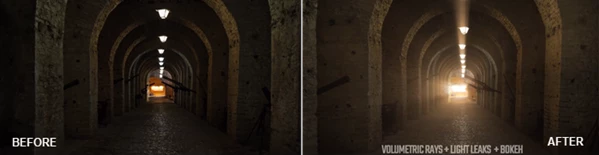
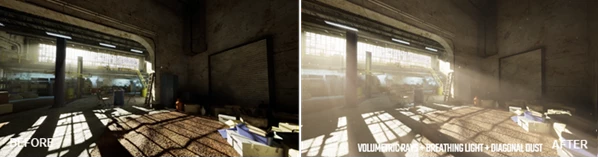
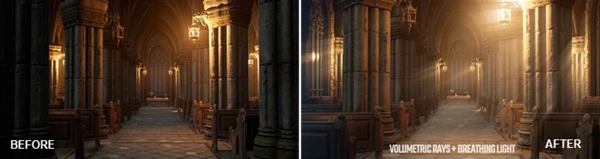
Realistic Volumetric Light Rays
Generate beautiful cinematic light beams that simulate sunlight entering through windows, forests, doors, or architectural spaces. These effects instantly create depth and drama.
Atmospheric Fog
Add realistic fog to soften backgrounds and produce a more cinematic environment. Fog also helps blend different visual elements together naturally.
Floating and Diagonal Dust
Tiny dust particles create realistic environmental detail that makes scenes appear more natural and less digitally perfect.
Cinematic Bokeh Overlays
Use elegant out-of-focus light effects to produce artistic backgrounds, romantic scenes, or premium commercial visuals.
Cinematic Light Leaks
Introduce warm organic light leaks that recreate the look of vintage lenses and cinematic cameras while adding energy to your footage.
Breathing Light Animation
Create subtle animated lighting variations that imitate natural changes in sunlight and environmental illumination without distracting the audience.
One-Click Effect Selection
Quickly choose the desired atmospheric effect without manually building complicated compositions.
Easy Customization
Every effect includes intuitive controls so you can adjust intensity, opacity, movement, and overall appearance to perfectly match your footage.
Multiple Resolution Support
The project includes ready-to-use templates for:
- 4K
- HD
- Square
- Vertical video formats
making it suitable for YouTube, Instagram, TikTok, and professional video production.
Well Organized Project Structure
Everything is neatly arranged, allowing both beginners and experienced editors to find and customize effects efficiently.
Real-World Creative Uses
This toolkit (Videohive 64086931) works well across many types of productions, including:
- Feature films
- Cinematic short films
- Commercial advertisements
- Documentary productions
- Movie trailers
- Wedding films
- Real estate videos
- Travel films
- Nature documentaries
- Music videos
- Product showcases
- Fashion campaigns
- YouTube videos
- Social media content
- Promotional marketing videos
Because the effects are highly customizable, the same toolkit can create subtle realism or dramatic Hollywood-style atmospheres depending on your creative vision.
Professional Tips for Better Results
To achieve the most natural cinematic look, try combining multiple atmospheric effects instead of relying on only one. A few helpful techniques include:
- Keep fog subtle so it enhances depth without hiding important details.
- Use light rays that match the direction of existing light sources in your footage.
- Apply dust effects gently to avoid visual clutter.
- Animate breathing light slowly for realistic environmental changes.
- Combine light leaks with color grading for a more cohesive cinematic style.
- Reduce effect intensity for dialogue scenes while increasing it during emotional or dramatic moments.
Small adjustments often create more convincing results than overly strong visual effects.
Final Thoughts
Cinematic Volumetric Light Rays & Atmospheric Effects Toolkit gives you a fast and easy way to add professional atmosphere effects to your videos within After Effects. Whether it’s volumetric light rays, fog, bokeh, floating dust, or breathing light animations - each of these effects will transform your videos into cinematic scenes that hold the viewer’s attention.
Use these effects within your film, commercial, travel, wedding, or social media editing projects. Each of these editing projects will benefit from these atmosphere effects and improved production quality - all while retaining full customization options and avoiding the need for additional software plugins.

Files Password : gfxplugin.com OR 123456