Downloadable Files
You can download the Lorenz System for free at the end of this page.
Turn Mathematical Chaos into Stunning Motion Paths
If you’ve ever wanted to create mesmerizing procedural animations inside After Effects, then the Lorenz System script will give you a fascinating glimpse into mathematical chaos.
Instead of having to manually draw the required motion graphics, the Lorenz System will automatically generate a collection of complex and organic-looking motion graphics for you to use in your projects.
From music visualizers to futuristic user interfaces, these procedural graphics can add a unique visual element to your projects that would be hard to recreate manually.
What Is a Strange Attractor?
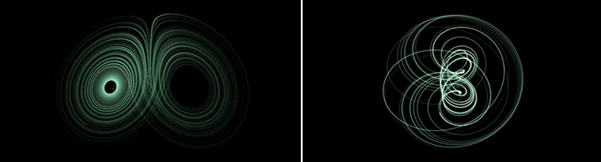
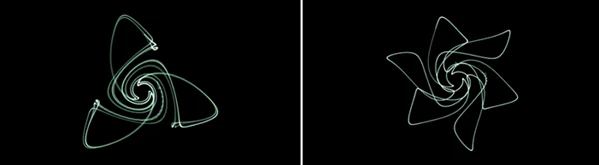
A strange attractor is a mathematical pattern created by chaotic systems. Although the underlying equations are deterministic, they generate incredibly complex curves that appear natural and unpredictable.
Instead of manually drawing intricate shapes, the Lorenz System calculates these mathematical trajectories and converts them into editable After Effects paths.
This approach improves your workflow because it allows you to generate highly detailed motion graphics with mathematical precision while maintaining an organic appearance. The resulting paths are ideal for projects that require elegant complexity without spending hours creating custom vector artwork.
Some practical examples include:
- Abstract motion backgrounds
- Scientific and educational animations
- Futuristic HUD interfaces
- Music visualizers
- Logo reveals
- Procedural graphic elements
- Experimental title sequences
Because every attractor follows a unique mathematical behavior, each generated design has its own visual personality.
Create Beautiful Chaos with the Lorenz System
Lorenz System is an After Effects script that converts several famous chaotic attractors into editable paths inside your composition.
The package includes two different script versions designed for different workflows:
- A fast version that generates static paths using a simple interface.
- An expression-driven version that allows parameters to remain editable and even animated over time.
This flexibility lets artists choose between maximum performance and maximum creative control depending on the project.
Features
Multiple Famous Chaotic Systems
The script includes a large collection of attractor models, including:
- Lorenz
- Rossler
- Aizawa
- Thomas
- Halvorsen
- Chen-Lee
- Arneodo
- Sprott B
- Sprott F
- Dadras
- Rucklidge
- Newton-Leipnik
- Genesio-Tesi
Each mathematical system generates completely different visual patterns, giving motion designers plenty of creative variety.
Generate Editable After Effects Paths
Instead of producing images or raster graphics, the script creates actual vector paths directly inside your composition.
These paths can be combined with shape layers, strokes, trim paths, repeaters, glow effects, particles, and countless native After Effects tools.
Fast Static Path Generator
The first script focuses on speed by creating a finished path after selecting your preferred parameters.
This option is ideal when you need quick results or when working with large projects where playback performance matters.
Animated Expression Version
The second version creates paths driven by expressions and exposed parameters.
This makes it possible to animate the mathematical values themselves, producing evolving procedural animations without rebuilding the artwork from scratch.
Easy to Customize
Since the source code is fully editable, advanced users can modify the script or adapt it to fit their own creative workflows. For technical artists and motion designers who enjoy experimentation, this opens many possibilities beyond the default setup.
Perfect for Procedural Motion Graphics
Imagine creating an animated logo reveal where glowing mathematical curves continuously evolve, or generating futuristic interface graphics that never repeat exactly the same pattern.
These types of procedural visuals help projects feel more dynamic and visually sophisticated while reducing manual drawing time.
Tips for Better Results
Although the script is easy to use, a few techniques can dramatically improve your final animation.
Start by experimenting with different attractor types before adjusting parameters. Every mathematical model creates its own distinctive motion language, and switching between them can completely transform the visual style.
Apply Trim Paths to animate the drawing of each generated curve. This simple addition often produces elegant reveal animations with very little effort.
Combine the generated paths with glow effects, gradient strokes, and motion blur to enhance depth and create a more cinematic appearance.
If you plan to animate the attractor over time, use the expression-based version. For static illustrations or heavy compositions, the faster static generator will provide smoother performance.
Finally, don't hesitate to duplicate paths, offset their timing, or layer several attractors together. Combining multiple systems often produces surprisingly rich procedural designs.
Bring Mathematics into Your Creativity
Creating procedural animations that feature complex mathematical designs usually requires significant technical expertise.
The Lorenz System removes this barrier and allows you to generate mathematical motion graphics with a few clicks of the mouse.
Useful for motion graphics, abstract art, science projects, and more, this script may just be the tool you’ve been looking for to expand your creative possibilities in After Effects.
If you are in search of a unique visual effect that can enhance your motion graphics projects, the Lorenz System script is definitely worth exploring!

Files Password : gfxplugin.com OR 123456