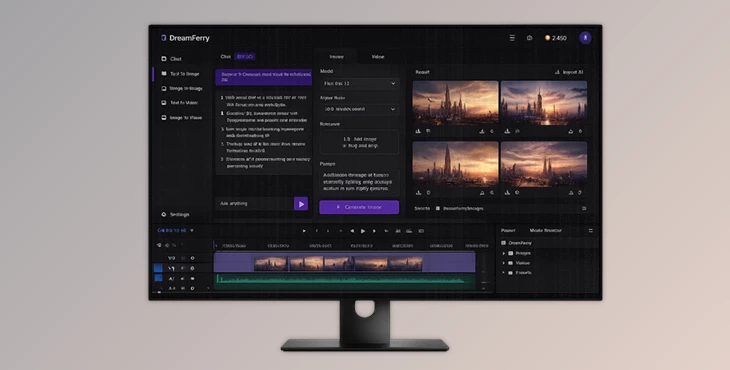
Downloadable Files
You can download the DreamFerry product for free at the end of this page.
Generate AI Content Without Leaving Premiere Pro
If you use AI image or video generators during your editing sessions, you are likely familiar with the disruptions they can cause. Each time you use an AI tool, you must write a prompt in your browser, wait for the file to be generated, download it, then import the file into Premiere Pro.
DreamFerry removes this disruption from your editing process. By integrating some of the leading AI image, video, and chat models into your editing software, DreamFerry allows you to generate AI content entirely within Premiere Pro. This integration allows editors to remain focused on their editing process without having to manage files or edit within multiple programs.
Whether you are generating concept art, AI-B-roll footage, animated images, or brainstorming creative concepts using AI, DreamFerry aims to create an experience that feels like a natural part of your editing process.
Why AI Inside Premiere Changes Everything
Generative AI has become an essential creative tool for modern editors. Instead of spending hours searching for placeholder footage or creating concept art manually, AI can generate exactly what you need in minutes.
The challenge has never been generation itself—it’s the workflow.
Normally, creating AI content means repeatedly moving between multiple applications and websites. Every interruption slows editing, breaks concentration, and creates unnecessary file management.
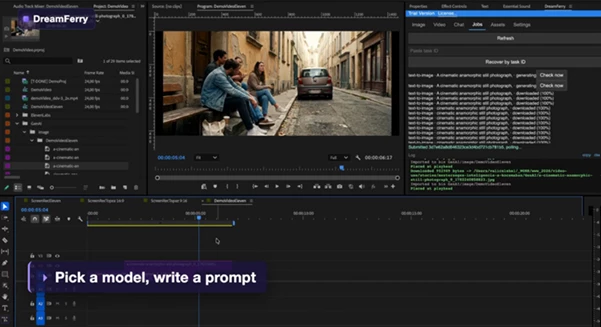
DreamFerry solves this by acting as a bridge between Adobe Premiere Pro and multiple AI generation models. You simply enter your prompt, optionally provide reference images or clips, and continue editing while everything runs in the background.
The generated result automatically appears inside your Premiere project and can even be placed directly onto your timeline.
This seamless workflow saves time while keeping creative momentum alive throughout the entire editing session.
Meet DreamFerry
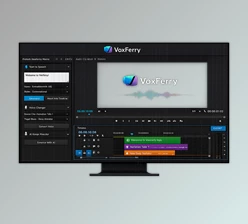
DreamFerry is a Premiere Pro extension that connects your editing timeline with powerful AI image generators, AI video generators, and conversational AI assistants through your own KIE.AI API.
Instead of replacing existing AI services, DreamFerry automates the entire creative pipeline—from prompt creation to importing finished assets into your project. Whether you’re experimenting with visual ideas or producing final assets for a commercial project, everything remains inside one familiar interface.
Features
AI Image Generation Inside Premiere
DreamFerry supports both text-to-image and image-to-image workflows.
Simply type a prompt to generate new artwork or add one or more reference images to guide the final result automatically.
Supported models include powerful options such as Nano Banana, Seedream, Flux, Grok Imagine, and GPT Image, giving editors flexibility for different artistic styles and creative goals.
This makes generating thumbnails, concept art, backgrounds, or visual references incredibly fast.
AI Video Creation Made Simple
Creating AI video no longer requires exporting files to external websites.
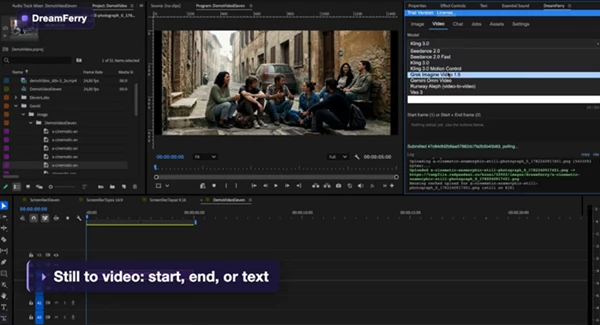
DreamFerry supports text-to-video, image-to-video, motion transfer, start-frame animation, end-frame guidance, and reference-driven video generation.
Editors can work with models like Kling, Veo, Seedance, Gemini Omni Video, Runway Aleph, and Grok Imagine Video while staying entirely inside Premiere.
This is especially useful for:
- AI-generated B-roll
- Motion graphics concepts
- Animated photographs
- Visual effects previews
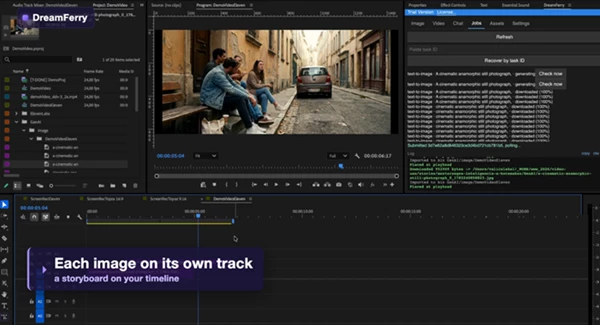
- Storyboard sequences
- Short cinematic inserts
Because references can come directly from your Premiere timeline, creating consistent AI footage becomes much easier.
AI Chat That Understands Your Project
DreamFerry also includes a built-in AI chat assistant.
Instead of opening separate AI websites, editors can brainstorm ideas, improve prompts, write marketing copy, or develop shot lists directly inside Premiere.
The conversation remains persistent throughout your project, making collaboration with AI much more natural during long editing sessions.
Supported models include GPT 5.5, GPT Codex, Claude Opus, and Gemini Flash.
Smart Reference Management
One of DreamFerry’s biggest advantages is how it handles reference assets. You can instantly use:
- Frames from your current timeline
- Images from your project bin
- Reference videos
- Audio clips
- Multiple style images
- Previously generated assets
The extension remembers uploaded references for up to 14 days, reducing unnecessary uploads and speeding up future generations.
Automatic Import to Your Timeline
Once the generation finishes, DreamFerry handles everything automatically.
The extension downloads the generated asset, imports it into a neatly organized GenAI bin, categorizes it by sequence and media type, and can even place it directly at your playhead position.
Your original media stays untouched while every AI-generated asset is added safely as new content.
This automation removes several repetitive editing steps from every generation.
Reliable Background Processing
Long AI generations don’t interrupt your editing session.
DreamFerry continuously checks generation progress in the background while you keep working.
Even if Premiere is restarted, unfinished jobs can continue automatically without losing progress.
For advanced users, a debug mode records every request and response while keeping API keys secure.
Real-World Editing Scenarios
DreamFerry becomes especially useful in professional editing situations.
Imagine creating a travel documentary and needing an atmospheric establishing shot before final footage arrives. Instead of leaving Premiere, you generate concept visuals immediately.
Or perhaps you’re editing a commercial and want several creative background variations for a product reveal. You can generate multiple versions without ever interrupting your timeline.
Editors working with YouTube content, social media videos, documentaries, advertisements, cinematic trailers, and motion graphics can all benefit from this faster workflow.
Pro Tips for Better Results
The quality of AI-generated content often depends more on your workflow than on your prompt alone. Here are a few practical suggestions:
- Use timeline frames as references whenever possible to maintain visual consistency.
- Combine multiple reference images to better define style and composition.
- Keep prompts descriptive but focused instead of overly complicated.
- Organize successful generations inside your GenAI bin for future reuse.
- Experiment with different AI models, since each produces unique visual characteristics.
- Let long generations run in the background while continuing your edit instead of waiting.
These simple habits can significantly improve both efficiency and final image quality.
Final Thoughts
Video editing has changed significantly in recent years. AI tools have become an essential part of editors’ projects.
The more valuable any editing tool is, the easier it integrates into editors’ projects.
DreamFerry removes the repetitive steps editors must take to generate AI content by integrating AI image, AI video, and AI chat functions into Adobe Premiere Pro.
Instead of editors constantly switching between different software and browser applications, editors can focus on creating the best possible videos.
For editors who use DreamFerry to generate AI content, brainstorm creative concepts, and edit their projects, DreamFerry offers a way to maintain all content within the same editing environment.