Downloadable Files
You can download the Transfer the vertex order addon for free at the end of this page.
Why Vertex Order Matters More Than You Think
When working on complex projects, models in the same state can exist in different versions. If the mesh vertex order has changed between those versions, any attempt to move mesh data will prove frustrating.
Transferring the vertex order comes in handy here and saves you time in the process.
Understanding Vertex Order
Vertex order is simply the internal numbering Blender assigns to every vertex, edge, and face in a mesh. While this numbering isn’t visible during normal modeling, many tools—including the Data Transfer modifier—depend on it for accurate transfers.
Imagine creating a character with perfectly painted weights and UV maps. Later, you receive another version of the same model with identical topology but different vertex IDs. Without matching vertex order, transferring those attributes correctly becomes nearly impossible.
By restoring the correct vertex order, you can:
- Transfer UV layouts accurately.
- Copy vertex colors.
- Preserve weight painting.
- Transfer custom mesh attributes.
- Maintain consistency across multiple versions of a model.
This dramatically improves production efficiency while reducing manual cleanup.
Meet Transfer the vertex order
Instead of manually rebuilding mesh information, Transfer the vertex order provides an efficient workflow for copying vertex, edge, and face IDs between meshes that share the same topology.
The addon integrates directly inside Blender’s 3D View Sidebar (N Panel → Tools), making it easy to access whenever needed during production.
Features
Multiple Vertex ID Transfer Methods
The addon offers several ways to copy vertex IDs depending on your workflow.
- Vertex proximity transfer for meshes with identical vertex positions.
- Topological transfer for meshes that have moved but retain the same topology.
- UV-based vertex matching was introduced in newer versions.
This flexibility makes the addon useful across many production scenarios.
Supports More Than Just Vertices
Since version 2.2, the addon also transfers:
- Edge order
- Face order
This allows more complete topology synchronization across matching meshes.
Seamless Data Transfer Modifier Workflow
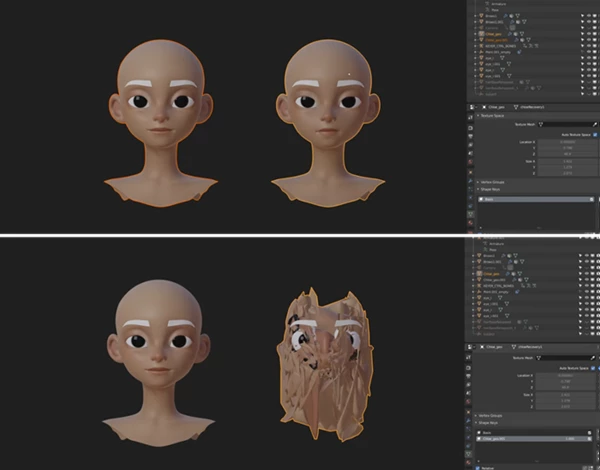
One of the biggest advantages is compatibility with Blender’s Data Transfer modifier. Once vertex order has been synchronized, you can reliably transfer:
- UV maps
- Vertex groups
- Weight painting
- Vertex colors
- Custom mesh data
Using Topology vertex matching.
Built-In Blender Integration
The addon works alongside Blender’s built-in tools, including:
- Copy Attributes Menu
- MeasureIt addon for previewing vertex IDs
No complicated setup is required, making the workflow feel like a natural extension of Blender.
Ideal for Production Pipelines
Whether you’re updating character meshes, synchronizing assets between artists, or preparing models for animation, maintaining consistent vertex order saves significant production time while reducing errors.
Tips for Better Results
For the best experience with Transfer the vertex order, keep a few practical tips in mind.
Always verify that both meshes have exactly the same vertex and polygon count before starting. Even small topology differences will prevent accurate transfers.
If your meshes occupy the same position in 3D space, use the vertex proximity method for the fastest workflow.
When geometry has been moved or reshaped but topology remains unchanged, switch to the topological transfer workflow by selecting matching adjacent faces on both meshes.
For models containing multiple disconnected mesh islands, perform the transfer separately for each island to maintain accuracy.
After transferring IDs, test the result with Blender’s Data Transfer modifier to confirm that UVs, weights, and other attributes align correctly.
A Small Tool That Solves a Big Workflow Problem
Many Blender artists may not realize the importance of vertex order until they encounter a problem transferring mesh data. Fortunately, the Transfer the vertex order addon solves this problem with a seamless integration into the Blender interface.
Use Transfer the Vertex Order whenever you need to maintain the same mesh data between different versions of the same mesh or when transferring it to another artist. It saves countless hours of manual work.
If you work with multiple versions of the same mesh, this will quickly become one of the tools you depend on daily in your Blender software.

Files Password : gfxplugin.com OR 123456