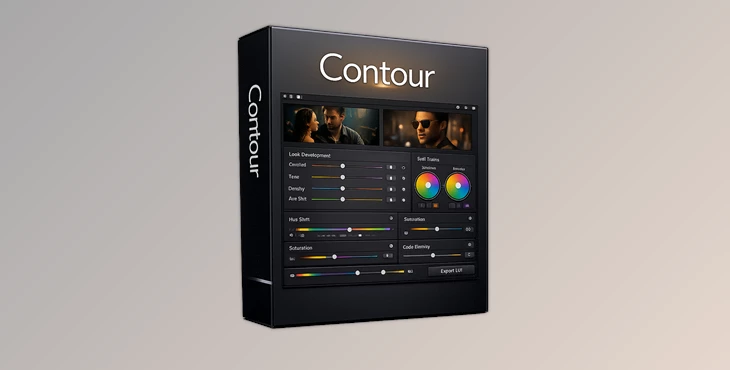
Downloadable Files
You can download Contour for free at the end of this page.
Discover a Smarter Way to Build Stunning Looks
Color grading can be more than just a task of increasing the contrast or the saturation in your footage. The challenge of color grading is to create a look that is beautiful and works well from shot to shot across your project.
Contour was created as a solution to the challenges of DaVinci Resolve’s traditional color grading tools. With Contour, look development within DaVinci Resolve happens in a more intelligent way that produces aesthetically pleasing results without breaking your workflow or the skin tones in your footage.
Whether you are color grading commercials, short films, documentaries, music videos, or even YouTube content, Contour will save you time and effort so that you can create your signature look and style.
What Makes Contour Different?
At its core, Contour is an advanced look development toolkit for DaVinci Resolve that uses intelligent color science to make every grading adjustment behave naturally.
Instead of relying on traditional controls that often interfere with one another, Contour organizes look creation into a logical workflow. Each module builds on the previous one, allowing you to shape contrast, color separation, saturation, density, and hue step by step.
The result is a grading process that feels intuitive while producing looks that remain consistent across an entire project.
For example:
- Create cinematic contrast without crushing shadows.
- Apply split toning while keeping skin tones perfectly natural.
- Increase color richness without producing neon colors.
- Add film-like color density without introducing artifacts.
- Adjust specific hues without affecting nearby colors.
These intelligent behaviors allow your grade to travel smoothly from one shot to another with minimal correction.
Features
Intelligent Look Development Workflow
Contour guides you through look creation in the order that has the biggest visual impact:
- Curve
- Split
- Saturation
- Split Saturation
- Density
- Hue
This structured workflow makes grading faster while helping every adjustment complement the previous one.
Adaptive Curve Module
Traditional RGB curves often require constant corrections because moving one part of the curve unintentionally changes another. Contour solves this with seven independent control points that work together intelligently. You can:
- Shape highlights independently.
- Refine shadow rolloff.
- Control contrast precisely.
- Maintain smooth tonal transitions.
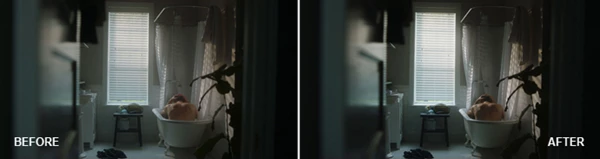
The result is cinematic contrast without compromising image quality.
Advanced Split Toning
Split toning usually introduces unwanted side effects like muddy skies, tinted neutrals, or oversaturated skin. Contour avoids these problems using intelligent saturation masking that protects:
- Neutral colors
- Skin tones
- Deep blacks
- Bright highlights
This allows you to push creative color separation much further while keeping the image natural.
Powerful Saturation Control
Instead of applying one global saturation adjustment, Contour separates saturation into multiple regions. Independent controls let you shape:
- Low saturation colors
- Mid saturation colors
- Highly saturated colors
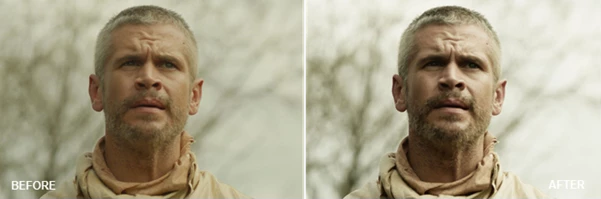
Its unique Versus controls intelligently separate colors to add depth and dimensionality rather than simply making everything more colorful. This produces vibrant images that still feel balanced and realistic.
Film-Like Color Density
Density is one of the subtle ingredients behind premium cinematic color.
Contour’s Density module increases the visual weight of saturated colors while preserving clean skin tones and avoiding noisy color transitions.
Advanced masking allows adjustments to affect only the intended color families, creating rich cinematic images that remain natural.
Perceptual Hue Control
Most grading tools adjust hue based on mathematical color wheels.
Contour instead targets colors the way our eyes naturally perceive them.
This makes selective hue adjustments much easier. For example, you can rotate deep reds while leaving skin tones untouched, creating dramatic color palettes that stay consistent throughout an entire edit.
Split Saturation Control
One of Contour’s most unique tools is Split Saturation. Rather than increasing traditional contrast, it controls saturation separately in shadows and highlights. This creates:
- Better depth
- Greater dimensionality
- Richer colors
- Softer highlight transitions
The effect resembles the subtle color richness found in many classic and modern cinematic productions.
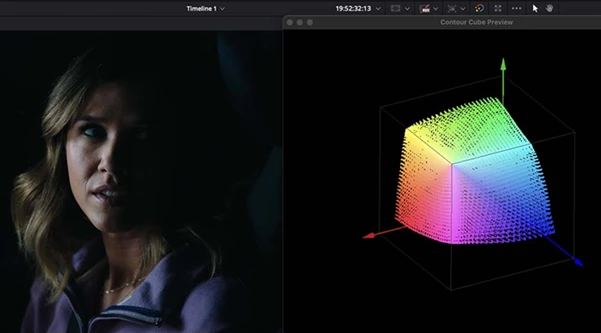
Export Looks as LUTs
After building your look, Contour lets you export it as a professional LUT.
These LUTs maintain their appearance across different shots, making them useful throughout production and post-production workflows.
Instead of rebuilding looks manually, you can quickly apply the same cinematic style across entire projects.
Tips for Better Results
Although Contour is designed to produce excellent results quickly, a few habits can improve your workflow even further.
Build Your Look Step by Step
Follow the module order instead of jumping between adjustments. Starting with contrast before refining color usually produces cleaner grades.
Keep Saturation Balanced
Instead of aggressively increasing saturation, try compressing saturation ranges. This often creates richer-looking images without making colors appear artificial.
Push Split Toning Further Than Usual
Contour’s intelligent masking protects neutrals and skin tones, allowing stronger creative split-toning than traditional grading tools.
Use Density Sparingly
Small density adjustments often create the most cinematic improvements. A subtle increase can add noticeable richness without drawing attention to the effect itself.
Export Your Favorite Looks
Once you’ve created a grading style you enjoy, save it as a LUT. This speeds up future projects while keeping visual consistency across multiple edits.
Final Thoughts
For professional colorists, traditional tools can often become challenging to control as the color grading adjustments become more complex.
Contour changes that are experienced by giving colorists more intelligent, adapted tools with a grading workflow that encourages experimentation while maintaining the quality of the footage that is being edited.
From the adaptive curves and split toning tools to the hue and density controls, every aspect of Contour was crafted to assist colorists in creating stunning color grades for their projects while maintaining the quality of the original footage.
Whether you are producing professional feature films, commercials, music videos, documentaries, or even YouTube videos and channels, Contour will give you a faster, more enjoyable experience in producing cinematic color grades.

Files Password : gfxplugin.com OR 123456