Downloadable Files
You can download FontObj for free at the end of this page.
Turn Simple Text into Real 3D Geometry
Working with text in After Effects is easy—until you need actual 3D geometry. Native text layers and shape layers look great for motion graphics, but they aren’t true mesh objects. This becomes a limitation when you want to use modern material workflows, realistic shading, or applications that require genuine 3D models.
That’s exactly where FontObj becomes useful.
Instead of rebuilding your text inside another 3D application, FontObj converts the text you create in After Effects into clean OBJ geometry with just a few clicks. The result is a much smoother workflow for artists who need real 3D assets while keeping text editing simple and familiar.
Why Real 3D Text Makes a Difference
Traditional After Effects text is designed primarily for animation and visual design inside the composition. However, many modern workflows—including material-based rendering and Substance pipelines—work best with actual 3D meshes.
Real OBJ geometry provides several advantages:
- More predictable lighting and shading.
- Better compatibility with material-based rendering.
- Easier integration into 3D pipelines.
- Improved flexibility for importing into other software.
- Individual letters can become separate objects for advanced animation.
For example, imagine creating a cinematic logo where every letter rotates, receives different materials, and reacts naturally to lighting. Using true OBJ geometry makes this process far more reliable than relying on flat text layers.
Meet FontObj
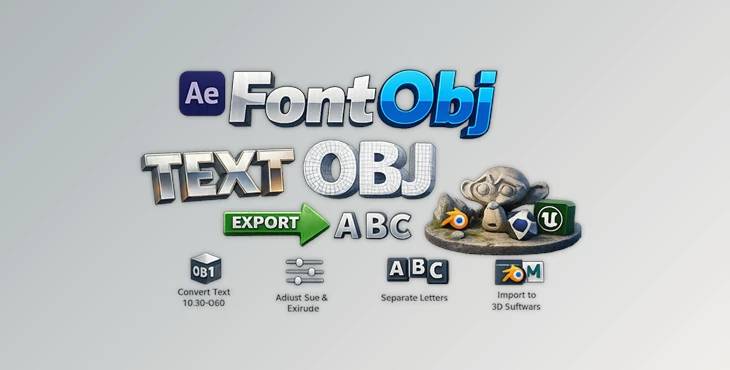
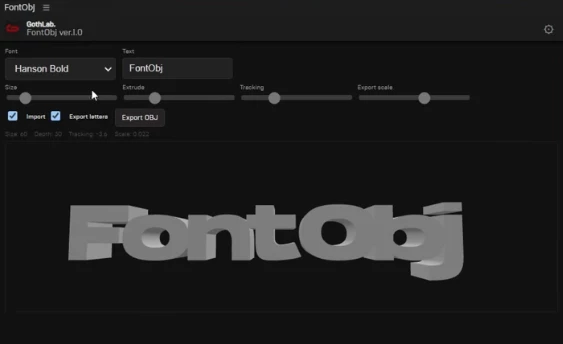
FontObj is an After Effects extension that converts typed text into real 3D OBJ files directly inside After Effects.
The workflow stays incredibly simple:
Choose your font, type your text, adjust the size, extrusion depth, tracking, and export scale, then generate a clean OBJ model ready for professional use.
Because everything happens directly inside After Effects, there’s no need to recreate your typography in separate modeling software.
Features
One-Click Text to OBJ Export
Convert text into clean OBJ geometry instantly without complicated modeling or manual mesh creation. This saves valuable production time while keeping your typography editable until export.
Designed for AE 2026 and Substance Workflows
FontObj is especially useful for artists working with After Effects 2026 and material-based rendering pipelines. Since exported OBJ files are genuine meshes, materials and lighting behave much more consistently than with standard 2D text layers.
Adjustable Text Controls
Before exporting, you can customize several important settings, including:
- Font selection
- Text size
- Extrusion depth
- Character tracking
- Export scale
These controls allow you to generate geometry that matches the exact needs of your project.
Separate OBJ Export for Every Letter
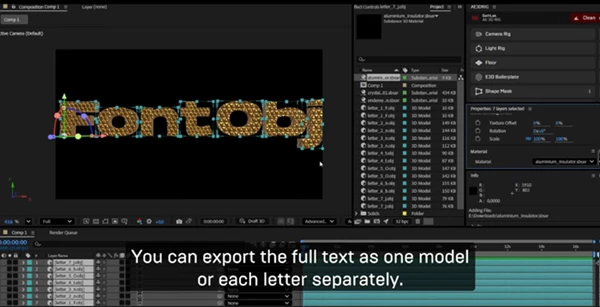
Need more animation freedom? Enable per-letter export, and FontObj creates an individual OBJ file for each character. This is perfect for:
- Exploding text animations
- Individual letter physics
- Dynamic logo reveals
- Procedural animation workflows
Automatic Import into After Effects
After exporting, FontObj can automatically import the generated OBJ files back into your current After Effects project or active composition. This eliminates repetitive import steps and keeps your workflow moving.
Simple Installation
Installation is straightforward using the aescripts + aeplugins Manager, while ZXP installation is also supported. Once installed, simply enable scripting permissions inside After Effects, and you’re ready to begin exporting.
Tips for Better Results
A few small adjustments can make your exported models even more useful.
Choose Fonts Carefully
Clean OpenType fonts generally produce smoother geometry and fewer unexpected mesh artifacts. Decorative fonts with extremely complex outlines may generate heavier models.
Adjust Extrusion Based on the Scene
Thicker extrusion works well for logos and cinematic titles, while thinner values often look cleaner for interface graphics or minimalist designs. Finding the right balance keeps your models visually appealing without unnecessary geometry.
Export Letters Separately Only When Needed
Separate-letter export is incredibly powerful, but it also creates more files. Enable it only when your animation actually requires individual letter control.
Keep Auto Import Enabled
If your workflow stays inside After Effects, automatic importing saves time and reduces repetitive tasks throughout production.
Final Thoughts
Creating real 3D text usually means jumping between multiple applications, rebuilding typography, and spending unnecessary time preparing assets.
FontObj removes much of that extra work by allowing you to generate clean OBJ geometry directly from After Effects. Whether you’re building animated logos, cinematic titles, material-based renders, or advanced typography projects, it provides a fast and reliable bridge between text design and real 3D geometry.
If your workflow regularly combines After Effects with modern 3D rendering or Substance materials, FontObj can become one of those small utilities that quietly save hours across every project.