Downloadable Files
You can download Shhh for free at the end of this page.
🎬 Editing Faster Starts with Smarter Silence Detection
Editing faster starts with properly detecting all the silence within your long recordings. Whether it’s YouTube videos, podcasts, online courses or any type of talking head footage, removing all silent sections manually can become a repetitive part of the editing process.
Shhh for Premiere Pro will automatically detect and remove all silent sections from your timeline with impressive accuracy to let you focus on the other important parts of the editing process.
✨ Why Automatic Silence Removal Matters
Silence detection is the process of analyzing audio levels to identify moments where nobody is speaking or where the sound falls below a chosen threshold. Once detected, those empty sections can be removed automatically while preserving the natural flow of the conversation.
For creators, this provides several practical benefits:
- Podcast editors can eliminate long pauses between speakers within minutes.
- YouTubers can speed up the editing of tutorials and commentary videos.
- Online educators can quickly polish lengthy lessons.
- Interview editors can maintain a fast and engaging rhythm without manually reviewing every second.
Instead of clicking through hours of footage, you let the software perform the repetitive work, making your editing workflow significantly faster while maintaining a clean, professional result.
🚀 Meet Shhh
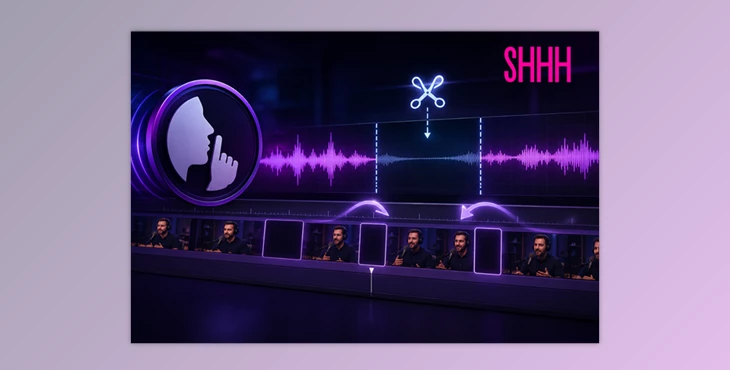
Shhh for Premiere Pro is a smart silence cutter plugin for Premiere Pro that automatically scans your footage, detects silent moments, and removes them using a completely non-destructive workflow.
Rather than permanently modifying your timeline, the plugin lets you experiment freely. If you want to restore removed sections or change your settings later, you can always go back without rebuilding your edit.
Its simple interface is designed for creators who want maximum speed with minimal setup.
Features
Smart Silence Detection
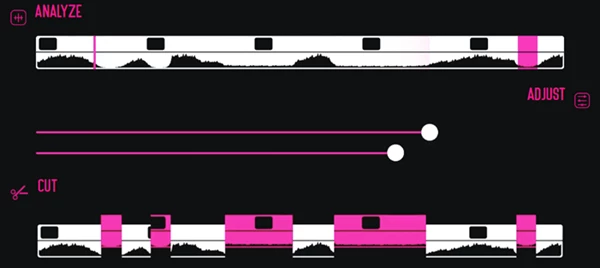
Shhh analyzes your timeline within seconds and accurately identifies silent sections, including very short pauses that would normally require careful manual editing.
This results in smoother pacing while dramatically reducing editing time.
Quick Timeline Analysis
Instead of reviewing every clip manually, the plugin scans your footage automatically and highlights the areas ready for trimming.
This allows editors to move directly into refining their content instead of searching for silence.
Adjustable Detection Settings
Every recording is different. Shhh lets you fine-tune silence sensitivity with both simple and advanced controls.
You can even save presets for different recording environments, making future projects even faster.
One-Click Automatic Cutting
After the analysis is complete, the plugin removes all detected silent sections almost instantly.
Whether you’re editing a five-minute video or a multi-hour podcast, the workflow remains fast and consistent.
Non-Destructive Workflow
One of the biggest advantages is flexibility.
Since edits remain non-destructive, you can revisit your timeline, adjust settings, or restore removed sections whenever needed without starting over.
Built for Content Creators
Shhh for Premiere Pro was designed specifically for editors, YouTubers, educators, streamers, and podcast creators who regularly work with dialogue-heavy footage.
Instead of replacing your editing decisions, it simply removes the repetitive work that slows you down.
💡 Tips for Even Better Results
Although Shhh automates silence removal, a few simple habits can help produce even better edits.
Start by choosing an appropriate silence threshold based on your recording environment. Clean studio recordings can use more aggressive settings, while noisy recordings may benefit from slightly lower sensitivity.
Save custom presets for different projects. Having separate presets for podcasts, tutorials, interviews, and livestreams makes future editing much quicker.
After the automatic cut, quickly review transitions between clips. A few manual adjustments can help conversations feel even more natural while keeping the pace energetic.
Finally, take advantage of the non-destructive workflow. Don’t hesitate to experiment with different settings because you can always return to your original timeline if needed.
🎯 Final Thoughts
Editing should be about telling better stories—not endlessly trimming silent moments.
Shhh for Premiere Pro removes one of the most repetitive parts of video editing by automatically detecting and cutting silence while preserving full control over your timeline. Its accurate analysis, customizable settings, instant cutting, and non-destructive workflow make it a valuable companion for anyone creating dialogue-focused content in Premiere Pro.
If you regularly edit podcasts, tutorials, interviews, or YouTube videos, Shhh can significantly reduce editing time while helping your final videos feel cleaner, faster, and more engaging.
 Shhh - Silence Cutter Plugin for Pr by Aescripts (v1.3.0).rar (Size: 7.4 MB - Date: 8/31/2026 11:45:19 AM)
- Shhh - Silence Cutter Plugin for Pr by Aescripts (v1.1.3).rar (Size: 7.6 MB - Date: 7/28/2026 10:35:36 AM)
- Shhh - Silence Cutter Plugin for Pr by Aescripts (v1.1.2).rar (Size: 7.4 MB - Date: 7/25/2026 10:30:17 AM)
- Shhh - Silence Cutter Plugin for Pr by Aescripts (v1.1.1).rar (Size: 7.6 MB - Date: 7/15/2026 2:52:06 PM)
- Shhh - Silence Cutter Plugin for Pr by Aescripts (v1.0.1).rar (Size: 7.5 MB - Date: 7/4/2026 12:06:22 PM)
- Aescripts - Shhh for Premiere Pro v1.0.rar (Size: 26.9 MB - Date: 7/2/2026 11:47:23 AM)
Files Password : gfxplugin.com OR 123456