Downloadable Files
You can download Folder Fanatic for free from the end of this page.
Keep Every Project Perfectly Organized
Any designer who has worked with After Effects knows how quickly a project can become cluttered with imported footage, compositions, images, audio files, and renders. As projects increase in size, so does the amount of time wasted searching for specific files.
Folder Fanatic was specifically made to fix this issue. With Folder Fanatic, users can create a folder structure that automatically sorts all project files in the way they wish. Whether you are a freelancer or part of a large production house, this program will help you maintain your desired project panel.
What is Folder Fanatic?
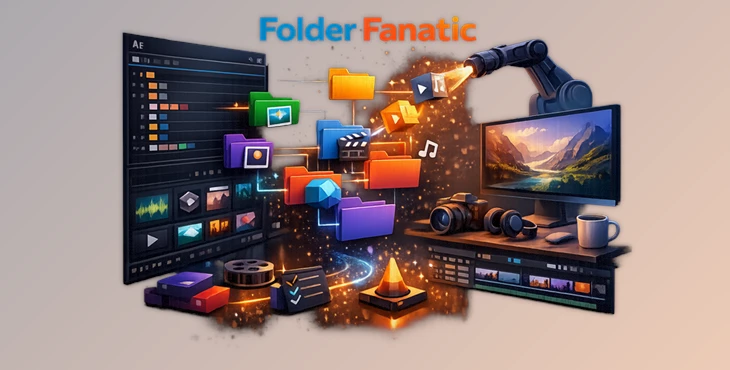
Folder Fanatic is a professional organization extension for Adobe After Effects that allows users to create, save, manage, and reuse custom folder structures. Rather than rebuilding the same project hierarchy repeatedly, you can create reusable presets and apply them with a single click.
The plugin goes far beyond basic folder creation. It includes intelligent rule-based sorting that can automatically organize files by media type, file format, naming conventions, duration, resolution, frame rate, aspect ratio, and much more.
Imagine importing hundreds of project assets—videos, images, audio clips, 3D files, and compositions—and watching everything instantly move into the correct folders without manual work. This not only saves valuable production time but also makes collaboration significantly easier because every project follows the same logical structure.
A clean project panel also reduces mistakes, improves navigation, and helps editors stay focused on creativity instead of file management.
Features
Create Unlimited Folder Presets
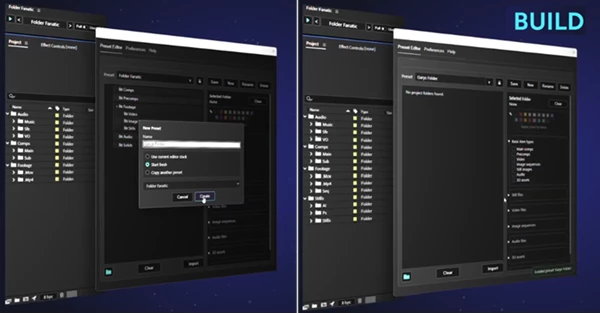
Build custom folder structures for any type of project and reuse them whenever needed. Create separate workflows for client work, motion graphics, templates, studio pipelines, or personal projects.
Import Existing Folder Structures
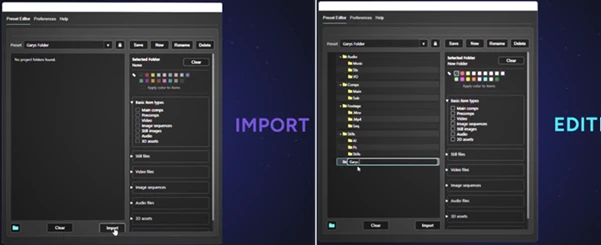
Already have a perfectly organized project? Folder Fanatic can import the entire Project Panel structure and turn it into a reusable preset, eliminating the need to recreate it manually.
Smart Organization Rules
Automatically sort assets using powerful rule combinations, including:
- File types
- File formats
- Naming conventions
- Starts with / Ends with / Contains
- Image sequences
- Resolution
- Frame rate
- Aspect ratio
- Duration
- Multiple stacked rules
These intelligent filters make asset management much faster than simple alphabetical sorting.
Label Color Support
Assign custom label colors to folders and assets while allowing child folders to inherit color settings automatically. This makes navigating large projects much more visual and intuitive.
Protected Folders
Prevent important folders from being moved or modified accidentally. Essential production folders always stay exactly where they belong.
Protected Presets
Lock completed folder presets so they cannot be edited unintentionally. This is especially useful when multiple artists share the same workflow.
Auto-Populate New Projects
Start every new After Effects project with your preferred folder structure already in place. This creates a consistent workflow across every job.
Familiar After Effects Experience
Folder Fanatic feels like a natural extension of the After Effects Project Panel. It supports drag-and-drop organization, nested folder creation, undo and redo functionality, and workflows that feel immediately familiar to existing After Effects users.
For example, a motion graphics studio can build one preset for client projects, another for social media campaigns, and another for template production. Switching between these workflows takes only a single click.
Tips for Faster Organization
To get the best results with Folder Fanatic, spend a little time designing a folder structure that matches your most common projects. Once your ideal workflow is built, save it as a protected preset so it remains consistent across future jobs.
Combine multiple Smart Rules instead of relying on just one. For example, sorting by both file type and naming convention creates much more precise organization than either rule alone.
If you’re working in a team, use shared folder presets so every artist follows the same project structure. This makes handoffs between editors much smoother and reduces confusion when opening someone else’s project.
Finally, enable automatic folder population for new projects to eliminate repetitive setup work and begin editing immediately.
Final Thoughts
A well-organized project is easier to edit, easier to manage, and much easier to deliver. Folder Fanatic removes one of the most repetitive parts of working in After Effects by automating project organization through customizable folder structures and intelligent sorting rules.
Whether you’re handling a simple freelance animation or managing complex studio productions with hundreds of assets, the plugin helps create cleaner projects, faster workflows, and a far more efficient editing experience. Once your folder system is in place, you can spend less time organizing files and more time creating great work.

Files Password : gfxplugin.com OR 123456