Downloadable Files
You can download JustPaste for free from the end of this page.
Stop Wasting Time Importing Assets
If you’ve ever copied an image from a website, exported it manually, searched for the saved file, imported it into Adobe After Effects, and finally dragged it into your composition, you already know how repetitive that workflow can become.
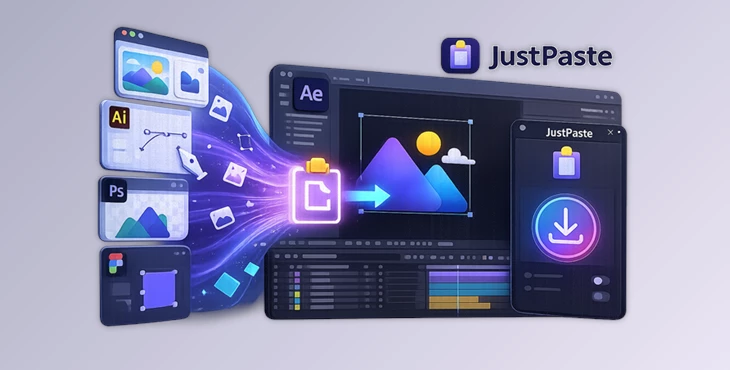
JustPaste removes all of those unnecessary steps. Instead of juggling multiple windows and folders, you simply copy an image or vector from almost any application, return to After Effects, and paste it directly into your project with a single click or keyboard shortcut.
It’s one of those small workflow improvements that quickly becomes something you don’t want to work without.
What Is JustPaste?
JustPaste is an Adobe After Effects extension that transforms the traditional import workflow into a simple copy-and-paste experience.
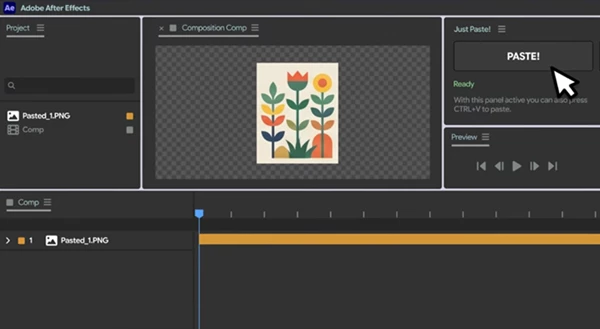
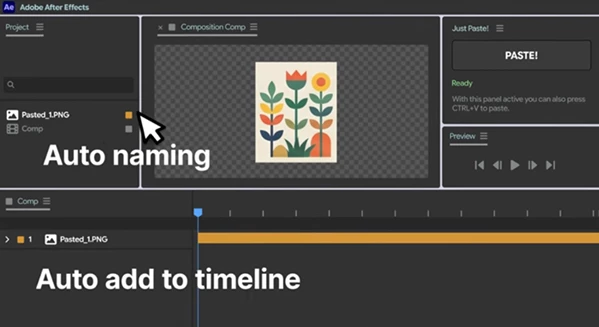
Rather than exporting assets manually, the extension automatically detects clipboard content, saves it next to your current After Effects project, imports it, and optionally places it directly into the active composition.
This is especially useful when collecting references, importing UI graphics, bringing web assets into motion graphics projects, or quickly testing design ideas without interrupting your creative flow.
For example:
- Copy an image directly from Chrome and paste it into your composition.
- Copy artwork from Adobe Illustrator and import it instantly.
- Copy graphics from Figma without exporting files.
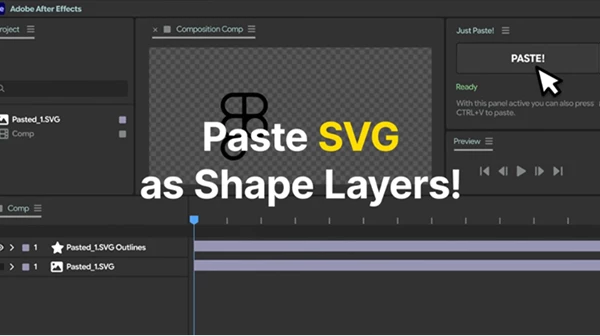
- Paste SVG graphics and automatically convert them into fully editable Shape Layers.
By eliminating repetitive importing tasks, you spend more time designing and less time managing files.
Features
One-Click Clipboard Import
Simply copy an image or vector from your favorite application and paste it directly into After Effects.
No exporting.
No file browsing.
No dragging assets manually. Everything happens in just one smooth workflow.
Works with Multiple Applications
JustPaste supports content copied from:
- Web browsers
- Adobe Illustrator
- Adobe Photoshop
- Figma
- Image viewers
- Most design applications
As long as the application places image or vector data on your clipboard, JustPaste can usually handle it.
Automatic File Management
Every pasted asset is automatically saved beside your current After Effects project.
You can also customize filename templates, making project organization much cleaner without additional effort.
Instead of temporary files scattered across your desktop, every imported asset stays with the project where it belongs.
Intelligent Format Detection
The extension includes several import modes:
- Auto Mode selects the best format automatically.
- Manual Mode lets you force PNG, JPG, or SVG.
This flexibility gives you complete control whenever a specific file format is preferred.
Automatic SVG to Shape Conversion
One of the most impressive features is automatic SVG conversion. When you paste an SVG graphic, JustPaste can instantly convert it into editable Shape Layers with fully adjustable paths. This is extremely useful for:
- Motion graphics
- Logo animations
- UI animations
- Icon animations
- Infographics
Instead of recreating vector artwork manually, everything becomes ready for animation immediately.
Optional Automatic Composition Placement
After importing, JustPaste can automatically place the asset inside the active composition. This saves another manual step and keeps your creative momentum uninterrupted.
Tips for Faster Results
To get the best experience with JustPaste, keep these simple tips in mind:
- Enable Allow Scripts to Write Files and Access Network inside the After Effects preferences before using the extension.
- Use Auto Mode for everyday work since it intelligently selects the most suitable file format.
- When working with vector artwork, keep SVG whenever possible to preserve editability.
- Store your After Effects project before importing so pasted assets are automatically organized beside the project file.
- If you’re using an older version of After Effects, import SVG artwork as PNG when native SVG support isn’t available.
These small habits make the workflow even smoother during large production projects.
Final Thoughts
Importing assets shouldn’t interrupt your creative process.
JustPaste removes one of the most repetitive parts of working inside After Effects by allowing designers to paste images and vectors directly from the clipboard into their projects. Automatic file saving, intelligent format detection, SVG conversion, and instant composition placement all contribute to a much faster editing experience.
Whether you’re creating motion graphics, UI animations, social media content, or client presentations, JustPaste helps keep your attention on creativity instead of file management.
 JustPaste (v2.0.0 for Win, Mac).rar (Size: 164.0 KB - Date: 9/27/2026 11:24:26 AM)
- JustPaste - After Effects Tool by Aescripts (v1.2.1 for Win, Mac).rar (Size: 181.1 KB - Date: 7/18/2026 3:25:25 PM)
- JustPaste - After Effects Tool by Aescripts (v1.2 for Win, Mac).rar (Size: 181.0 KB - Date: 7/4/2026 12:06:26 PM)
- Aescripts - JustPaste v1.0 (Win, Mac).rar (Size: 170.1 KB - Date: 6/29/2026 12:00:10 PM)
Files Password : gfxplugin.com OR 123456