Downloadable Files
You can download Pigment for free from the end of this page.
🎨 Finding the Perfect Colors Shouldn't Slow You Down
Choosing the right colors is one of the most important parts of motion design, yet it's often more time-consuming than expected. You may spend several minutes experimenting with different combinations, searching for inspiration, or manually adjusting fill and stroke colors until everything feels balanced.
This process becomes even more challenging when working on branding projects, explainer videos, UI animations, social media content, or title sequences where color consistency plays a huge role.
That's exactly where Pigment comes in. Instead of guessing which colors work together, it helps you generate beautiful, harmonious color palettes in seconds and apply them directly inside After Effects without interrupting your creative workflow.
🌈 What Is Pigment and Why Is It Useful?
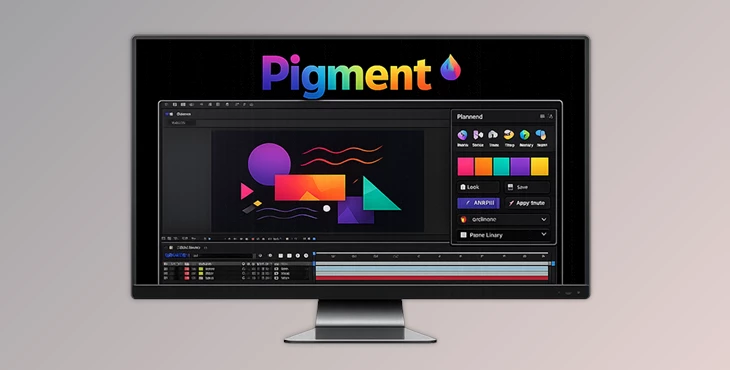
Pigment is a professional color palette extension for Adobe After Effects designed specifically for motion designers. It allows you to generate, customize, save, and instantly apply color palettes while staying inside your composition.
Rather than relying on external palette websites or manually copying HEX values, Pigment keeps everything inside After Effects.
Imagine you're creating:
- A modern logo animation
- A colorful infographic
- A product commercial
- A UI animation
- A kinetic typography project
Instead of testing dozens of colors manually, Pigment instantly builds harmonious palettes using professional color harmony algorithms. This not only saves time but also produces more visually balanced and polished results.
Another major advantage is consistency. Since every color in the palette is mathematically related, your final design naturally looks more professional and cohesive.
🚀 Meet Pigment
Pigment is designed to make color management inside After Effects incredibly fast, flexible, and enjoyable. Whether you're creating a brand identity, designing motion graphics, or experimenting with creative visuals, it simplifies one of the most repetitive parts of the workflow.
Instead of switching between multiple color picker websites and external applications, everything happens directly inside After Effects through a clean and intuitive interface.
Features
Generate Beautiful Color Palettes Instantly
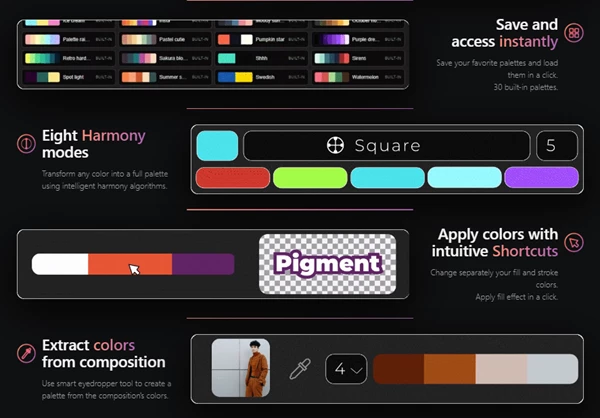
Create complete color palettes from a single color in just a few clicks. Pigment automatically generates visually pleasing combinations using intelligent harmony algorithms.
Perfect for branding, title animations, social media graphics, and UI design projects.
Eight Professional Harmony Modes
Pigment includes eight different harmony systems that transform one base color into balanced palettes suitable for different creative styles.
Whether you need complementary, analogous, triadic, or more experimental color combinations, switching between them is quick and effortless.
Save and Reuse Your Favorite Palettes
Build your own color library by saving custom palettes for future projects.
The plugin also includes 30 built-in palettes, allowing you to start working immediately without searching for inspiration elsewhere.
Extract Colors from Existing Compositions
One of Pigment's smartest features is its built-in eyedropper tool.
It analyzes your current composition and extracts its dominant colors, allowing you to instantly create matching palettes from existing artwork, logos, illustrations, or footage.
This is especially useful when expanding an existing brand identity or maintaining visual consistency throughout an animation.
Apply Fill and Stroke Colors Quickly
Changing colors across different layers becomes much faster with Pigment's shortcut-based workflow.
You can independently apply fill colors, stroke colors, or fill effects without repeatedly opening multiple color pickers.
This significantly speeds up everyday animation tasks.
Fine-Tune Every Palette
Every generated palette remains fully editable.
Adjust individual colors, lock preferred color boxes while generating new variations, and continue refining until the palette perfectly matches your project's style.
Lightweight and Fast
Pigment is built for speed.
Its lightweight design keeps the interface responsive while working smoothly even inside larger After Effects projects.
Works with Animated Colors
Unlike basic palette tools, Pigment integrates well with animated workflows, making color animation much easier to manage when creating dynamic motion graphics.
Clean Modern Interface
The interface follows a minimalist design philosophy that feels native inside After Effects.
Everything is organized logically, helping artists focus on creativity instead of navigating complicated menus.
💡 Tips for Better Results
Although Pigment can generate excellent palettes automatically, a few simple habits can make your designs look even stronger.
- Start with your primary brand or accent color before generating harmonies.
- Save successful palettes into your personal library for future projects.
- Use the eyedropper feature when matching colors from logos, photos, or existing animations.
- Lock colors you already like before generating new palette variations.
- Keep the number of dominant colors limited to create cleaner and more professional compositions.
- Test your palette across both light and dark backgrounds before finalizing the design.
- Combine Pigment with subtle gradients and proper contrast to make motion graphics feel more cinematic and visually engaging.
🎬 Final Thoughts
Color selection has a huge impact on how professional an animation feels, but it shouldn't interrupt your creative flow.
Pigment transforms what is normally a repetitive process into a fast, intuitive, and enjoyable experience. From generating harmonious palettes and extracting colors from compositions to organizing reusable color libraries and applying colors instantly, it provides everything motion designers need for efficient color management.
Whether you're producing branding animations, explainer videos, UI motion, or creative visual content, Pigment helps you spend less time choosing colors and more time creating outstanding animations.
 Pigment - Palette Plugin for Ae by Aescripts (v1.3.0 for Win, Mac).rar (Size: 1.2 MB - Date: 8/31/2026 11:44:29 AM)
- Pigment - Palette Plugin for Ae by Aescripts (v1.2.3 for Win, Mac).rar (Size: 26.9 MB - Date: 8/10/2026 11:08:49 AM)
- Pigment - Palette Plugin for Ae by Aescripts (v1.2.2 for Win, Mac).rar (Size: 26.9 MB - Date: 8/1/2026 8:52:40 AM)
- Pigment - Palette Plugin for Ae by Aescripts (v1.1.0 for Win, Mac).rar (Size: 1.0 MB - Date: 7/4/2026 12:06:23 PM)
- Aescripts - Pigment v1.0 (Win, Mac).rar (Size: 980.4 KB - Date: 6/27/2026 1:47:52 PM)
Files Password : gfxplugin.com OR 123456