Downloadable Files
You can download LAYERQ for free at the end of this page.
Work Smarter with Multiple Layer Variations
If you’ve ever worked on multiple versions of the same After Effects project, you know how taxing and repetitive it can be to continually duplicate your compositions and render every variation individually.
With LAYERQ, you can eliminate these repetitive tasks. Simply save every different layer visibility set as a composition within the project. Then, click a few buttons to batch render every saved version of that composition. Whether you’re creating localized videos for multiple regions or clients, LAYERQ will save you time and effort!
What is LAYERQ?
At its core, LAYERQ is a layer set management and batch rendering tool for Adobe After Effects.
Rather than creating separate compositions for every version of your project, LAYERQ lets you store different visibility states for your layers as named sets. Each set can represent a unique variation of your animation while keeping everything inside the same project.
For example, you can create:
- Different language versions of a title animation
- Client-specific branding variations
- Multiple product color options
- Alternative logo animations
- Social media versions with different graphics
Instead of managing dozens of duplicate compositions, everything stays clean and centralized.
Features
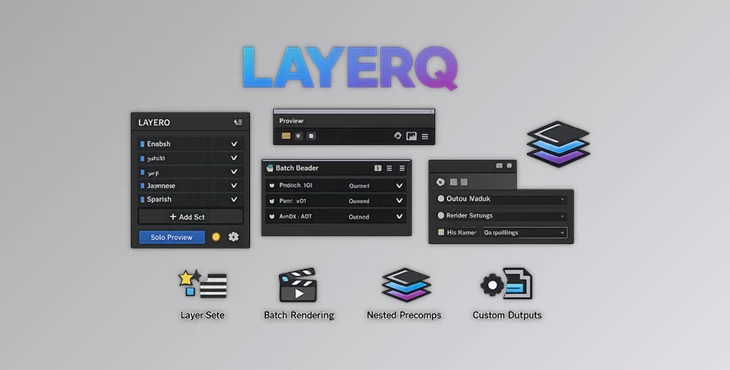
Save Layer Visibility Sets
LAYERQ allows you to save different combinations of visible and hidden layers as reusable sets for each composition.
This makes switching between project variations almost instant and removes the need for manually enabling or disabling layers every time.
Live Preview Before Rendering
Before rendering, you can instantly preview exactly how each variation will look.
LAYERQ uses After Effects’ native Solo property, allowing you to verify every version before committing to the final render. Since it relies on native functionality, you can easily clear previews directly from the timeline whenever needed.
Hierarchical Precomp Support
One of LAYERQ’s most powerful capabilities is its support for nested precompositions.
Layer visibility can be managed across child compositions, while the plugin automatically handles recursive duplication and rendering throughout the entire composition hierarchy.
This is especially useful for complex motion graphics projects with deeply nested structures.
Batch Render Every Version
Once your sets are ready, rendering becomes incredibly simple. You can:
- Render every saved variation with the ALL button
- Render only selected variations using SEL
- Automatically duplicate temporary compositions
- Send every version directly to the After Effects Render Queue
This removes hours of repetitive manual work.
Individual Render Settings
Each saved set can use its own export configuration. You can assign:
- Output Module presets
- Render Settings presets
- Custom file name templates
- Individual output folders
This gives every project variation complete export flexibility without additional setup.
Set Solo Mode
While editing, you can focus only on the layers belonging to a specific set. Using Shy Mode together with Solo Mode keeps the timeline clean and reduces distractions, making large projects much easier to navigate.
Cross-Composition Queue Stacking
For larger productions, LAYERQ can add multiple compositions to the Render Queue without rendering immediately. This makes it ideal for preparing batches of shots before launching the final render.
Bilingual Interface
LAYERQ includes a fully localized interface with both English and Japanese support. Menus, dialogs, tooltips, and alerts are translated, while your preferred language is remembered between sessions.
Persistent Set Storage
Your layer set definitions are stored directly inside composition markers. Because of this, your saved configurations remain with the project and can easily be reused later.
Compatible with Modern After Effects
LAYERQ works with:
- Adobe After Effects 2022 or later
- Windows
- macOS
Tips for Better Workflow
To get the most from LAYERQ, create clear and descriptive names for each layer set so switching between versions stays organized. Preview every variation using Live Preview before rendering to catch visibility mistakes early. When working with multilingual projects, keep all language versions inside one composition instead of duplicating entire timelines. Assign unique output folders and filename templates to avoid overwritten renders, and use Set Solo Mode whenever editing complex compositions to keep the timeline focused and clutter-free.
Final Thoughts
Instead of creating multiple versions of the same composition in After Effects, you can save those versions as layer visibility sets and batch render them.
With the benefits that LAYERQ offers for managing your projects and rendering them without manually creating and managing each composition, this tool is perfect for motion designers with projects that require multiple versions of the same composition.
Whether you are working on projects with multiple languages, clients, and brands, LAYERQ will save you time and effort while keeping your projects looking clean.

Files Password : gfxplugin.com OR 123456