Downloadable Files
You can download Foliage Tint Master for free at the end of this page.
Tired of Manually Fixing Every Tree and Plant?
When it comes to architectural visualizations, vegetation is a major part of the package. However, it can be quite frustrating when the vegetation within a scene is too saturated or too green for the environment being visualized.
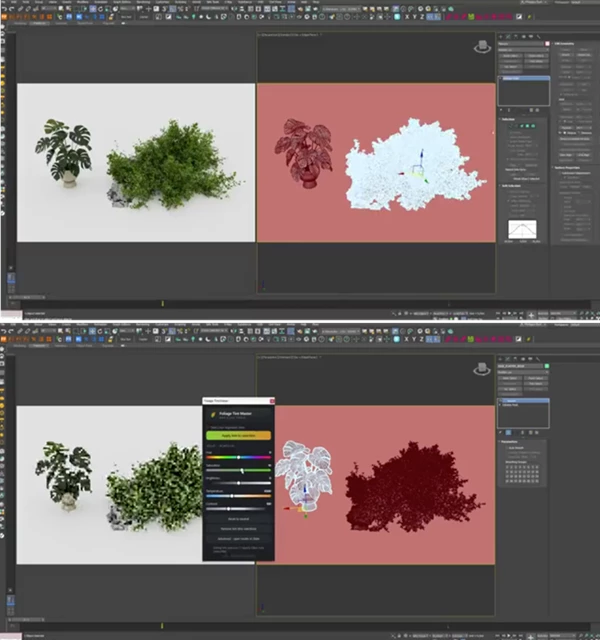
That’s when Foliage Tint Master comes in handy. This powerful tool will allow you to quickly and easily recolor all the vegetation within your project.
What Is Foliage Tinting and Why Does It Matter?
Vegetation plays a major role in the realism of architectural renders. Even the most detailed buildings can feel artificial if the surrounding trees, bushes, and plants don’t match the lighting, season, or atmosphere of the scene.
Foliage tinting is the process of adjusting the color characteristics of vegetation materials to achieve a desired visual style. For example:
- Transform summer greenery into warm autumn foliage.
- Reduce overly saturated vegetation in exterior scenes.
- Create colder winter environments with subtle color shifts.
- Match vegetation colors to specific lighting conditions.
These adjustments help create more believable renders and allow artists to direct the viewer’s attention more effectively.
Meet Foliage Tint Master
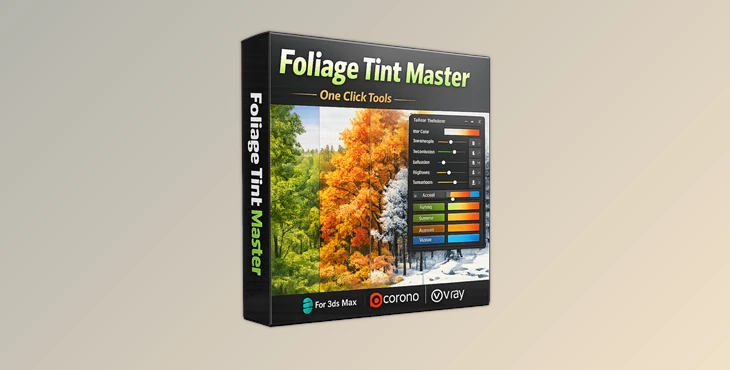
Foliage Tint Master is a vegetation grading tool designed for both Corona Renderer and V-Ray in 3ds Max. This tool makes it easy to quickly apply grading to any vegetation in your scene with a single click.
Features
One-Click Vegetation Grading: Select your foliage assets, click Apply, and begin adjusting the look immediately. The entire selection updates at once, eliminating repetitive material editing. Five Intuitive Color Controls.
The tool focuses on the adjustments artists use most frequently:
- Hue
- Saturation
- Brightness
- Temperature
- Contrast
These controls make it easy to achieve natural seasonal variations without technical complexity.
Live Interactive Rendering Support
Changes are displayed in real time while using Corona or V-Ray Interactive Rendering. This allows artists to instantly evaluate the visual impact of every adjustment.
Per-Selection Control
Different vegetation groups can receive unique color treatments. Trees, shrubs, and ground plants can each maintain their own grading settings for more realistic environments.
Non-Destructive Workflow
Original textures remain untouched. If needed, all tinting can be removed instantly, restoring the materials to their original state. Broad Material Compatibility
The tool supports:
- Corona Physical Materials
- Corona Legacy Materials
- VRayMtl
- 2-Sided Materials
- Multi/Sub Materials
- Blend Materials
- Layered Materials
- Composite Materials
This compatibility ensures smooth integration into complex archviz scenes.
Real-World Examples
Imagine creating multiple seasonal versions of the same architectural project:
- Spring with vibrant green vegetation.
- Summer with rich natural foliage.
- Autumn with warm orange and yellow tones.
- Winter with muted and desaturated plants.
Instead of rebuilding materials for each variation, Foliage Tint Master allows these transformations in minutes. It is also useful when importing assets from different libraries that have inconsistent colors. A quick tint adjustment can unify the entire scene and create a more cohesive look.
Tips for Better Results
Start with Subtle Adjustments
Small color shifts often produce the most realistic results. Extreme saturation or hue changes can make vegetation appear artificial.
Match the Lighting Environment
Adjust foliage temperature to complement the scene’s lighting. Warm sunsets benefit from warmer vegetation tones, while overcast environments often look better with cooler colors.
Use Separate Groups
Apply different grades to trees, bushes, and ground vegetation. Natural environments rarely contain identical shades of green.
Test During Interactive Rendering
Take advantage of the live rendering support to fine-tune colors while viewing the final lighting conditions.
Preserve Seasonal Consistency
When creating seasonal scenes, ensure vegetation colors align with the overall atmosphere, weather conditions, and lighting direction.
Final Thoughts
Foliage Tint Master removes a significant amount of the repetitive tasks for architectural visualization artists. This tool gives artists greater control over vegetation in their scenes and saves them considerable time in the visual development process.
Whether you are creating architectural visualizations, landscapes, or even creating different seasonal visualizations for your projects, Foliage Tint Master can save you and your team a significant amount of time. For those who use Corona Renderer and V-Ray in 3ds Max, this tool could not be more useful to vegetation artists in the visual development process.

Files Password : gfxplugin.com OR 123456