Downloadable Files
You can download RadialZ for Zbrush for free from the end of this page.
Sculpt Without Breaking Your Flow
Switching between brushes and menus to find the perfect sculpting tool takes time away from your craft. Every second counts when sculpting with ZBrush, and any distractions can make a drastic difference in your project’s completion time. RadialZ for Zbrush puts your entire brush collection one hotkey away to save you time. Access your favorite brushes from anywhere on the screen with a quick click of your mouse cursor. Regardless of the project type, sculpting requires focus and time management to produce the best results.
What Makes Brush Workflow So Important?
In digital sculpting, brushes are the primary tools used to create and refine every detail of a model. Artists constantly switch between brushes for blocking out forms, adding secondary shapes, refining surfaces, and polishing final details. A streamlined brush management system offers several advantages:
- Faster access to frequently used brushes.
- Reduced interruptions during sculpting sessions.
- Improved focus on artistic decisions rather than interface navigation.
- Better organization of large custom brush libraries.
- More efficient workflows for both beginners and professionals.
Imagine working on a detailed creature sculpt and instantly switching between Clay Buildup, DamStandard, and Smooth brushes with a simple flick of your pen. This seamless interaction keeps creativity flowing without unnecessary distractions.
Meet RadialZ for Zbrush
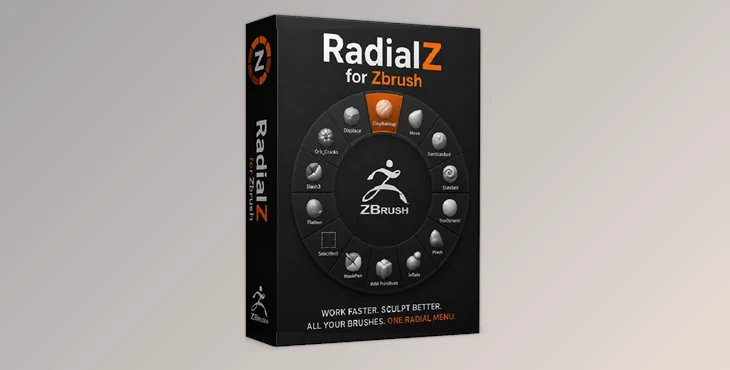
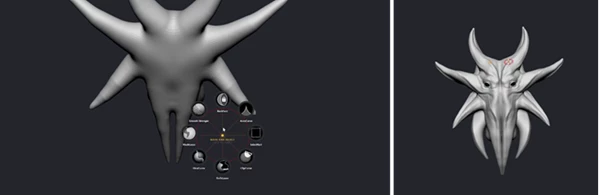
RadialZ for Zbrush is a workflow enhancement tool that introduces a customizable radial brush menu directly into ZBrush. The system allows artists to organize, access, and manage their brushes through intuitive radial menus and integrated library tools. Instead of relying on traditional brush palettes, RadialZ creates a fast and visual selection experience that feels natural and efficient.
Features
Radial Menu Access
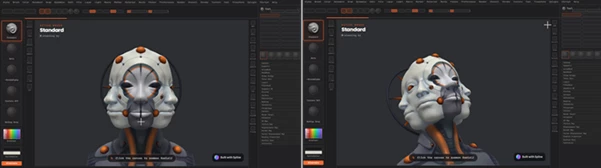
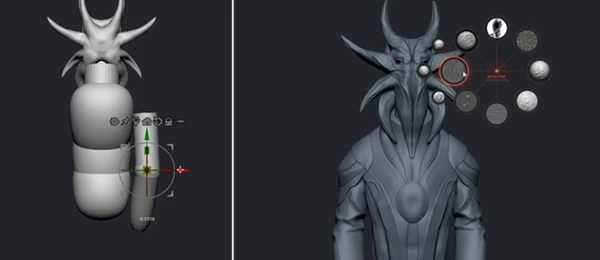
The core feature of RadialZ is its customizable radial menu. Press a designated hotkey, and a brush wheel instantly appears at your cursor location. Simply hover over the desired brush and release your pen or mouse to activate it. The selected brush loads directly into ZBrush without interrupting your workflow.
Fully Customizable Brush Slots
Artists can create personalized brush layouts by dragging and dropping brushes into specific radial menu slots. This allows separate menus to be built for:
- Blockout sculpting
- Secondary forms
- Surface detailing
- Character polishing
- Hard-surface workflows
Each workflow can have its own dedicated radial menu and shortcut.
Child Brush Support
A single slot can contain up to three child brushes. When hovering over a slot, a secondary submenu expands automatically, giving quick access to additional brush variations without cluttering the main interface. This feature helps artists keep more tools available while maintaining a clean workspace.
Direct ZBrush Bridge Integration
RadialZ includes a dedicated Bridge plugin that communicates directly with ZBrush. Instead of relying on complicated scripts or manual hotkey chains, the Bridge automatically loads selected brushes into ZBrush. This direct connection creates a smooth and reliable workflow that feels fully integrated with the sculpting environment.
Automatic Brush Library Management
The built-in Brush Library automatically scans available brushes and organizes them into an easy-to-navigate panel. Artists can:
- Search brushes instantly
- Filter by category
- View thumbnails
- Mark favorites
- Drag brushes directly into radial slots
This eliminates the need to manually browse large brush collections.
Popup Library Window
For artists with extensive brush collections, the Popup Library provides a searchable floating window that can be opened at any time. The library can remain pinned above ZBrush while testing and comparing brushes, making exploration and organization much faster.
Real-World Workflow Benefits
The advantages of RadialZ become especially noticeable during complex projects. For example:
- Character artists can quickly alternate between anatomy brushes and detailing tools.
- Creature sculptors can organize separate radial menus for skin textures, wrinkles, and muscle refinement.
- Hard-surface artists can maintain dedicated menus for panel lines, cuts, and surface detailing.
- Concept sculptors can rapidly experiment with different shaping brushes without leaving the canvas.
These workflow improvements help maintain concentration and reduce repetitive interface interactions throughout long sculpting sessions.
Pro Tips for Better Results
Create Workflow-Specific Menus
Instead of placing every brush into a single menu, create dedicated radial menus for different stages of sculpting. This keeps selections clean and speeds up decision-making.
Use Child Slots Strategically
Reserve child slots for closely related brushes, such as:
- Clay Buildup variations
- Surface detail brushes
- Texture brushes
- Polishing tools
This reduces menu clutter while keeping options easily accessible.
Organize Favorites
Use the favorites system to store your most frequently used brushes. This creates an efficient workflow for daily sculpting tasks.
Keep Menus Consistent
Try maintaining similar brush positions across different menus. Muscle memory develops quickly and allows even faster brush selection over time.
Test and Refine
As your workflow evolves, periodically update your radial menus. Removing rarely used brushes and optimizing layouts can significantly improve efficiency.
Final Thoughts
RadialZ for Zbrush aims to give artists more control over their brush libraries and provide faster access to the tools most important to their sculpting process. A variety of features make RadialZ the ideal brush management tool for sculptors who use multiple brushes and custom brush collections. For anyone sculpting with ZBrush, RadialZ will help sculpting activities take place without any distractions. The best part about RadialZ is that the sculpting process will feel much more fluid and enjoyable from start to finish.