Downloadable Files
You can download Colorbox for free from the end of this page.
Bring More Color Into Your Blender Workflow
Working with colors should be a fun, creative, and effortless experience in the Blender 3D application. Whether you are creating product visualizations, game scenes, motion graphics, or brand projects, having good control over colors can make a major difference in the outcome of your Blender projects.
While working with colors in Blender, many artists find themselves spending unnecessary time selecting HEX codes and colors from their projects. However, with Colorbox, artists can have complete control over their color palettes and color schemes inside Blender.
Colorbox is perfect for artists who are looking for a smarter way to work with colors in their Blender projects.
What Is Color Management and Why Does It Matter?
Color management is the process of organizing, selecting, and applying colors consistently throughout a project. A strong color palette helps create visual harmony, improves readability, strengthens branding, and enhances the overall mood of a scene.
For example:
- A product visualization may require exact brand colors.
- A game environment may need carefully balanced color palettes to create atmosphere.
- A motion graphics project may rely on complementary colors to guide viewer attention.
- An architectural render may use consistent color schemes to achieve a realistic and professional appearance.
Using organized palettes and color schemes allows artists to work faster while maintaining a polished and cohesive visual style. Instead of manually tracking dozens of color values, Colorbox provides a centralized system that keeps everything accessible and easy to manage.
Meet Colorbox
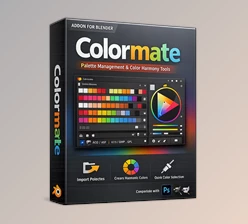
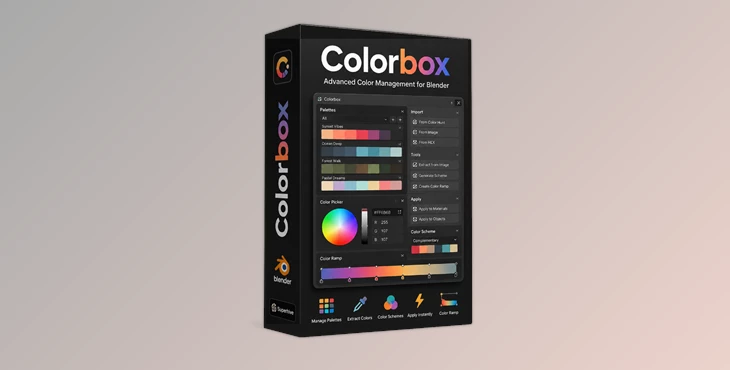
Colorbox is a powerful Blender addon designed to give artists complete color control directly inside Blender. It acts like a Swiss Army knife for color enthusiasts, offering palette management, color extraction, scheme generation, color swapping, and workflow enhancements that simplify every stage of color design.
The addon helps artists experiment with colors more freely while maintaining consistency across projects. Whether you’re creating personal artwork or professional client work, Colorbox makes color exploration faster and more enjoyable.
Features
Palette Swapping Made Easy
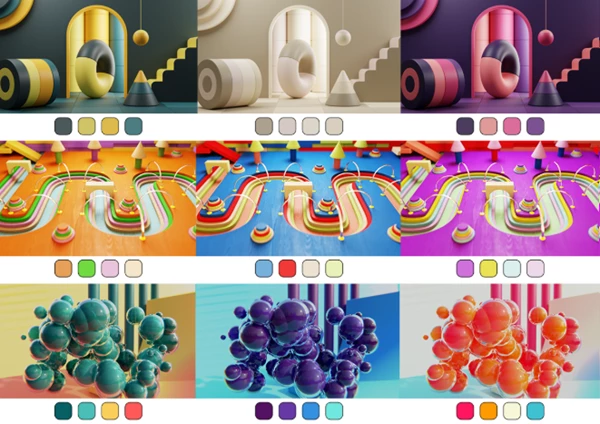
Colorbox includes a powerful Swapper tool that allows you to quickly replace existing palettes with new ones.
Instead of manually changing colors one by one, artists can instantly experiment with different visual styles and discover creative combinations that may have otherwise been overlooked.
This feature is particularly useful when exploring multiple art directions or testing different branding concepts.
Drag-and-Drop Color Workflow
Colors can be dragged directly from palettes and applied where needed.
This intuitive workflow reduces unnecessary clicks and allows artists to focus on creativity rather than technical setup.
The result is a smoother and more natural color editing experience.
Import External Color Palettes
Colorbox allows users to import palettes from external sources such as Colorhunt and other websites.
This makes it easy to discover trending color combinations and instantly integrate them into Blender projects.
Artists can quickly build a collection of inspiring palettes without manually recreating color values.
Create Palettes From Images
The built-in Colorbox Selector can sample colors from any image and automatically transform them into a usable palette.
This is extremely useful when:
- Matching colors from reference images
- Building mood boards
- Recreating cinematic color styles
- Extracting brand colors from logos and marketing materials
Generate Mathematical Color Schemes
The Color Scheme Maker enables artists to create mathematically balanced color combinations directly inside Blender.
Users can generate:
- Complementary schemes
- Analogous schemes
- Triadic schemes
- Other structured color relationships
These schemes help create visually balanced compositions while reducing guesswork during the design process.
Build and Organize Palette Collections
Colorbox allows users to create their own palette libraries and organize them for future projects. Having a personal color database improves efficiency and ensures that favorite color combinations are always available when needed.
Blend Palettes With Effects
Artists can apply blending effects between palettes to generate new color variations and creative combinations. This opens the door to experimentation while maintaining harmony within the overall design.
Convert Palettes Into Color Ramps
With just a few clicks, palettes can be transformed into color ramps and inserted directly into Blender’s node editor.
This feature is especially valuable for:
- Procedural materials
- Shader creation
- Stylized rendering
- Environment design
Save Palettes Locally or Inside Blend Files
All palettes can be saved directly within Blender files or exported to disk for future access. This ensures consistency across multiple projects and prevents valuable color resources from being lost.
Store Important Brand Colors
Colorbox makes it easy to keep important brand HEX codes directly inside project files. For client work and commercial projects, this helps maintain brand consistency and reduces the risk of using incorrect color values.


Pro Tips for Better Results
Build a Personal Palette Library
Create collections for different project types, such as:
- Product visualization
- Character design
- Motion graphics
- Architectural rendering
This saves time and provides quick inspiration when starting new projects.
Use Image Sampling for Inspiration
When you find artwork, photography, or movie frames with appealing colors, use the Colorbox Selector to extract palettes and study professional color relationships.
Test Multiple Variations Quickly
Use the Swapper tool to experiment with different palettes before committing to a final look. Small color adjustments can dramatically change the mood of a scene.
Keep Brand Colors Organized
For commercial projects, save approved brand palettes inside your Blender files to maintain consistency throughout production.
Use Mathematical Schemes as a Starting Point
Color schemes generated by the Color Scheme Maker provide a strong foundation. From there, artists can fine-tune individual colors to match the specific mood of their project.
Final Thoughts
Color is one of the most important elements of the visual experience of artists and players of Blender projects. Managing colors properly in the application can ultimately dramatically impact how fast and how effectively artists work on their projects, as well as the visual quality of their work.
Colorbox brings together color management features for Blender, including color palette creation and management, color scheme creation and management, color extraction from images, and more. This powerful addon will simplify the color workflow of artists and allow them to take full control of their projects’ colors.
Whether you are working on stylized art projects or commercial Blender projects for your clients, Colorbox will allow you to take complete control of the colors in your projects.

Files Password : gfxplugin.com OR 123456