Downloadable Files
You can download CurveConductor for free from the end of this page.
Bring Your Animation Timing to Life
After Effects is a powerful tool for creating motion graphics. Yet, the process of animating objects and adjusting their timing can be both time-consuming and repetitive.
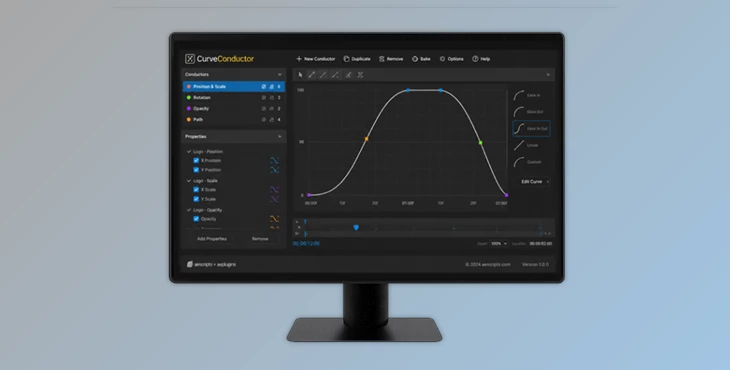
CurveConductor introduces a smarter way to adjust the timing of your After Effects projects. With CurveConductor, you can control the timing of numerous After Effects properties using a single master animation curve.
This allows you to adjust the timing of individual properties and have them all automatically adjust to remain synced with one another.
CurveConductor is ideal for working on a variety of After Effects projects, from user interface (UI) and app animations to motion graphics and brand identity animations.
Understanding Curve-Driven Animation
By default, After Effects requires you to adjust the easing or timing of each individual animated property.
Curve-driven animation allows you to specify a curve that controls the timing for numerous animated properties at once.
When you adjust the timing of the control curve, all associated animated properties will adjust simultaneously. This provides several advantages:
- Controlled motion across your entire project
- Faster iteration and experimentation with your animations
- Easier management of complex scenes in your After Effects project
- Naturally and visually appealing movement within your composition
Meet CurveConductor
CurveConductor is a professional After Effects tool designed to bring procedural, curve-driven timing to animation workflows. It allows motion designers to drive timing across numerous properties using a single editable control curve.
Every property connected to the curve updates live whenever the curve shape changes, eliminating the need for repetitive bezier matching and manual adjustments.
The result is a more flexible and efficient animation process that helps artists focus on creativity instead of technical repetition.
Features
Single Curve Control
Drive timing across multiple animations using one control curve. Any modification to the curve automatically updates all linked properties, ensuring perfect consistency throughout the project.
Marker Mode
Define where specific curve shapes are applied through layer markers. Multiple curves can be assigned to a single property, providing precise control over animation behavior.
Velocity Matching
Blend CurveConductor timing with native After Effects keyframes. This allows smooth transitions between traditional animation workflows and curve-driven motion.
Advanced Curve Application
Apply custom timing only to selected keyframe segments instead of entire animations. This gives animators greater flexibility when refining complex motion sequences.
Motion Path Support
Control complete multi-keyframe motion paths with a single curve. This feature helps maintain smooth and cohesive movement throughout intricate animations.
Curve Blending
Combine multiple curves to create motion that feels both responsive and natural. Designers can easily achieve smooth transitions while preserving energetic movement.
Real-World Creative Uses
CurveConductor can improve a wide variety of motion design projects, including:
- UI and app interface animations.
- Logo reveals and brand identity sequences.
- Infographic and data visualization motion.
- Social media content and promotional videos.
- Product presentations and explainer videos.
- Broadcast graphics and title animations.
For example, when animating a series of interface panels sliding into view, a single control curve can maintain perfect timing across every element, resulting in a polished and professional appearance.

Pro Tips for Better Results
Start With Simple Curves
Begin with basic curve shapes before creating complex timing structures. This makes it easier to understand how motion responds across multiple properties.
Use Marker Mode Strategically
Organize animation sections using markers to apply different timing styles where needed. This helps create variety without sacrificing consistency.
Blend Curves Carefully
Experiment with curve blending to balance smooth movement and snappy responsiveness. Small adjustments can dramatically improve the feel of an animation.
Combine With Native Keyframes
Use Velocity Matching when integrating CurveConductor into existing projects. This creates seamless transitions between traditional and procedural animation techniques.
Refine Motion Paths
When working with multi-keyframe movement, use a single control curve to unify the motion path and maintain a cohesive visual rhythm.
Final Thoughts
CurveConductor adds a new level of control and flexibility to the motion graphics creation process in After Effects.
By eliminating the repetitive effort of adjusting each individual After Effects property, CurveConductor reduces the time it takes to create animations.
CurveConductor is an incredibly useful tool for After Effects designers of all levels who want to take more control over their animations and create smoother, more responsive motion graphics in their projects. If you create motion graphics with After Effects, be sure to explore the CurveConductor plugin for your After Effects projects.

Files Password : gfxplugin.com OR 123456