Downloadable Files
You can download Rock Form Designer & Generator for free from the end of this page.
Create Stunning Rock Formations Faster Than Ever
Designing realistic rock formations is generally one of the most challenging aspects of creating natural environments for games or other visual projects. Whether you are after cliffs, arches, pillars, canyon walls, or fantasy landscapes, manually sculpting these elements can take up considerable amounts of time.
The Rock Form Designer & Generator was created to offer a faster and more predictable solution for artists looking to create unique rock formations at a rapid rate.
If you are someone who struggles with creating convincing rocks or who generally finds the rock sculpting process to be a time-consuming one, then Rock Form Designer & Generator may be of interest to you.
What Is a Procedural Rock Generation Tool?
A procedural rock generation tool is a system that automatically creates complex rock formations using customizable parameters rather than relying entirely on manual sculpting.
Instead of building every detail by hand, artists start with a simple guide mesh and then use procedural controls to shape, distort, and refine the formation. This approach offers several advantages:
- Faster iteration and experimentation.
- Consistent visual quality across multiple assets.
- Easier creation of large environmental sets.
- Better scalability for game and VFX production.
- Simplified generation of both high-poly and low-poly assets.
For example, an environment artist creating a canyon scene can quickly generate multiple unique cliff faces while maintaining a cohesive visual style. Similarly, a game developer can create dozens of rock assets for an open-world environment without manually sculpting each one from scratch.
These benefits significantly improve productivity while allowing artists to focus more on creativity and less on repetitive technical work.
Meet Rock Form Designer & Generator
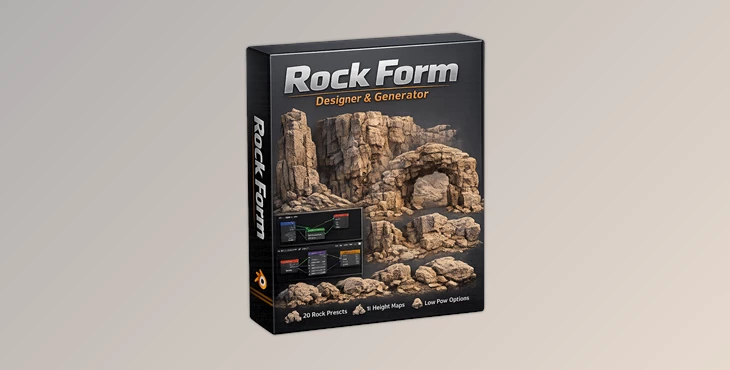
Rock Form Designer & Generator is a professional Blender add-on specifically designed for creating highly detailed rock formations through a procedural geometry-based workflow.
Unlike many displacement-based solutions that rely heavily on shaders, Rock Form Designer & Generator performs changes directly at the mesh level using Geometry Nodes. This makes it much easier to generate accurate low-poly versions suitable for baking and game-ready asset production.
The workflow is designed to be straightforward:
- Create any object as a guide shape.
- Select one of the included formation groups.
- Add surface detail using displacement textures.
- Refine materials and coverage settings.
- Generate a low-poly version when ready.
The result is a flexible system capable of producing everything from realistic geological formations to stylized fantasy environments.
Features
Dedicated Artist-Friendly Interface
The add-on includes a well-organized side panel that provides access to all major controls. Artists can quickly adjust formation settings without navigating complex node networks.
Geometry Nodes Powered Workflow
All transformations happen directly on the mesh through Geometry Nodes. Benefits include:
- True geometry-based detail.
- Easy modifier application.
- Accurate mesh export.
- Simplified low-poly generation.
- Better baking workflows.
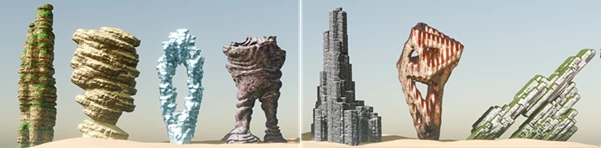
20 Unique Formation Groups
The package includes twenty custom-designed base mesh groups that dramatically change the character of generated formations. These presets make it easy to create:
- Stone arches
- Rocky pillars
- Cliff faces
- Canyon formations
- Massive boulders
- Stylized fantasy structures
Users can also create and integrate their own custom formation groups.
Advanced Displacement System
Rock Form Designer & Generator ships with eleven high-quality height map textures. Artists can:
- Mix different displacement styles.
- Create realistic surface erosion.
- Generate unique rock patterns.
- Import custom textures for specialized projects.
Tri-Planar Projection Support
The integrated tri-planar projection system helps eliminate common texture stretching and seam issues. This produces cleaner and more professional-looking surfaces across complex formations.
Powerful Master Material
The included master material provides advanced surface control based on physical object properties such as:
- Axis direction
- Displacement values
- Ambient occlusion
- Surface coverage masks
Combined with seamless tri-planar projection, this allows artists to create highly convincing rock materials with minimal effort.
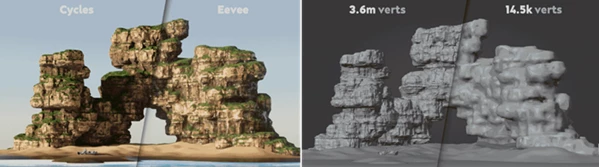
Low-Poly Asset Generation
One of the most valuable features is the ability to generate optimized low-poly meshes directly from the final high-detail formation. This is particularly useful for:
- Game asset production
- Real-time rendering
- Texture baking workflows
- Environment optimization
Suitable for Realistic and Stylized Projects
Whether you’re building a photorealistic mountain environment or a stylized fantasy world, the procedural controls allow for a wide range of visual outcomes.
Professional Tips for Better Results
Start with Strong Base Shapes
The guide mesh heavily influences the final formation. Simple but well-proportioned shapes often produce the best results.
Experiment with Multiple Formation Groups
Try different shape groups before committing to a design. Small changes at this stage can dramatically alter the final appearance.
Layer Surface Details Gradually
Instead of applying aggressive displacement immediately, build detail in stages to maintain believable rock structures.
Use Custom Height Maps
For unique projects, importing custom displacement textures can help create distinctive geological styles that stand out from standard assets.
Generate High-Poly First
Focus on achieving the best visual quality during the design phase. Once satisfied, create an optimized low-poly version for baking and production use.
Combine Material Influences
The master material becomes much more powerful when ambient occlusion, axis masking, and displacement-based coverage are combined strategically.
Final Thoughts
The process of manually creating convincing rock formations within games and other visual projects can be both challenging and time-consuming. Rock Form Designer & Generator was created to streamline this often tedious process.
This powerful add-on allows artists to create a variety of rock structures, from high-poly designs to low-poly models ready for game engines.
For anyone within the industry who is looking to rapidly produce visual assets without compromising quality, the Rock Form Designer & Generator offers an efficient and capable solution.

Files Password : gfxplugin.com OR 123456