Downloadable Files
You can download Signature Pack for free from the end of this page.
Elevate Your Edits Without Wasting Hours
Creating professional-looking videos requires more than just good footage. It takes a few extra steps to elevate your editing skills from average to outstanding.
If you’ve spent hours creating text animations, sound effects, or editing templates from scratch, then you’re not the only one who's suffered under these editing challenges.
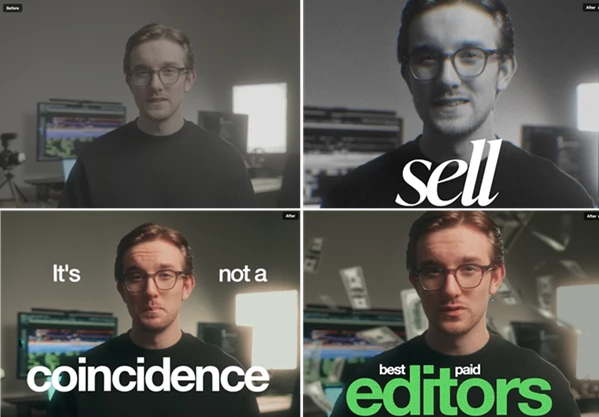
That’s why we made the Signature Pack. This pack includes a complete collection of professional editing assets and tutorials that will allow you to create outstanding videos without wasting hours.
No matter what kind of editing you do with your videos for clients, social media, YouTube, or just for yourself, the Signature Pack will make your editing experience significantly easier while also improving the quality of your videos.
What Makes Video Editing Assets So Valuable?
Professional editing assets are pre-built tools and resources that help editors achieve high-quality results without repeatedly creating everything from scratch.
Think about a typical editing project:
- You need animated text for key moments.
- You want impactful sound effects to keep viewers engaged.
- You need consistent color grading across multiple videos.
- You want overlays that add depth and visual interest.
Instead of building each element manually every time, professional asset packs allow you to drag, drop, and customize proven components. This saves time, improves consistency, and lets editors focus more on storytelling and creative decisions rather than repetitive technical tasks.
Meet Signature Pack
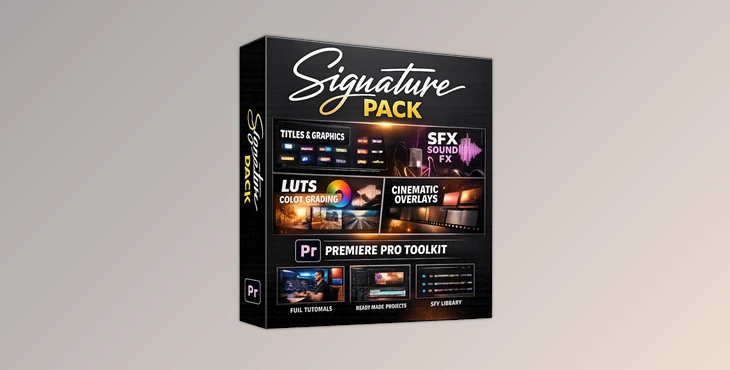
Signature Pack is an all-in-one editing toolkit that combines premium assets, ready-to-use templates, and educational content into a single package.
Rather than offering thousands of random files, it focuses on providing a carefully selected library of assets that editors can realistically use in everyday projects.
The pack includes editing presets, sound effects, LUTs, overlays, Premiere Pro templates, tutorials, and a complete masterclass that demonstrates a successful editing workflow from start to finish.
Features
22 Drag & Drop Presets
The pack includes 22 professionally designed presets covering:
- Text animations
- Motion graphics
- Audio enhancements
These presets help create polished edits in seconds while maintaining a professional appearance across projects.
30 Custom Sound Effects
Sound design plays a major role in audience retention.
Signature Pack includes 30 custom-made sound effects that can be used for:
- Transitions
- Emphasis moments
- Text reveals
- Motion graphics
- General engagement boosts
Good sound design often makes videos feel more dynamic and premium.
One-Click LUT
Color grading can dramatically affect the mood and quality of a video.
The included LUT allows editors to apply a consistent visual style quickly, helping footage appear more cinematic and cohesive.
8 Cinematic Overlays
The pack features 8 handcrafted overlays designed to add:
- Texture
- Atmosphere
- Visual depth
- Cinematic character
These overlays can transform simple footage into something that feels more polished and intentional.
Premiere Pro Master Project File
Editors receive a complete Premiere Pro project file containing ready-made templates that can be adapted for future projects.
Instead of rebuilding layouts repeatedly, users can simply customize existing structures and focus on creative execution.
Tutorials & Full Editing Masterclass
One of the strongest aspects of Signature Pack is its educational content.
Included are:
- 5 detailed asset tutorials
- A complete editing masterclass
The masterclass walks through one of the creator’s highest-performing edits from beginning to end, providing practical insights into professional editing decisions and workflow strategies.
Compatibility
Premiere Pro users receive access to all assets, including presets and project files.
Additional assets such as:
- Sound effects
- LUTs
- Overlays
are compatible with:
- Adobe Premiere Pro
- DaVinci Resolve
- Final Cut Pro
- CapCut
This flexibility makes the pack useful for creators working across different editing platforms.
Pro Tips for Getting Better Results
Build a Consistent Editing Style
Choose a set of presets, overlays, and color grading settings that fit your brand. Consistency helps viewers recognize your content instantly.
Don’t Overuse Effects
Professional editing isn’t about using every asset available. Select effects that support the story rather than distract from it.
Focus on Sound Design
Even simple videos can feel significantly more professional when supported by well-placed sound effects.
Create Reusable Workflows
Use the included templates as starting points for future projects. Over time, this can save dozens of hours of editing work.
Study the Masterclass Carefully
The educational content often provides more long-term value than the assets themselves because it teaches decision-making and editing strategy.
Final Thoughts
The Signature Pack was made for editors and content creators who want to have access to an extensive library of editing assets that will allow them to significantly improve the quality of their videos.
By including editing presets, sound effects, LUTs, overlays, editing templates, and an editing masterclass, The Signature Pack will make your editing experience easier and your videos better.
Whether you are editing videos for your clients, your social media channels, or for your projects, the Signature Pack includes editing assets and tools that will not only save you time but also enhance your editing and creativity in producing videos. Furthermore, the editing masterclass will provide you with the knowledge of the strategies and decisions needed to create outstanding videos.

Files Password : gfxplugin.com OR 123456