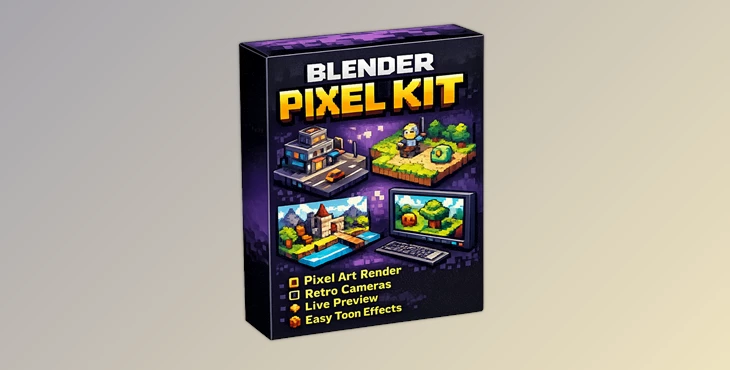
Downloadable Files
You can download the Blender Pixel Kit for free from the end of this page.
Turn Your Blender Scenes into Retro Pixel Art
Have you ever thought about creating stunning pixel art renders directly in your scene in Blender? While pixel art is loved by many, it can be frustrating to have to manually set up cameras, resolutions, outlines, and other artistic materials to create these retro visual elements.
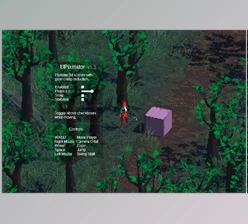
Blender Pixel Kit is a great way around this difficulty. This lightweight plugin allows artists to create low-resolution pixel art, isometric scenes, and retro art projects with minimal effort and configuration of Blender’s settings.
What Is Blender Pixel Kit and Why Is It Useful?
Blender Pixel Kit is an add-on for Blender that helps with pixel art and low-resolution rendering projects. This tool helps artists achieve their desired pixel art look while avoiding the difficulties of having to manually configure their art projects for such an outcome.
This is beneficial for various project types, such as game assets, environments, and dioramas.
Additionally, features like proper camera settings and materials will result in better, more consistent pixel art renders. The ability to see the project from a pixel art standpoint directly in Blender will allow artists to more easily configure projects for better visual outcomes.
Imagine designing a pixel art isometric city or game prop. This tool allows artists to create these projects with relative ease.
Features
One-Click Pixel Render Setup
One of the most useful features of Blender Pixel Kit is its ability to instantly configure Blender for low-resolution rendering.
With a single click, artists can apply pixel-friendly render settings and begin working immediately. This eliminates repetitive manual adjustments and ensures that renders maintain a crisp and authentic pixel-art appearance. For artists testing multiple visual styles, this can save significant time during production.
Pixel and Isometric Cameras
Creating the right camera setup is essential for pixel-art projects. The addon allows users to create and update pixel-ready cameras with:
- Resolution-based camera naming
- Framing controls
- Projection options
- Optional grid backgrounds
This makes it much easier to build classic isometric scenes and maintain proper composition throughout a project. For example, artists creating strategy-game environments or pixel dioramas can quickly switch between different camera setups while preserving visual consistency.
Viewport Pixel Preview
One common challenge in pixel-art workflows is not knowing exactly how the final render will look until after exporting. The Viewport Pixel Preview solves this issue by providing real-time previews directly inside Blender using compositor tools. Users can adjust:
- Preview resolution
- Pixel scale
- Preview offsets
This allows for faster experimentation and more accurate creative decisions before rendering.
Outline Support
Outlines often play a major role in stylized and retro artwork. Blender Pixel Kit includes a simple outline system with adjustable:
- Line thickness
- Line color
- Background color
- Alpha-based outline generation
These controls help artists improve object readability and create stronger visual separation between elements in a scene. For low-resolution artwork, clear outlines can dramatically improve the final image quality.
Pixel-Art Material Starters
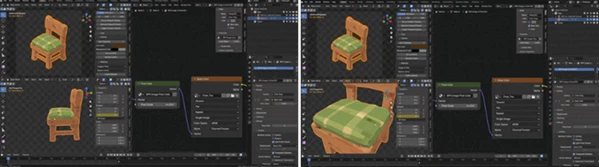
Creating materials from scratch can slow down production. The addon includes quick-start materials such as:
- Flat Material
- Flat UV Material
- Toon Material
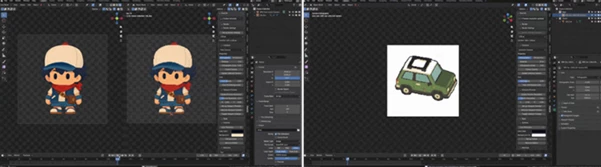
- Image to Pixel Material
These presets provide a solid foundation for pixel-art projects and help artists maintain a consistent visual style across multiple assets.
Camera Pixel Grid Overlays
Pixel alignment is important when working with low-resolution renders. Blender Pixel Kit automatically generates camera grid overlays based on output resolution, helping artists visualize pixel placement more accurately. This feature can reduce alignment issues and improve overall image clarity.
Built for Practical Creative Work
The addon is especially useful for:
- Pixel-art renders
- Retro-style environments
- Isometric scenes
- Stylized game assets
- Dioramas
- Experimental low-resolution projects
Because the toolkit remains lightweight, artists can integrate it into existing Blender workflows without learning a completely new system.
Professional Tips for Better Results
Start with Small Resolutions
Artists can test their projects at small resolutions first to ensure readability. If they appear good at small resolutions, they will be good at larger resolutions as well.
Use Outlines Carefully
Outlining objects can aid in the readability of the project. Artists should avoid using very thick outlines for pixel art projects, though, as this could hide details from view.
Combine Flat and Toon Materials
Both flat and toon materials can be used in different projects. Using flat materials is good for beginners or simple projects. Using toon materials allows for more depth in projects. Using both helps artists create better projects.
Preview Frequently
Artists should use the viewport pixel preview function to review their projects often. This will allow them to fix any readability issues before continuing with their project.
Maintain Consistent Camera Settings
For projects with several scenes or assets, using the same camera settings will help maintain the visual aspect of the project throughout.
Final Thoughts
Creating pixel art projects in Blender can be a difficult task due to the amount of configuration needed. However, Blender Pixel Kit makes this easier for artists by providing tools and features that benefit pixel art projects.
With one-click pixel art render setups, pixel and isometric cameras, viewport pixel previews, outline support, pixel art material starters, and pixel grid overlays for cameras, this Blender add-on provides artists with everything they need to create their own pixel art projects.
Whether you are building game assets, scenes, dioramas, or just experimenting with different art styles in Blender, Blender Pixel Kit will make it easier for artists to focus on their creativity rather than configuring Blender to achieve their desired outcome.

Files Password : gfxplugin.com OR 123456