Downloadable Files
You can download Raytracing Relight for free from the end of this page.
Transform Lighting Without Re-Rendering
Have you ever finished shooting a scene, only to realize that the lighting was not right for the scene? If you’ve ever created a shot with lighting that you felt was perfect for the scene, but later found that it needed to be changed, you know the difficulties of having to go back into your editing software to re-render your shot.
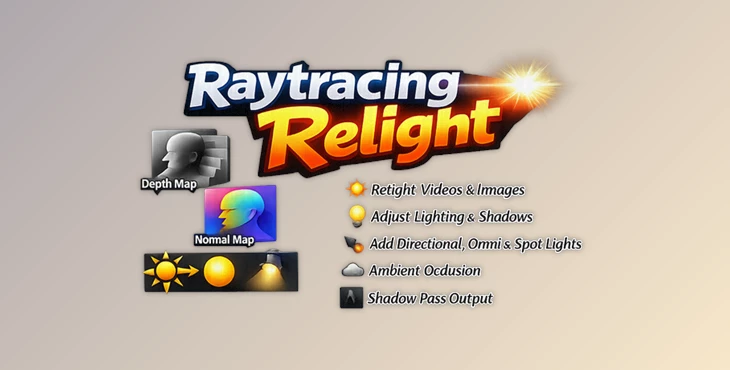
Raytracing Relight allows video and film creators to add lighting, change lighting, or even replace lighting within a video or static image file, all without having to re-render or re-shoot the footage. Using depth and normal maps of the video or image, Raytracing Relight allows for realistic lighting within the file to be created in real time.
Whether you’re creating cinematic videos, adding lighting matches to help tell a better story within a film, or simply enhancing the visuals of a video project, Raytracing Relight allows filmmakers to explore new creative possibilities with their projects.
What Is Relighting and Why Does It Matter?
Relighting refers to the process of changing the lighting in a video or image file after it has been created. Whether your video was filmed in bright sunlight or during the height of the night, relighting allows you to change the lighting of that video after the scenes have been filmed.
For instance, you may have filmed a scene in the middle of the day, but you want to edit the video to appear as if it were shot during the sunset. Instead of having to reshoot or perform color grading to attempt to accomplish this effect, relighting allows for these changes to be performed directly on the footage.
Lighting has a major influence on the feel of the video that is being created. By being able to alter the lighting within your footage, you have the ability to create a visual impact on your audience that enhances your story and increases its emotional impact.
Meet Raytracing Relight
Raytracing Relight is a real-time, 2.5D, raytraced relighting tool for After Effects and Nuke. This plugin works with physically-based rendering principles and utilizes depth and normal maps to create realistic relighting within your projects in After Effects and Nuke.
The same license is provided for both After Effects and Nuke.
Features
Physically-Based Rendering Workflow
Raytracing Relight uses a metallic/roughness PBR workflow, allowing materials to react to light in a realistic and predictable way. Surfaces behave more naturally, resulting in believable highlights, reflections, and shading.
Intelligent Thickness Estimation
The tool estimates object thickness, allowing light transmission through and around objects. This produces physically accurate shadows and more convincing interaction between light and geometry.
Multiple Independent Lights
Each instance supports up to three fully independent lights. Artists can adjust position, intensity, radius, tint, and other parameters to create complex lighting setups directly within the composition.
Multiple Light Types Users can choose between:
- Directional Lights
- Omnidirectional Lights
- Spotlights
- Ambient Light
This flexibility makes it possible to recreate a wide variety of real-world lighting scenarios.
Advanced Shadow and Occlusion Controls, Raytracing Relight supports:
- Soft Shadows
- Hard Shadows
- Translucent Lighting
- Ambient Occlusion
- Optional Denoising
These features help create depth, realism, and more natural-looking results.
Broad Depth Map Compatibility The tool supports five different depth map formats:
- Direct Depth
- Normalized Depth
- Inverted Normalized Depth
- 1/Z Depth
- Inverted 1/Z Depth
This compatibility allows integration with various rendering and AI-based depth generation workflows.
Flexible Output Modes Artists can switch between several output modes, including:
- Final Render
- White Albedo
- Shadows Only
- Additional Diagnostic Outputs
These modes simplify troubleshooting and compositing workflows.
Real-World Examples
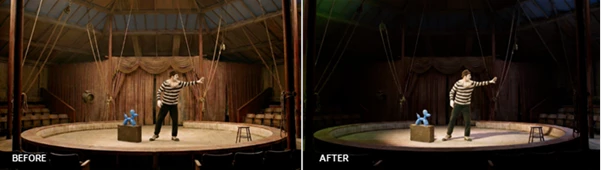
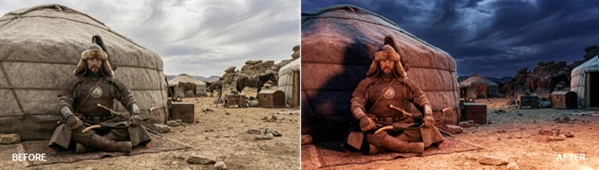
Film Creators can use this to add rim lights to separate the actors from the background.
Compositing can change bright daytime footage into a sunset sequence.
Visual effects editors can use this tool to match the lighting between two different angles of the same scene.
CG artists can use this to blend their digital models into live-action footage without disrupting the lighting of the scene.
Pro Tips for Better Results
Use depth maps of high quality.
Lights should not be too intense.
Use different types of lights together to allow for more realistic scenes.
Use soft shadows for outdoor scenes.
Use warm and cool lights to create an emotional impact on the audience.
Final Thoughts
Raytracing Relight is a helpful tool that allows editors to transform the lighting within their projects without returning to the original render process. Based on physically-based rendering principles, with a real-time interface, an advanced shadow system, and support for various types of lighting, Raytracing Relight allows editors to create their ideas faster than ever before.
Whether you are creating film projects, editing cinematic footage, or simply want to enhance the visual elements of your editing projects, this software can assist editors of all levels. For these reasons, it is a tool that is worth exploring to increase the capabilities of your editing project.

Files Password : gfxplugin.com OR 123456