Downloadable Files
You can download AE Work Manager for free from the end of this page.
Take Control of Your After Effects Time and Project Costs
Have you ever finished working on an After Effects project and had trouble calculating how much time you spent on specific tasks within the project? Many motion graphics designers and video editors may have used spreadsheets or other methods to record the time spent on projects. However, these methods are often inaccurate and require a significant amount of effort to complete effectively.
AE Work Manager aims to solve these problems by providing After Effects users with a way to track their projects and the time spent on each project directly within the software. This After Effects extension will allow you to focus on your projects as it will track the time spent on projects in the background. At the end of your project, you can view an overview of your project, the cost of the project, and your productivity without investing any additional effort in creating these records.
Why Time Tracking Matters in Creative Projects
Managing time is one of the biggest challenges for freelancers, agencies, and motion graphics artists. When project hours are estimated incorrectly, profitability suffers, and client reporting becomes more difficult.
A dedicated time-tracking solution helps you:
- Understand where your time is actually spent.
- Calculate project costs more accurately.
- Improve workflow efficiency.
- Create transparent reports for clients.
- Identify tasks that consume the most production hours.
For example, a motion designer working on a commercial project may spend several hours tracking footage, adding visual effects, color grading, and rendering final exports. Without detailed tracking, it’s difficult to know which stage required the most effort. With proper activity-based tracking, project estimates become more reliable and future planning becomes much easier.
Meet AE Work Manager
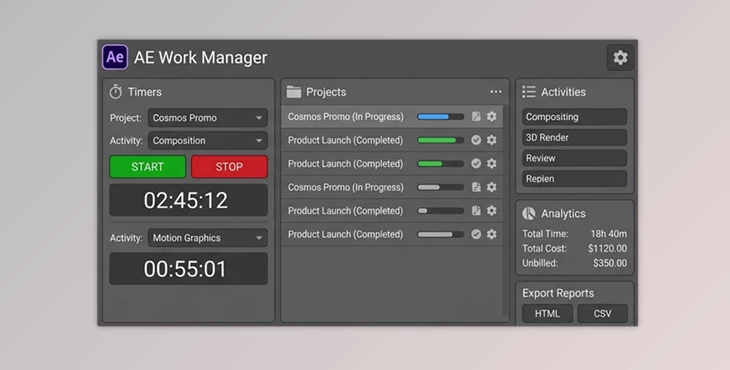
AE Work Manager is a professional After Effects extension that allows users to track the time spent on projects and generate reports for those projects. This extension allows designers to track the time spent on every stage of a project with a single click.
The extension will run in the background of After Effects and automatically generate reports on the projects you have completed. This extension is suitable for individuals who work independently on projects for clients or studios that include After Effects in a large number of projects.
Features
⏱ Per-Activity Time Tracking
Track time across fully customizable activity categories such as:
- Editing
- Tracking
- Color Grading
- VFX
- Rendering
- Compositing
- Motion Graphics
- Any custom activity you define
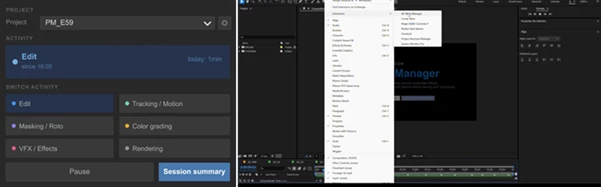
Switching between activities requires only one click, allowing you to continue working without interruptions.
💾 Automatic Session Recovery
Creative applications can occasionally crash or close unexpectedly. AE Work Manager automatically saves session data every time an activity changes, ensuring that your tracked time remains protected.
When After Effects is reopened, all recorded information is restored automatically so you can continue working without losing valuable project data.
📊 Detailed Session Summary
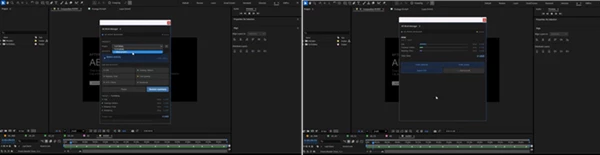
When a project is complete, the AE Work Manager provides a visual overview of:
- Time spent per activity
- Hourly rates
- Activity costs
- Total project duration
- Overall project value
The built-in bar chart makes it easy to identify where most of your production time was invested.
📄 Professional HTML Reports
Generate clean and professional reports in two formats: Internal Report
- Includes activity breakdowns
- Displays hourly rates
- Shows detailed cost calculations
Client Report
- Displays time information only
- Hides financial details
- Ideal for client transparency and project documentation
These reports are print-ready and easy to share.
📁 CSV Export Support
Export raw tracking data directly to CSV format for:
- Spreadsheet analysis
- Accounting workflows
- External billing systems
- Project management software
Each export is automatically timestamped and named according to the project.
⚙️ Custom Activities and Rates
Every workflow is different. AE Work Manager allows users to:
- Create custom activity categories
- Rename existing activities
- Remove unnecessary categories
- Assign individual hourly rates
Configurations can be saved as defaults for future projects, reducing setup time.
💱 Flexible Currency Support
Use any preferred currency symbol, including:
- USD
- EUR
- PLN
- GBP
- Custom currencies
The selected currency is applied consistently throughout the interface and exported reports.
📂 Multi-Project Management
Manage several projects simultaneously without losing progress. Users can:
- Switch between active projects
- Rename projects
- Remove completed projects
- Maintain separate tracking records
This feature is especially useful for freelancers handling multiple client jobs at once.
📐 Responsive User Interface
The panel automatically scales when resized, ensuring that all controls remain accessible and visible regardless of workspace dimensions.
🔲 Dockable After Effects Panel
AE Work Manager integrates naturally into the After Effects environment. The panel can be docked anywhere within the interface and automatically remembers its position between sessions.
Professional Tips for Better Results
Create Detailed Activity Categories
Instead of tracking everything under a single category, separate tasks into specific activities such as compositing, tracking, animation, and rendering. This provides more meaningful project insights.
Set Realistic Hourly Rates
Assign accurate hourly rates for different services. Advanced VFX work may have a higher value than routine editing tasks, resulting in more precise project costing.
Review Reports Regularly
Don’t wait until the end of a large project. Reviewing session summaries throughout production can help identify bottlenecks and improve scheduling.
Use Client Reports for Transparency
Providing clients with time-based reports can increase trust and demonstrate the amount of work invested in a project.
Analyze Long-Term Trends
Over time, collected data can reveal valuable information about workflow efficiency, helping estimate future projects more accurately.
Final Thoughts
For After Effects designers, understanding where their time goes on projects and how much each project costs is a significant challenge. However, AE Work Manager aims to provide a solution for this common problem in the industry.
By bringing time tracking, cost calculation, reporting, and project management to After Effects, this extension will eliminate the need for designers to use external time-tracking programs and spreadsheets. AE Work Manager will give designers a smooth, efficient experience that allows them to have better visibility into every stage of the projects they work on.
For freelance motion graphics designers, video editors, visual effects artists, and studios that work on After Effects projects, AE Work Manager will improve the efficiency of After Effects designers and give them deeper insight into their projects.

Files Password : gfxplugin.com OR 123456