Downloadable Files
You can download The Full Stack Bundle for free from the end of this page.
Transform Your DaVinci Resolve Workflow in Minutes
Editing videos and manually animating keyframes can be a time-consuming task. Most editors would love to save time and create visually appealing edits that will stand out from the crowd.
The Full Stack Bundle gives editors all the tools they need to produce professional videos without spending hours on editing tasks.
What Is The Full Stack Bundle and Why Does It Matter?
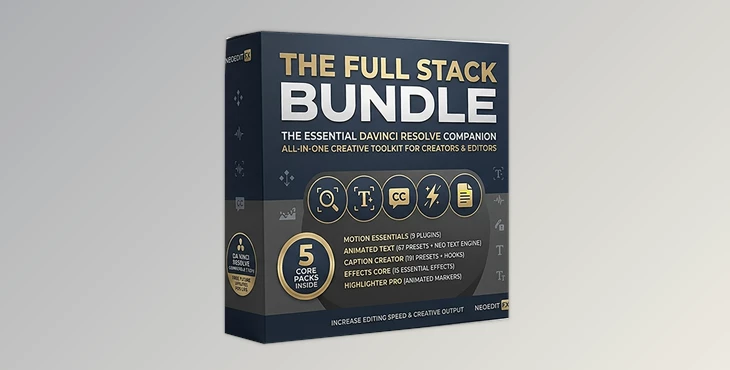
The Full Stack Bundle is a collection of motion graphics and video editing plugins for DaVinci Resolve 20+ that offer animated text, effects, transitions, and much more.
With the collection of over 300 plugins and presets, editors will be able to create:
- Zoom effects for gaming videos
- Transitions for vlogs
- Captions for social media videos
- Animated text for advertisements
- Highlight important elements in educational videos
- Add cinematic effects for commercial projects
Meet The Full Stack Bundle
The Full Stack Bundle combines all five NeoEdit packs into one bundle that offers over 307 plugins and presets. Additionally, with the purchase of this bundle, editors will receive access to future NeoEdit video editing packs for DaVinci Resolve automatically. This trusted editing bundle, edited by thousands of professional editors, offers tools that will assist editors with almost every editing task in DaVinci Resolve.
Features
Motion Essentials Pack
Motion Essentials Pack The Motion Essentials Pack includes nine industry-standard editing tools to make creating motion graphics easier. Tools included in this preset pack:
- Neo Zoom Pro
- Neo Anim
- Neo Face Camera
- Neo Shake Pro
- Gradual Zoom
- Edge Fade
Multiple transition presets. The zoom and transition effects are perfect for YouTube creators looking to emphasize important elements within their videos.
Animated Text Pack
Text animation is one of the most time-consuming elements in video production. The Animated Text Pack streamlines the process through a massive collection of customizable text solutions. Included features:
- 67 Text+ presets
- Neo Text Engine
- More than 333 keyframe-free text combinations
- Size, Slide, Fade, Blur, and Spin animations
- One-click Glow, Shadow, Outline, and Shine effects
Editors can quickly create attention-grabbing titles, lower thirds, callouts, and social media graphics while maintaining full creative control.
Effects Core Pack
The Effects Core Pack includes over a dozen professional visual effects that editors can add to any video. Visual effects included:
- Neo Glow Pro
- Neo Glitch
- Neo Chroma
- Neo Lens Distort
- Neo Shatter
- Neo Tri-Tone
- Neo Long Shadow
- Neo Light Sweep
- Neo Reflection
- Neo Bevel
- Neo Halftone
- Neo Emboss
All effects can be used to enhance editing projects and add professional visuals without spending hours on keyframing.
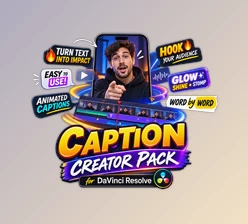
Caption Creator Pack
Captions are now essential for content performance across social media platforms. The Caption Creator Pack provides a complete captioning system optimized for engagement and retention. Included features:
- 191 caption presets
- 9 caption styles
- 3 animation modes
- 21 stylized hooks
- 3 CTA variations
- 3 caption shaders
Available animation styles include:
- Full Text Animation
- Word-by-Word Animation
- Letter-by-Letter Animation
These tools help editors create highly engaging subtitles commonly seen in viral content, educational videos, and short-form social media clips.
Highlighter Pro
Highlighting important information can significantly improve viewer comprehension and retention. Highlighter Pro offers:
- Hand-drawn marker-style animations
- Adjustable color controls
- Customizable timing settings
- Smooth highlight reveals
This makes it ideal for:
- Educational videos
- Tutorials
- News breakdowns
- Article overlays
- Quote highlights
- Evidence presentations
The effect looks natural and professional without requiring masks or complex workarounds.
Pro Tips for Better Results
Combine Motion and Text Effects
Instead of using standalone text animations, combine Animated Text Pack presets with Motion Essentials zoom effects. This creates more dynamic visuals and keeps viewers engaged longer.
Keep Effects Purposeful
While the bundle includes many visual effects, using them strategically often produces better results. Focus on enhancing important moments rather than applying effects everywhere.
Use Captions to Improve Retention
Word-by-word caption animations can help maintain viewer attention, especially for social media videos where users often watch without sound.
Create Reusable Templates
Build your own branded presets using Neo Face Camera, text animations, and caption styles. This ensures visual consistency across all future projects.
Highlight Key Information
Use Highlighter Pro selectively to emphasize important data, quotes, or educational points without overwhelming the viewer.
Final Thoughts
These editing features are crucial for editors looking to produce professional editing projects in today’s market. From motion graphics to highlighting, all the tools in The Full Stack Bundle are essential to producing visually engaging videos.
Whether editors are producing YouTube videos, creating channels for educational content, or producing content for their clients as professionals, all of these editing tools will make a significant difference in the editors’ workflow.
With the wealth of editing tools available in The Full Stack Bundle, editors can produce stunning, professional videos in a fraction of the time it used to take to complete them.
If you want to edit quickly and creatively, the Full Stack Bundle for DaVinci Resolve is a tool suite that will significantly improve the editing experience inside DaVinci Resolve.

Files Password : gfxplugin.com OR 123456