Downloadable Files
You can download the Old Modifier Menu for free from the end of this page.
Make Modifier Management Faster and More Enjoyable
Working with modifiers in Blender is one of the most important parts of any Blender workflow. Whether you are working on hard-surface models, procedural workflows, character grooming, or Grease Pencil animation projects, modifiers will speed up your production process.
Old Modifier Menu is a free Blender addon that was created to make managing modifiers faster and more enjoyable for Blender artists.
If you have ever wished for Blender’s modifier management to be faster and more organized, then this tool for Blender is definitely worth considering.
What Is the Old Modifier Menu and Why Is It Useful?
Old Modifier Menu is a Blender addon that makes it easier for Blender artists to access their favorite modifiers by streamlining the modifier management process.
The old Modifier Menu can become especially useful within real-world projects in Blender, such as:
- Hard-surface modeling with repeated modifier combinations.
- Procedural workflows using Geometry Nodes.
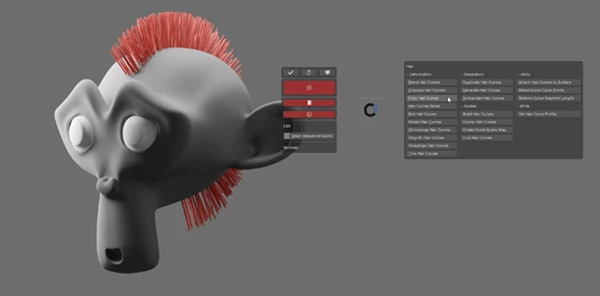
- Character grooming with Hair modifiers.
- Grease Pencil animation projects.
- Rapid prototyping and concept creation.
By reducing repetitive actions, artists can focus more on creativity and less on interface navigation. Faster access to tools often leads to smoother workflows and increased productivity throughout a project.
Meet Old Modifier Menu
Old Modifier Menu is a professional Blender addon that was made with the intention of improving the experience of managing modifiers in Blender. This Blender addon allows users to create their own modifier workflows to accommodate their project requirements and preferences.
The Old Modifier Menu is suitable for both new and experienced Blender artists who are looking to make their modifier management processes faster and more efficient.
Features
Customizable Modifier Menu
Enable only the modifiers you actually use. This helps keep the interface clean and focused, making it easier to find the tools you need.
Pie Menu Support
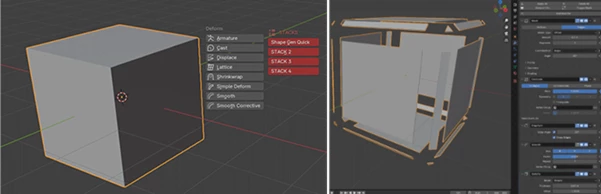
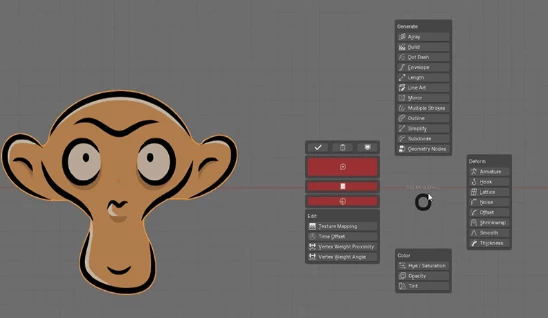
Access your customized modifier collection directly from the 3D Viewport through an intuitive Pie Menu. This dramatically reduces the time spent navigating through Blender menus.
Favorites System
Save your favorite modifiers and access them instantly whenever needed. This is especially useful for Mesh workflows where the same modifiers are applied repeatedly.
Modifier Stacks
Store up to four complete modifier stacks as favorites and apply them with a single click. For artists who use consistent workflows, this feature can save a significant amount of setup time.
Geometry Nodes Integration
Assign up to four Geometry Nodes modifiers directly to the menu for quick access. This is ideal for procedural modeling workflows and custom node-based tools.
Hair Modifier Support
Version 3 introduced support for Hair modifiers, making the addon useful for grooming and advanced hair workflows.
Grease Pencil Modifier Support
Artists working with Grease Pencil can now access modifier tools more efficiently through the same streamlined interface.
Editor Functions
Quickly add wire objects and empties using dedicated editor functions, reducing setup time for various production tasks.
Search Functionality
Built-in search makes locating modifiers faster, especially in larger workflows with many available options.
One-Click Modifier Management
Additional buttons allow users to quickly apply or remove all modifiers, making scene management much more convenient.
Blender 5 Support
The latest version adds support for Blender 5 modifiers, including:
- Geo Nodes Array
- Curve to Tube
- Instances
This ensures compatibility with newer Blender workflows and procedural systems.
Practical Examples
The old Modifier Menu can be used to quickly manage the modifiers for projects that require the use of the Bevel, Weighted Normal, and Subdivision Surface modifiers for their models.
For procedural Blender artists who use Geometry Nodes to create their models, the Old Modifier Menu can save them time by allowing them to quickly access their most-used Geometry Nodes modifiers.
For Grease Pencil artists who often work with animation projects, the modifier management tool can help them to find and use the modifiers that they create within their projects more efficiently.
Pro Tips for Better Results
Create different modifier stacks within the Old Modifier Menu according to the different project types in which you are working.
Ensure that the modifiers that you save as your favorite modifiers are only those that you use within your projects the most.
Use the Pie Menu as often as possible within your projects to save time.
Store your favorite Geometry Nodes modifiers within the Old Modifier Menu to increase the efficiency with which you access them.
Use the preferences menu to disable the modifiers that you do not use within your projects to keep your modifier management interface as clean as possible.
Final Thoughts
Old Modifier Menu is a Blender addon that is useful for anyone who uses modifiers within their Blender projects. By giving users the ability to save their favorite modifiers, create modifier stacks, use the Pie Menu to access their favorites, store Geometry Nodes and Hair modifiers, and offer editor functions and search functionality, this modifier management tool is dedicated to one of the most important aspects of any Blender artist’s workflow: speed and convenience.
Whether you are working on hard-surface models, procedural projects, grooming projects, Grease Pencil animation projects, or any other type of project in Blender, the Old Modifier Menu will make your daily tasks much more enjoyable and efficient.
For Blender artists who care about the efficiency with which they manage their modifiers, this Old Modifier Menu tool is one that is worth trying and exploring within their next Blender project.

Files Password : gfxplugin.com OR 123456