Downloadable Files
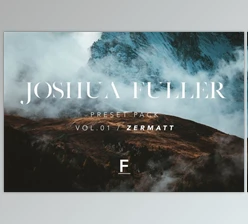
You can download Joshua Mannila Presets for free from the end of this page.
Transform Your Photos with Cinematic Presets
Have you ever looked at a photograph that you felt could benefit from a particular mood or atmosphere? Many professional photographers use photo editing presets to achieve consistent editing results and save time. Joshua Mannila Presets are specially crafted to add cinematic and dreamy features to your photographs with just a few clicks.
These Joshua Mannila Presets work on all types of photography, from portraits to landscapes.
What Are Lightroom Presets and Why Are They Useful?
Lightroom presets are editing profiles that photographers use to quickly and easily apply editing settings to their photographs. These editing settings include color, contrast, tones, and more. Instead of having to manually select settings for dozens of editing features on Adobe Lightroom, photographers can save time by using presets.
The benefits of editing presets include:
- Editing presets allows photographers to edit their photographs at a faster rate.
- Presets help photographers create a consistent editing style.
- Great for achieving professional-looking color edits.
- Much faster to experiment with editing styles using presets.
- Edit presets to enhance storytelling within the photograph.
For instance, warm editing presets are perfect for enhancing sunset portraits, while cool-toned presets are perfect for creating a cinematic atmosphere with overcast photography.
Meet Joshua Mannila Presets
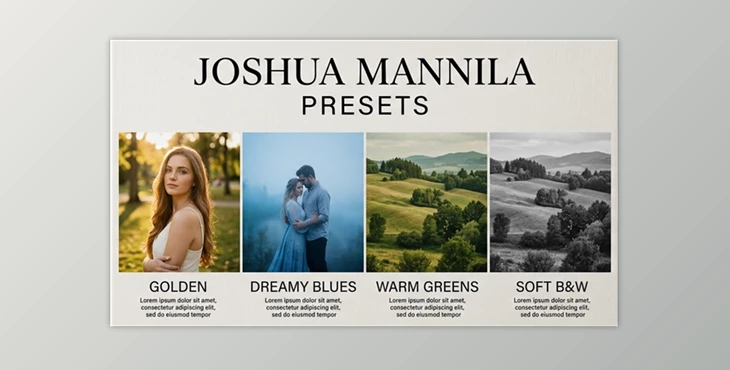
Joshua Mannila Presets features four base presets for both Adobe Lightroom Desktop and Mobile. These include three color editing presets and one black-and-white editing preset that photographers can use for all types of their projects. Joshua Mannila Presets are an excellent starting point for all photographers looking for cinematic color editing presets.
Features
Golden Preset
Inspired by the magical feeling of golden hour, this preset introduces warm highlights, subtle contrast, and a soft, glowing atmosphere. Key benefits:
- Creates a warm and nostalgic mood.
- Enhances backlit portraits.
- Adds gentle sunlight-inspired tones.
- Produces soft and radiant skin tones.
This preset works particularly well for outdoor portraits, lifestyle photography, and sunset sessions.
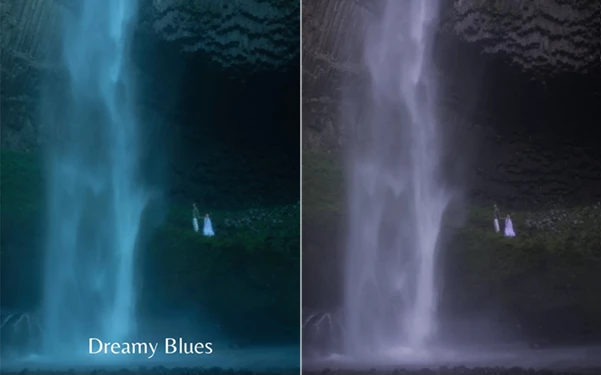
Dreamy Blues Preset
Inspired by twilight and overcast environments, Dreamy Blues adds deep blue tones and soft contrast for a cinematic aesthetic. Key benefits:
- Creates a calm and dreamy atmosphere.
- Adds cool blue color grading.
- Softens harsh contrasts.
- Ideal for cloudy and low-light conditions.
Perfect for portraits, urban photography, and storytelling-focused imagery.
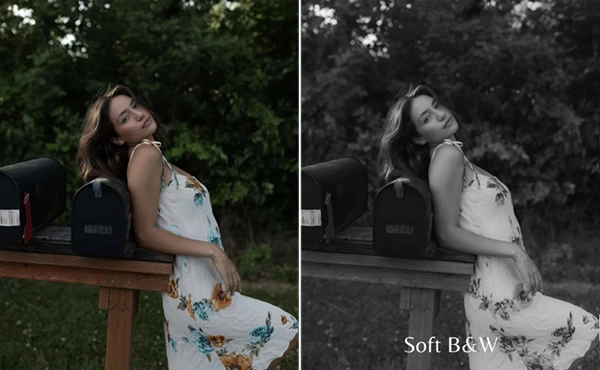
Soft B&W Preset
For photographers who appreciate timeless monochrome imagery, Soft B&W creates elegant black-and-white conversions with smooth tonal transitions. Key benefits:
- Gentle monochrome rendering.
- Balanced contrast.
- Preserved detail and texture.
- Clean and professional black-and-white appearance.
Excellent for portraits, documentary work, and artistic photography.
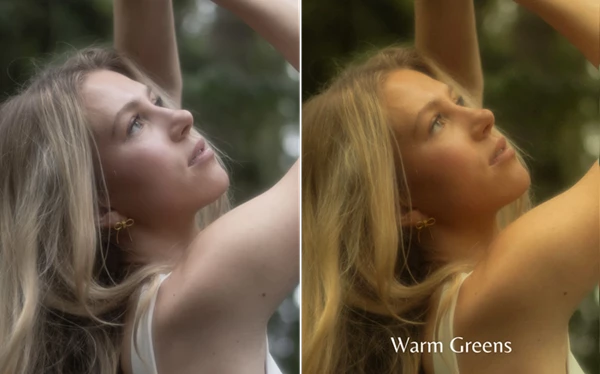
Warm Greens Preset
This preset enriches green tones while introducing a warm golden ambiance that feels immersive and cinematic. Key benefits:
- Vibrant and rich green colors.
- Warm and inviting atmosphere.
- Enhanced natural environments.
- Cinematic landscape and portrait styling.
Ideal for forest photography, outdoor adventures, and nature-focused portraits.
Professional Tips for Better Results
Use Presets as a Starting Point
These editing presets are base editing presets that photographers can use as a starting point. Depending on the lighting within the photograph, edits may be required after using these editing styles.
Match the Preset to the Lighting
Use the following editing presets for the following lighting conditions in your editing library:
- Use the Golden editing style for warm sunlight editing styles.
- Use the Dreamy Blues editing style for cloudy editing library features.
- Use the Soft B&W editing style for timeless black and white editing features.
- Use the Warm Greens editing style for all nature editing features.
Fine-Tune Skin Tones
All the editing presets in this pack include the ability to edit skin tones to enhance the appearance of the subjects within the photograph.
Consider Lens Filters
Some of the example images of these editing styles used lens filters to enhance the editing features to create a dreamy editing style within Lightroom. Using a diffusion filter in your lens can provide similar editing results.
Easy Installation Process
For Desktop
- Extract the Joshua Mannila zip folder.
- Select Adobe Lightroom Classic.
- Select File > Import Develop Profiles & Presets.
- Select the Joshua Mannila zip file.
- Click the Import button.
For Mobile
- Extract the Joshua Mannila zip file on your mobile device.
- Select the Lightroom Mobile application.
- Navigate to the Presets tab.
- Tap the three-dot menu on the top right of the screen.
- Tap Import Presets.
- Select the Joshua Mannila zip file.
- Tap to import the file.
Final Thoughts
Joshua Mannila Presets offers photographers editing presets for various editing styles that enhance all types of photography projects. From warm golden tones to dreamy blue atmosphere editing, black and white editing styles, and rich green tone editing for natural environments, Joshua Mannila Presets has something for everyone.
Furthermore, these Joshua Mannila Presets were designed as base editing presets so that photographers have complete control over their editing projects. Whether you are new to editing software or have experience with editing your projects, Joshua Mannila Presets will allow you to enhance your editing library and provide your subjects with the best lighting and editing software features.

Files Password : gfxplugin.com OR 123456