Downloadable Files
You can download MATE for AE for free from the end of this page.
Automate After Effects Like Never Before
Have you found yourself spending hours after effects automating repetitive tasks? Tasks like renaming layers, animating the same action across multiple layers, replacing text, or rendering specific composition layers can all take a significant amount of time out of your project timeline.
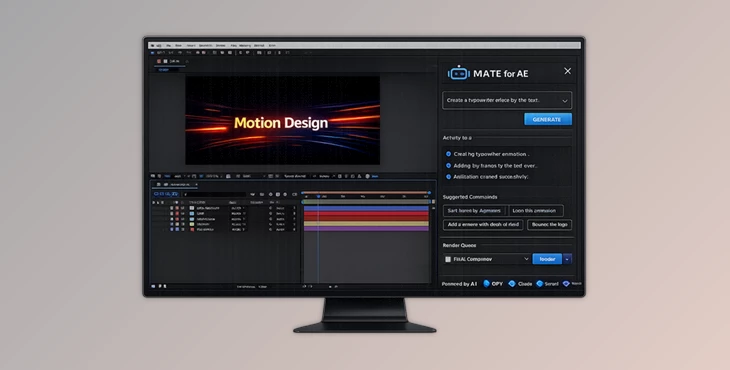
MATE for AE allows you to describe the automation task you would like to automate in plain language. Complex After Effects AI systems will then automate the process for you to save you time and effort.
What Is MATE for AE and Why Is It Useful?
MATE for AE is an AI program that was developed for After Effects. It understands your commands in natural language and can transform those into actions in After Effects.
For example, you can simply say:
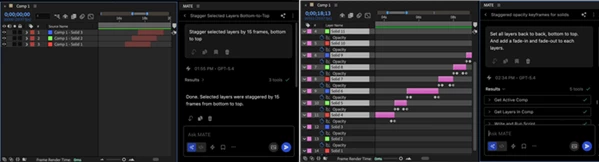
- “Stagger all the layers in my composition”
- “Replace all instances of ‘Team’ with ‘Company’”
- “Add fade-in animations to all the text layers”
- “Show the French language layers, add them to the render queue”
Instead of having to manually select each task, MATE for AE will automate it for you. By automating these repetitive tasks, you will find that you are able to complete your projects faster and with fewer errors. This can benefit teams of motion designers who are all working on the same project.
Meet MATE for AE
MATE for AE was made to automate many tasks within After Effects. These tasks can vary from simple to more advanced automations based on the skill level of the motion designer using the tool.
Whether you are a new motion designer who is looking to simplify your After Effects projects or an experienced designer looking for more advanced automation tools, MATE for AE can work for you.
Features
Agent Mode: Let AI Handle the Work
Agent Mode allows MATE to perform complete workflows on your behalf. Instead of executing individual commands one by one, you can provide a goal and let MATE handle all required steps automatically. Examples include:
- Staggering multiple layers
- Reorganizing compositions
- Showing or hiding language-specific content
- Preparing render queues
- Running multi-step automation sequences
This feature is especially useful for repetitive production tasks that would otherwise require dozens of manual actions.
Script Mode: Generate Custom Scripts Instantly
Many After Effects users rely on scripting to increase productivity, but writing ExtendScript can be challenging. With Script Mode, simply describe the functionality you need, and MATE generates working scripts automatically. For example:
- Create batch processing tools
- Build custom animation utilities
- Modify existing scripts
- Generate reusable workflow tools
This makes scripting accessible even to users without programming experience.
Expression Generation on Demand
Expressions are one of the most powerful features in After Effects, but they often require technical knowledge. MATE can instantly generate custom expressions for:
- Wiggle animations
- Looping effects
- Conditional logic
- Dynamic motion controls
- Responsive design systems
Instead of searching through tutorials, you can generate exactly what your project requires.
Built-In AI Models
MATE includes AI usage for supported base models, allowing users to start immediately without needing API keys.
Included models provide excellent performance for everyday automation and scripting tasks. Users who require more advanced AI capabilities can also connect their own API keys for higher-tier model access.
Save, Organize, and Reuse Workflows
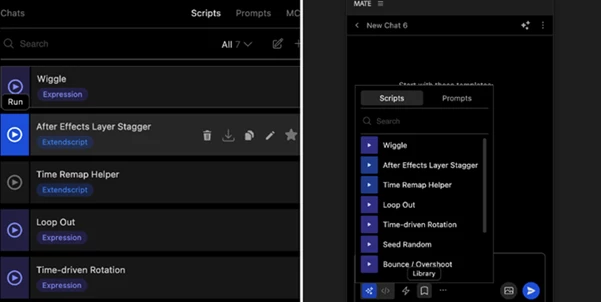
One of the most practical features is the ability to build a personal library of scripts, expressions, and prompts. Users can:
- Save successful workflows
- Organize favorites
- Export tools for team sharing
- Reuse automations with a single click
- Import existing scripts for improvement
This creates a growing knowledge base that becomes more valuable over time.
MCP Integration for External Data
MATE supports MCP (Model Context Protocol), allowing it to connect directly with external services. This means users can pull information from platforms such as:
- Notion
- Linear
- CI HUB
- Other supported services
For example, a motion designer can retrieve content directly from a Notion document and automatically populate text layers inside After Effects without manual copy-pasting. This creates a seamless workflow between content management systems and motion design projects.
Real-World Workflow Examples
A localization team can automatically display specific language layers, update text content, and render multiple versions of a video.
A motion graphics designer can stagger hundreds of layers, apply animation presets, and generate render-ready compositions in minutes.
A creative agency can maintain a library of reusable scripts and expressions that standardize production across multiple team members.
These practical applications demonstrate how automation directly translates into faster project delivery and improved consistency.
Pro Tips for Better Results
Use specific language and provide as much detail as possible in the automation commands.
Build a library of your most-used scripts and automations to reuse in different projects.
Use Agent Mode when working on large projects to automate more steps at once.
Use MATE for AE to automate tasks so that you can focus on the creative aspects of After Effects.
Integrate your external platforms with MATE for AE to automate even more aspects of your creative process.
Final Thoughts
As the demands of motion graphic design projects and timelines continue to evolve, creatives are required to be both creative and efficient in the methods that they perform their tasks.
MATE for AE helps to bridge the gap between these two requirements. Whether you are automating scripts, expressions, and elements in your projects or if you are simply looking to automate tasks like adding animations, renaming elements, or managing teams within your projects, MATE for AE will significantly increase the efficiency with which you can create your projects and deliver them to clients.
For motion graphic designers of all skill levels and experience with After Effects software, MATE for AE is a valuable new addition that will save time and effort in creating high-quality projects.

Files Password : gfxplugin.com OR 123456