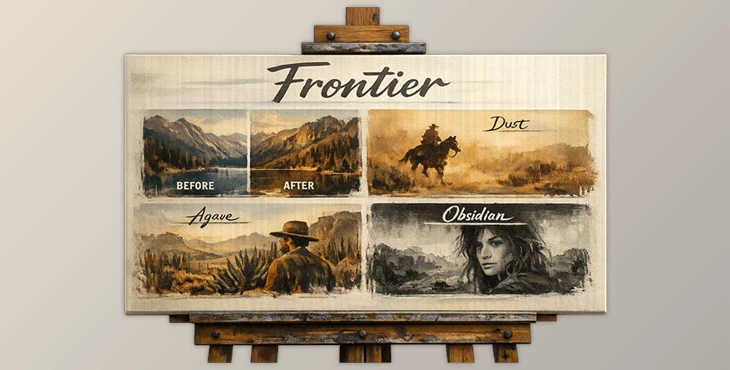
Downloadable Files
You can download Frontier for free from the end of this page.
Discover a New Way to Shape Your Photos
Photography captures a feeling rather than merely a scene. Whether you are shooting landscapes, fashion, portraits, or any other subject your creative mind decides to focus on, the mood of your photograph can make a critical difference to the viewer’s experience of the image.
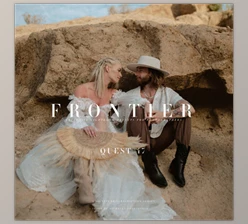
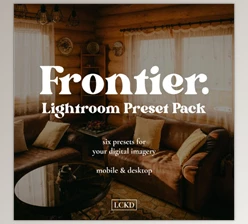
Frontier is a collection of professionally crafted Lightroom presets that allow photographers to create a range of images that feel authentic and timeless. Inspired by some of the most iconic landscapes, cities, and fashion shoots around the world, this tool enhances the originality of each photograph it is used upon. Each of the presets in this collection avoids the use of overly saturated colors and drastic editing effects so that the subject of each photograph remains preserved in its original form.
If you are looking for a way to add some visual style to your images without losing the authenticity of your subjects and locations, Frontier is a preset collection that you should consider for your photography projects.
What Is Frontier and Why Does It Matter?
Lightroom presets allow photographers to quickly apply a specific editing style to their photographs without having to select each editing parameter individually. The Frontier collection of presets focuses on minimal editing of the colors within the photographs.
This allows photographers’ images to maintain the following characteristics:
- Natural skin tones
- Realistic colors
- Enhanced contrast
Editing presets are a helpful time-saving tool in the photography industry, and this product allows photographers to maintain the authenticity of their subjects and locations while quickly creating a consistent editing style for their projects. Benefits include:
- Consistent editing styles
- Saves editing time
- Preserves natural skin tones
- Maintains realistic colors and lighting
- Works with a variety of photography genres
For example, photographers who shoot travel locations around the world can use Frontier to instantly apply editing styles to all of their travel photography projects. Similarly, portrait photographers can use Frontier to edit their portraits while maintaining the natural look of their subjects’ skin tones.
Meet Frontier: A Professional Preset Collection
This tool was inspired by photographer Garrett’s photography projects of Mexico, the western part of the United States, fashion photography, and urban photography projects around the world.
Features
Dust Dust
introduces warm and earthy tones while gently reducing saturation. Highlights become softer, shadows maintain depth, and natural textures become more pronounced.
Best for:
- Lifestyle photography
- Outdoor portraits
- Travel photography
- Natural environments
Agave
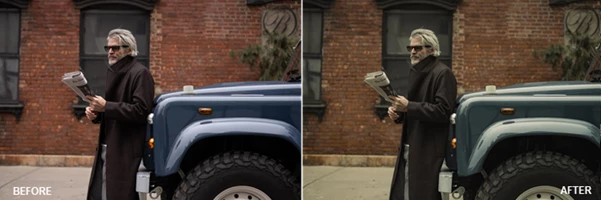
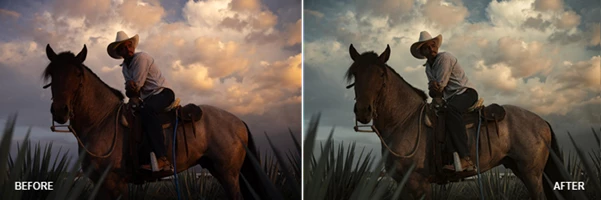
Agave delivers a more restrained and cinematic appearance. Greens, blues, and neutral colors become subtle and refined while preserving realistic skin tones.
Best for:
- Editorial photography
- Fashion shoots
- Street photography
- Urban environments
Ember
Ember creates a stronger contrast and a richer tonal foundation. Shadows become deeper while maintaining detail, resulting in a bold yet controlled cinematic look.
Best for:
- Dramatic portraits
- Storytelling photography
- Outdoor adventures
- Creative projects
Bone
Bone provides a clean and balanced black-and-white conversion. Rich midtones preserve texture while maintaining a timeless monochrome aesthetic.
Best for:
- Portrait photography
- Documentary projects
- Fine art photography
- Everyday black-and-white work
Iron
Inspired by classic Leica monochrome aesthetics, Iron offers stronger tonal separation and a polished black-and-white foundation.
Best for:
- Professional monochrome editing
- Fashion photography
- Editorial work
- Architectural imagery
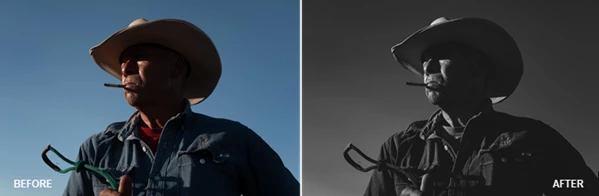
Obsidian
Obsidian delivers the strongest monochrome presence within the collection. Deep blacks, brighter highlights, and nostalgic tonal character create a striking visual impact.
Best for:
- Vintage-inspired portraits
- Western-style photography
- Fine art projects
- High-contrast storytelling
Creative Modifiers
This tool also includes additional modifiers to quickly adjust image mood: Drift +
- Slightly increases exposure
- Adds warmth to the image
Drift -
- Slightly increases exposure
- Introduces cooler tones
Add Grain
- Adds a natural film-inspired texture
- Fully customizable through Lightroom’s grain controls
AI Masks
The pack includes intelligent AI masking tools that speed up workflow and improve subject separation. Subject Pop
- Automatically selects the subject
- Increases exposure and shadow detail
- Enhances subject prominence
Deepen Background
- Automatically selects the background
- Reduces exposure and highlights
- Creates stronger visual separation
Editing Walkthrough Included Frontier comes with a complete editing walkthrough and workflow guide, helping photographers understand how to maximize each preset and adapt it to different shooting situations.
Professional Tips for Better Results
Start with the Right Base Preset
The best starting point with Frontier editing styles is to use the preset that best matches the mood of your photograph. For example, if your photography projects have soft lighting, you can start with the Dust editing style. If you want stronger contrast and shadows to stand out more in your photographs, use the Ember editing style.
Use AI Masks Sparingly
The AI editing tools are powerful, but often best used in subtle ways. Photographers can get caught up using all the editing tools, but the best editing results will come from small, targeted changes to the photograph.
Adjust Exposure Before Color
Correct the exposure in your photograph before you use the color editing tools in the Frontier collection.
Customize the Grain
The Add Grain editing style is a great starting point for photographers learning to edit in Lightroom. However, every photograph will have a different look to it with varying amounts of grain.
Build Your Own Signature Look
Finally, think of Frontier as the starting point for your editing projects. With a few small editing adjustments to the above editing styles and tools, you can develop your own editing style that works best for your projects.
Final Thoughts
Frontier is not just a collection of editing presets for Lightroom. It is a complete editing system that focuses on allowing photographers to create authentic, timeless editing styles for their projects. Because each editing style within Frontier maintains the natural light in the photograph and preserves the color and tonal characteristics of the subjects in the photograph, it is a great tool that photographers can use for any project genre.
Whether you are editing portraits, fashion, travel photography projects, or any kind of landscape of your choice, Frontier will enhance your editing projects. The combination of editing styles, creative modifiers, AI editing tools, and the editing walkthrough guide makes Frontier a tool worth adding to your editing software and editing processes.
If you are looking for a way to enhance your photography projects while creating a cinematic look and feel to your work, Frontier is a preset collection worth exploring.