Downloadable Files
You can download Shotify for free at the end of this page.
Simplify Shot Management and Save Hours of Editorial Work
If you’ve ever attempted to manage hundreds of shots, you know how time-consuming this aspect of editing can be. From creating shot labels to exporting thumbnails and movie references, it can take up to hours of editorial work to complete these tasks.
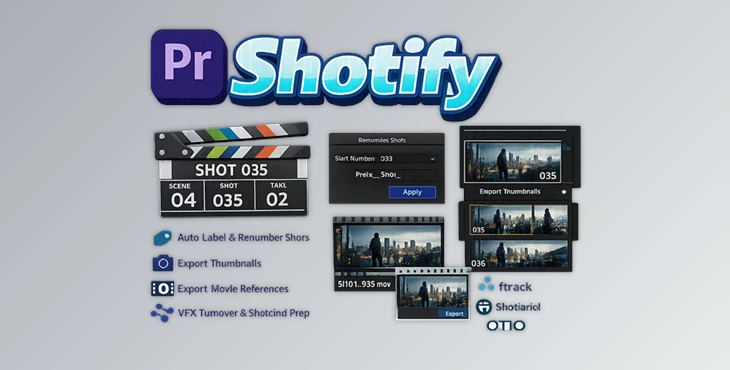
This tool was created to eliminate these hours of work. With Shotify in Premiere Pro, assistant editors, VFX editors, and editorial teams can generate shot sequences, create shot overlays, and export movie references in just a few clicks.
Whether exporting shots for VFX houses or creating references for editorial turnovers, Shotify does it all and makes the entire process faster and easier for your editorial teams.
What Is Shot Management and Why Is It Important?
Shot management is the process of organizing and managing all the shots in your editing project. From editing to review, every single shot from your project can be exported, tracked, and performed on as many times as necessary.
Without proper shot management in place, editors can struggle with issues like:
- Inconsistent shot naming
- VFX turnovers can be difficult to manage
- Tracking issues in review software
- Manual exporting of thumbnails
- Confusion surrounding version management
If you work on projects that contain hundreds of VFX shots, every single shot must have a label, thumbnail, and exportable reference movie. By automating these shot tasks, editors can avoid the errors that come from performing these tasks manually. This is where Shotify becomes a valuable tool in the editing suite.
Meet Shotify: Professional Shot Automation for Premiere Pro
This product was created for Premiere Pro editors looking to streamline the editing process for shots. Whether you are an assistant editor, VFX editor, or editorial team member, Shotify will allow you to create and manage your shots in faster processes to improve your editing software experience.
Shotify was built with real editorial projects and workflows in mind so that you can automate your most common editing tasks within Premiere Pro.
Features
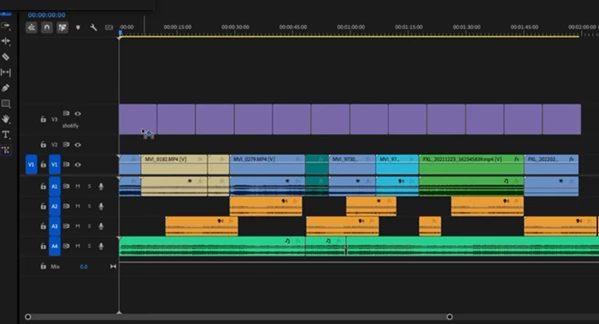
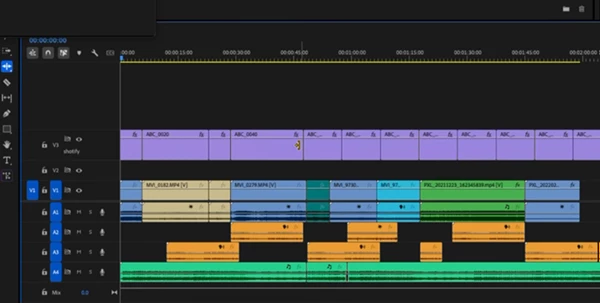
Generate Entire Shot Sequences Instantly
Shotify can automatically generate complete shot placeholder sequences using customizable parameters, including:
- Scene Number
- First Shot Number
- Increment Values
- Shot Padding
- Shot Count
- Cut-In Frame Number
- Frame Rate
This allows editors to create large shot structures within minutes instead of manually building them one by one.
Real-World Benefit
For a VFX-heavy sequence containing hundreds of shots, automated generation ensures consistent naming conventions and dramatically reduces setup time.
Smart Shot Overlays
Thsi tool can instantly add professional shot overlays and frame counters directly to your timeline. These overlays make it easier to:
- Review shots
- Communicate with VFX teams
- Verify frame ranges
- Track editorial changes
Real-World Benefit
When sending review materials to supervisors or external vendors, clear overlays help reduce confusion and improve communication.
Renumber Clips in Seconds
Editorial changes often require shot renumbering. Doing this manually can be tedious and error-prone. Shotify allows users to:
- Select multiple clips
- Define new numbering rules
- Instantly rename entire shot ranges
Real-World Benefit
After timeline revisions, editors can quickly update shot numbering without rebuilding organizational structures.
Export Thumbnails with One Click
Shotify automatically exports thumbnails from the first frame of every shot.
Exported files are automatically named according to shot numbers, making them ideal for:
- Spreadsheets
- Asset databases
- Review systems
- Production tracking
Real-World Benefit
Teams using review platforms can instantly generate visual references without manually capturing screenshots.
Export Per-Shot Movie References
Generating individual movie references manually can take hours on large projects. This tool automates the process by:
- Exporting movie references per shot
- Organizing files automatically
- Maintaining consistent naming structures
Real-World Benefit
VFX turnovers become significantly faster and more organized.
OpenTimelineIO (OTIO) Ready
Modern productions increasingly rely on OpenTimelineIO workflows. Shotify placeholders include:
- Accurate frame-referenced metadata
- Timecode information
- OTIO-compatible structures
This makes them ideal for:
- Editorial pipelines
- VFX turnovers
- Cross-platform workflows
Projects can be exported through Premiere Pro XML workflows or integrated into Premiere Pro 2026+ OTIO pipelines.
Built for Real Editorial Workflows
Shotify is specifically designed for professionals working in:
VFX Turnovers
Generate shot placeholders, exports, overlays, and turnover materials quickly and consistently.
ShotGrid and ftrack Pipelines
Export thumbnails and movie references ready for production tracking and review systems.
OTIO-Based Productions
Maintain accurate metadata and improve interoperability across modern post-production environments.

Professional Tips for Better Results
Establish Consistent Naming Rules
If you are to automate Shotify’s shot sequences, you must first establish naming and numbering rules for your project. Using consistent shot numbers will make it easier for you and your team to track and edit each shot as required.
Use Overlays During Reviews
Always enable the shot overlays when you are sharing your edited project with your supervisors or VFX teams. This will allow them to easily and correctly identify the edits you have made.
Export References Regularly
Export your thumbnails and movie references for all of your project’s shots. Editing projects can grow quickly, and it is best to have your databases and review systems updated with new shots.
Integrate with Existing Pipelines
If you or your team uses OTIO, ShotGrid, or ftrack to manage your editing and VFX projects, ensure that Shotify is integrated into your editing software as early in your project as possible.
Final Thoughts
Shotify was created to eliminate hours of work in the editing and VFX industries. With Shotify, editors can generate shot sequences, renumber shots, create shot overlays, export thumbnails, and export individual movie references for each of their project’s shots.
For assistant editors, VFX editors, and editorial teams working on high-volume editing and VFX projects, Shotify is the perfect tool to automate these tedious tasks. If you have ever exported hundreds of shots for VFX teams, shared them with supervisors, or managed OTIO projects, Shotify will save you and your teams time and money while keeping everyone on the same page and on the same project.

Files Password : gfxplugin.com OR 123456