Downloadable Files
You can download aePipeline is free from the end of this page.
Stop Wasting Time on Repetitive After Effects Tasks
As any person in the visual effects (VFX) industry knows, time is money. For VFX artists, time spent on repetitive tasks is money wasted.
Creating VFX shots involves performing repetitive tasks such as creating the shots, naming the versions correctly, setting up the render, LUT previews, and mattes. Instead of focusing on the creative work that they love to do, VFX artists spend hours performing these repetitive, time-consuming tasks.
This tool was created to solve this problem by eliminating these repetitive tasks and allowing artists to focus on their craft: creating VFX shots. aePipeline can be used for projects of any size - whether working on a single VFX commercial or managing hundreds of VFX shots for a project.
What Is aePipeline and Why Does It Matter?
aePipeline is a workflow automation system built specifically for Adobe After Effects VFX projects.
Instead of performing repetitive tasks like creating VFX shots and composited versions, managing render settings, and creating mattes, aePipeline does it all for you with a few clicks of the mouse.
Using aePipeline, you’ll be able to receive a new shot and immediately have:
- A complete shot stack
- Correctly named versions
- Color management set up
- Burn-ins and references set up
- Render outputs ready to go
This product reduces the number of mistakes that you can make and ensures that every element of your VFX product is consistent throughout the production process.
Meet aePipeline: Your Automated VFX Assistant
aePipeline was created to simplify the repetitive technical processes that every compositor encounters daily.
The system allows teams to define show-specific conventions once for each client and then switch between projects effortlessly using a simple dropdown menu. This ensures every shot follows the correct structure without requiring manual setup each time.
By replacing multiple repetitive production tasks with a few automated actions, this tool helps artists stay focused on delivering high-quality visual effects.
Features
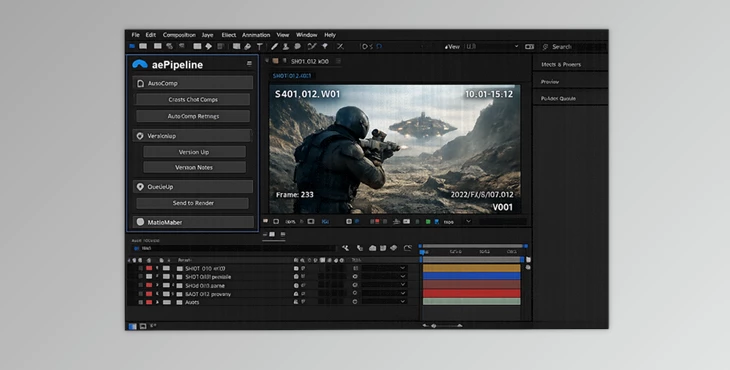
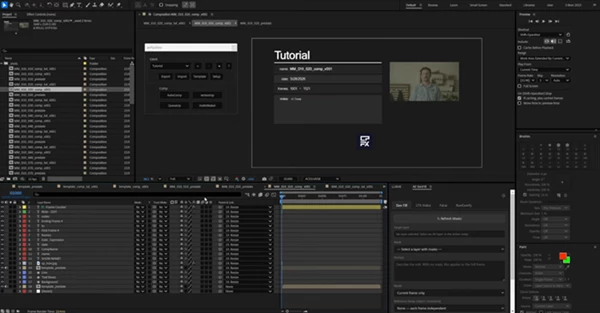
AutoComp
AutoComp transforms the way new shots are prepared.
Simply select your footage, and aePipeline automatically generates:
- Working _preslate compositions
- Final _comp_v001 compositions
- Preview _comp_lut_v001 compositions
- Reference setups
- Color management connections
- Burn-ins and overlays
Instead of spending several minutes building the same structure repeatedly, artists can begin compositing almost immediately.
For productions with large shot counts, this can save hours every week.
versionUp
Version management is one of the most common sources of production mistakes.
The versionUp feature automatically increments compositions to the next version number while allowing slate notes to be added.
It can also create optional backups of the entire composition stack, providing an additional layer of security when delivering multiple revisions to clients.
This ensures version tracking remains organized and consistent throughout production.
QueueUp
Rendering often involves manually selecting settings, output modules, file locations, and naming conventions.
QueueUp automates the entire process. The tool automatically sends compositions to the render queue using:
- Correct render settings
- Appropriate output modules
- Predefined output paths
- Proper file naming conventions
This significantly reduces rendering mistakes and ensures outputs remain consistent across projects.
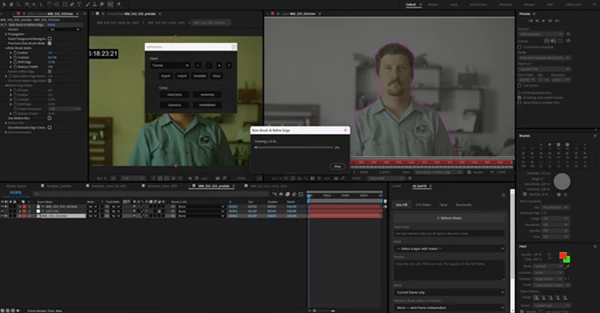
matteMaker
Creating mattes manually can be tedious and prone to timing errors.
The matteMaker feature generates frame-accurate matte compositions directly from preslate comps.
The generated mattes automatically match:
- Current shot timing
- Active versions
- Existing composition structure
This guarantees accuracy while reducing manual preparation work.
Professional Tips for Better Results
Define Client Standards Early
Before starting production, configure client-specific conventions and naming structures. This allows aePipeline to apply consistent standards automatically throughout the project.
Use Version Backups Strategically
When working on important deliveries, enable backup creation during versionUp operations. Having archived versions available can save significant time when revisions need to be revisited.
Standardize Render Templates
Creating reliable render templates allows QueueUp to work even more efficiently. Consistent render settings reduce quality control issues during final delivery.
Keep Your Pipeline Organized
Although aePipeline automates many processes, maintaining clear folder structures and project organization will maximize the benefits of the system.
Focus on Creative Work
The greatest advantage of aePipeline is not simply speed—it’s the ability to spend more time compositing and less time performing repetitive technical tasks.
Final Thoughts
Every minute that a VFX artist spends on a task is time that they cannot dedicate to creating new VFX shots. Hence, the importance of automating the creation of these VFX shots using aePipeline.
This tool automates the creation of VFX shots, version management, rendering, and matte composition so that your VFX company or individual VFX artists can focus on what they do best - creating visually interesting, high-quality visual effects.
For these reasons, aePipeline is a tool that every VFX artist and company should have in their production software suite.

Files Password : gfxplugin.com OR 123456