Downloadable Files
You can download Procedural Skin Details for free at the end of this page.
Add Realistic Skin Details in Minutes
Creating believably detailed digital characters can be challenging, even with realistic texture painting and sculpting applied to the base mesh of the character.
Even the best digital characters have areas where the skin can look too smooth and may lack the realistic details that characterize the skin of real people.
Procedural Skin Details is a tool that makes it easy for artists to add these realistic skin details to their digital characters in minutes, rather than spending days manually creating these details.
The tool is ideal for adding realistic skin details to digital characters used in games, animations, digital humans, and portraits.
What Are Procedural Skin Details?
Procedural skin detailing is a technique used to generate fine skin surface information automatically. These details are often too small to sculpt manually for every character but are essential for creating realistic skin behavior under different lighting conditions.
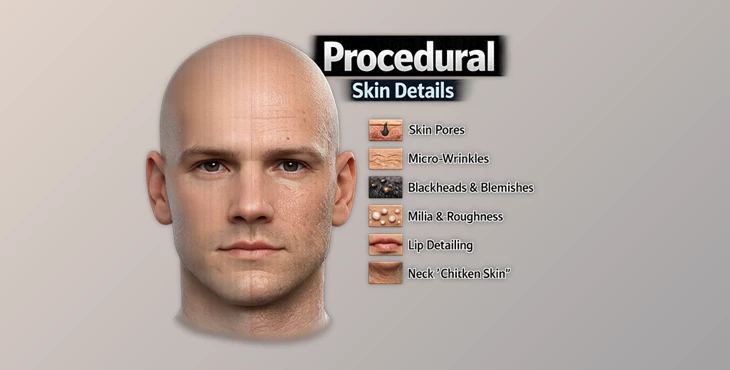
The generated details include:
- Pores
- Neck details and chicken skin
- Micro-wrinkles
- Milia
- Spotheads and blackheads
- Lip surface detailing
- Subtle skin bumps
- Natural skin unevenness
These micro-details help break up perfectly smooth surfaces, making skin react more naturally to light and shadows. As a result, characters appear more believable in close-up renders and high-resolution animations.
For example, a realistic portrait character may already have excellent base color textures, but adding procedural pores and micro-wrinkles can significantly improve realism when viewed at close range. Similarly, game-ready characters can benefit from enhanced surface variation without requiring extensive manual detailing.
Meet Procedural Skin Details
Procedural Skin Details is a tool that automatically generates high-frequency tertiary details for the skin of digital characters to enhance their realism.
The tool is built specifically for artists using Blender software applications for creating their digital characters. It supports many popular digital character creation systems.
Requirements
Procedural Skin Details has the following requirements that your digital character must meet before using the tool:
- Blender 5.0 or newer
- Any compatible head mesh
- Clean, non-overlapping UVs
- Consistent texel density
- Sufficient polygon density for vertex painting to be performed
Features
Realistic Skin Detail Generation. The tool procedurally creates:
- Pores
- Micro-wrinkles
- Milia
- Spotheads and blackheads
- Lip surface details
- Skin bumps
- Natural skin variation
Specialized Facial Region Controls Dedicated controls are available for important facial regions, including:
- Big pores
- Eyes
- Inside areas
- Lips
- Neck
- Nose tips
- Under-eye regions
- Spotheads
This allows artists to customize the appearance of different skin zones more accurately. Bake-Friendly Workflow The tool outputs three modified maps that are easy to bake and integrate into existing character pipelines. This makes it suitable for production workflows where optimization and flexibility are important.
Broad Character Compatibility
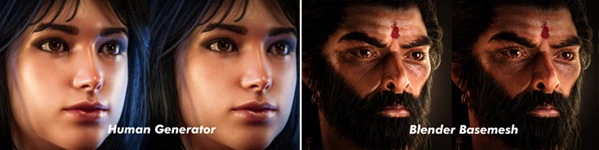
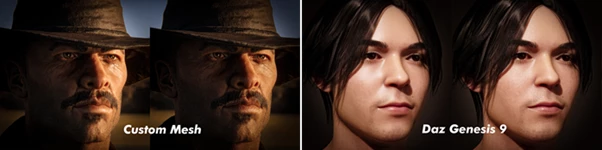
Built-in support is available for several popular character systems:
- Character Creator 4
- Daz Genesis 9
- Human Generator for Blender
- Blender Free Basemeshes
Custom basemeshes are also supported, provided the user is willing to paint a few masks where necessary.
What It Cannot Do
It is important to understand the scope of the tool.
Procedural Skin Details does not:
- Generate wrinkles, folds, or secondary facial forms
- Create base color textures
- Generate roughness maps
- Create SSS weight maps
Instead, it focuses specifically on enhancing existing textures with high-frequency tertiary skin information.
Pro Tips for Better Results
Ensure your character features good UVs before using Procedural Skin Details. Poor UVs can make the generated skin details look bad.
Use a mesh with sufficient geometry for the software to generate realistic skin details. Higher polygon density allows for better and more accurate results.
Ensure that your base textures for the digital character are of good quality. Procedural Skin Details adds the last bit of realism to your character’s skin.
Focus on generating skin details in the close-up areas of the character’s face.
Always bake and preview the character in various lighting setups to ensure the skin details look good under different lighting conditions for your digital character.
Final Thoughts
Procedural Skin Details can take the believability of your digital character to the next level.
By automatically generating pores, micro-wrinkles, skin bumps, and other realistic skin details, this tool will significantly reduce the amount of time you spend manually detailing your character’s skin to enhance the visual engagement of your digital creations.
The compatibility with the most popular digital character systems and the bake-friendly workflow make this a tool that is worth adding to your character creation and pipeline software suite. For anyone seeking to produce digital characters with more natural skin appearances when rendered, this tool can be of great importance to the digital art and game animation industry.

Files Password : gfxplugin.com OR 123456
![Download [Blender] Real Skin Shader V2](https://dls3.gfxplugin.ir/Download_Files/20246/SearchSmall/banner.png)