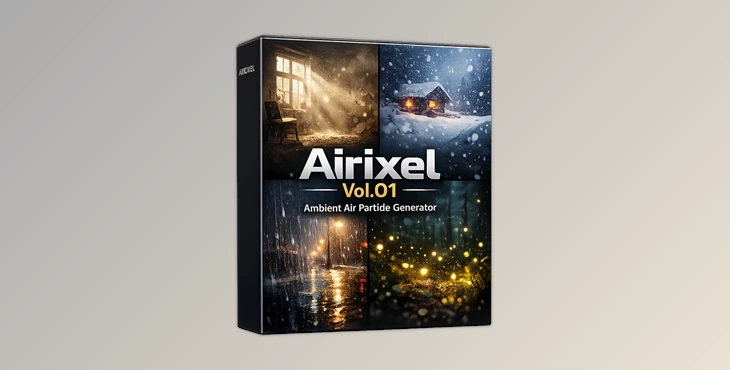
Downloadable Files
You can download Airixel for free at the end of this page.
Bring Your Scenes to Life in Seconds
Adding small details to your scene can make all the difference in creating a believable environment. Consider effects like dust particles that float in the air, magical glowing lights, snow that falls from the sky, or the way it rains in rainy environments.
Airixel will make it easy for you to add these elements to your scene. Airixel is a Geometry Nodes-based add-on for Blender that makes it possible for users to add these types of atmospheric effects to their scenes with just a few clicks. Airixel is ideal for users looking to create scenes for fantasy worlds, architecture visualizations, cinematic animations, or even game environments.
What Is Atmospheric Particle Enhancement?
Atmospheric particle enhancement is used to add different types of environmental particles to your scene. Examples of these types of environmental particles include dust, spark effects, snow, rain particles, or glowing magical effects.
For example, if you are creating an abandoned warehouse environment, adding floating dust particles to the scene will make the environment feel more realistic. Similarly, if you are creating a magical forest scene, adding glowing fireflies and other magical effects will make the scene feel more enchanting. Other examples of why you might add environmental particles include falling snow in winter environments or adding sparks to make a battle scene more dramatic.
These different types of environmental effects will help to create a connection between the viewer and the scene. Viewers will feel as if the environment itself is coming to life within the scene.
Meet Airixel
Airixel is a professional tool within Blender’s Geometry Nodes system. It is used to add atmospheric particle effects to scenes, and it allows users to create these types of effects quickly and efficiently.
Airixel is designed for maximum speed, ease of use, and control for artists looking to create atmospheric particles of any kind.
Features
7 Professional Atmospheric Presets
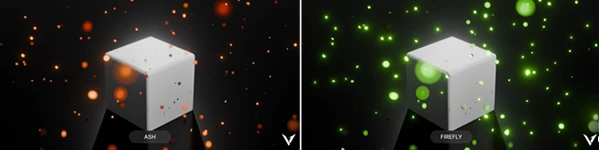
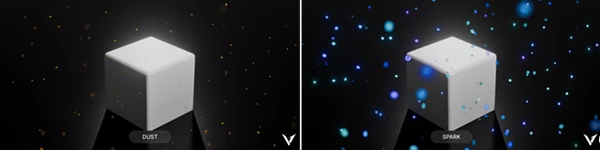
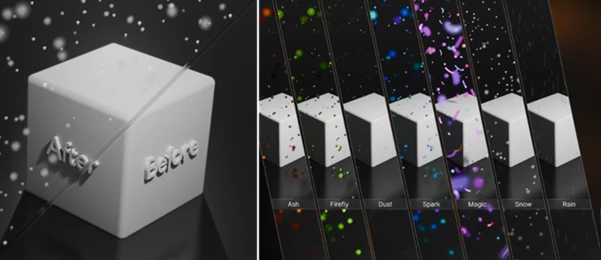
Airixel includes seven handcrafted particle presets designed for different creative needs:
- Ash
- Firefly
- Dust
- Sparks
- Magic
- Snow
- Rain
Each preset is ready to use instantly, allowing artists to quickly establish the desired mood and atmosphere.
Highly Optimized Performance
Airixel utilizes an instance-based system specifically designed for large environments and production-scale scenes. Benefits include:
- Smooth viewport interaction
- Efficient memory usage
- Suitable for complex projects
- Real-time workflow support
This optimization ensures that artists can focus on creativity rather than performance limitations.
Natural Motion Controls
The tool includes integrated wind controls across X, Y, and Z axes. Additional noise-based turbulence creates:
- Organic movement
- More realistic particle behavior
- Natural environmental variation
- Dynamic visual interest
These controls help avoid repetitive motion and make effects feel more believable.
Material Aging System
Certain effects, especially the Magic preset, support material aging controls. Using the Age Speed parameter, artists can influence:
- Glow intensity changes
- Color transitions
- Particle lifecycle behavior
- Visual evolution over time
This creates richer animations and more dynamic visual storytelling.
Custom Domain Optimization
Airixel allows users to define custom simulation domains. Examples include:
- Camera-view areas
- Specific environment sections
- Focus zones within large scenes
By generating particles only where they are visible or needed, performance remains efficient while preserving visual quality.
Continuous Respawn Technology
Unlike systems that continuously accumulate particles, Airixel uses a looping respawn mechanism. Advantages include:
- Stable performance
- No particle buildup
- Consistent density
- Long animation support
This makes the tool especially useful for cinematic sequences and large-scale productions.
Real-World Creative Uses
Airixel allows users to add atmospheric effects to a wide variety of projects. For instance:
Fantasy Worlds
Using the Firefly and Magic particles will allow you to create mythical forests and other landscapes that contain magical elements.
Cinematic Animations
Use the Ash and Sparks particles to create dramatic effects within battle scenes in your cinematic animations.
Architectural Visualizations
Use the Dust particles to add more realism to your architectural visualizations.
Seasonal Effects
Airixel includes the Snow and Rain particles that allow users to create winter environments or rainy climates for their projects.
Game Art
Use Airixel to create atmospheric effects in the environments of your game projects.
Professional Tips for Better Results
Use Subtle Settings at First
Start with the default settings for the atmospheric effects. Often, these effects will be barely noticeable when added to your scene at first. As you become more used to the features of Airixel, you can gradually adjust the settings to match your desires for the particles.
Match the Effect to the Environment
Choose the appropriate atmospheric effect based on the type of environment that you are creating. Use snow particles for winter environments. Use dust particles for abandoned warehouses or dry locations in your scene.
Use Some Turbulence
In addition to the directional wind that can be applied to the atmospheric particles, adding some noise-based turbulence will make the particles move in a more realistic manner in your scene.
Use Custom Domains for Large Scenes
If you are creating a large scene in Blender, use the custom domain feature to limit the areas within which the particles are created. This will increase performance within your scene.
Use the Material Aging System to Add Dynamics to Your Scenes
For projects that feature the Magic Preset, use the Age Speed feature to control how fast the glow colors change within the scene and how long the individual particles last in your project.
Final Thoughts
Atmospheric particle additions to your scenes can make a world of difference in terms of realism and visual impact of your scenes. Airixel makes it easy for users to add these types of effects to their projects with its variety of presets and features.
From fantasy worlds to cinematic animations to game art projects, Airixel will become a valuable tool within your Blender installation.

Files Password : gfxplugin.com OR 123456