Downloadable Files
You can download Voxify | Mesh To Voxel Modifier for free from the bottom of this product page.
🧊 Turn Any Mesh Into Voxel Art (inside Blender)
You know that moment when you look at a normal 3D model and think: “this would look way cooler if it was made of cubes”?
Yeah… that’s exactly what Voxify is for.
It basically takes any mesh in Blender and turns it into voxel style (those cube/block looks), but the cool part is: your original model stays untouched. So you can mess around freely, try stuff, break things, go crazy… and still not ruin anything.
✨ So what’s voxelization actually?
It’s actually really simple:
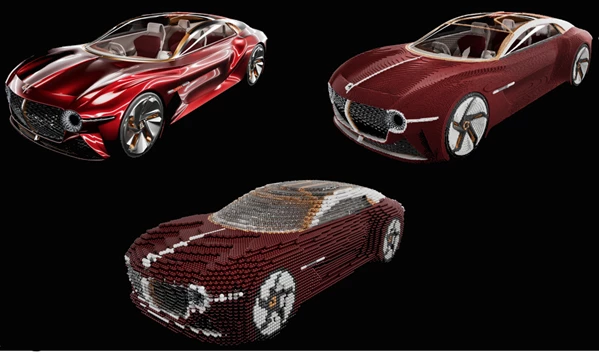
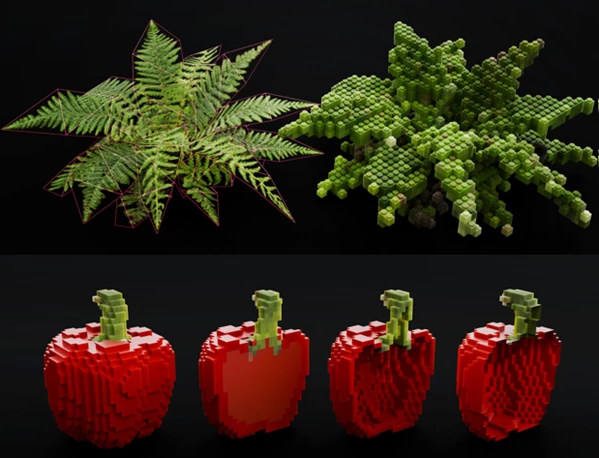
Voxelization is the process of taking a 3D model and turning it into a bunch of cubes.
The result typically features:
✔️ More stylized artwork
✔️ A sense of LEGO or blocky design
✔️ More graphic and artistic designs rather than realistic ones
Voxelization works especially well for turning 3D scenes into digital art projects that focus on creating a more stylized product rather than a realistic one!
🧰 About Voxify
Voxify is built with Geometry Nodes, so everything stays procedural. No destructive edits, no stress.
You just tweak stuff and see results live.
🔹 Features
🧊 Adjustable Voxel Size
Make the cubes big and chunky or small and detailed—depends on the style you want.
🎬 Assembly Animation
You can literally make your model build itself from voxels. Super nice for cinematic shots or intros.
🎞️ Static or Frame-by-Frame Voxelization
Determine whether each of your models should remain static in their current form or if each object should voxelize frame-by-frame to allow for animation effects within your project.
🟩 Clean Mesh Output
If you need, you can turn the result into a proper mesh for export or further work.
✂️ Remove Empty Spaces
Gets rid of unnecessary gaps so things stay clean and optimized.
🧱 Custom Voxel Shapes
Not locked to cubes—you can tweak the vibe a bit and get different looks.
🌈 Color Quantization
Simplifies colors so everything matches that voxel-style aesthetic.
🎨 What people usually use it for
Honestly, a lot of fun stuff:
- turning forests into blocky, stylized worlds
- making characters look like voxel game assets
- creating abstract motion graphics
- doing experimental renders just for fun
It’s one of those tools where you open it “just to try,” and suddenly you’ve spent 2 hours playing with settings 😄
🧠 A few practical tips
Try not to use too small a voxel size when creating your project
The assembly animation is perfect for creating intros for your videos
Use color quantization and Eevee for a more game engine look
Adjust the settings for your project a little bit to make it more visually interesting
Use pruning to reduce the number of objects Blender has to render
Small tweaks = totally different results.
🚀 Wrap-up
At the end of the day, Voxify is just a fun way to completely change the vibe of your 3D work.
Instead of smooth and realistic, you go blocky, stylized, and way more artistic.
It’s simple, fast, and honestly… just really fun to play with.
If you’re into voxel art or just want to experiment with a different look inside Blender, this is definitely one of those tools worth trying out.

Files Password : gfxplugin.com OR 123456