Downloadable Files
You can download BaseLUTs for Panasonic S1II for free at the end of this page.
✨ Introduction: Why BaseLUTs for Panasonic S1II matter
Color grading is often where footage either comes alive or gets stuck in endless adjustments. The BaseLUTs for Panasonic S1II are designed to simplify that process by giving you a clean, reliable starting point for cinematic color conversion.
Instead of fighting flat log footage, you can instantly move into a balanced viewing space and focus on creative decisions rather than technical corrections.
🎯 What BaseLUTs for Panasonic S1II does in practice
BaseLUTs for Panasonic S1II will allow you to convert your footage from Panasonic S1 II that is recorded in Log to color spaces that are accurate and easy to use during editing.
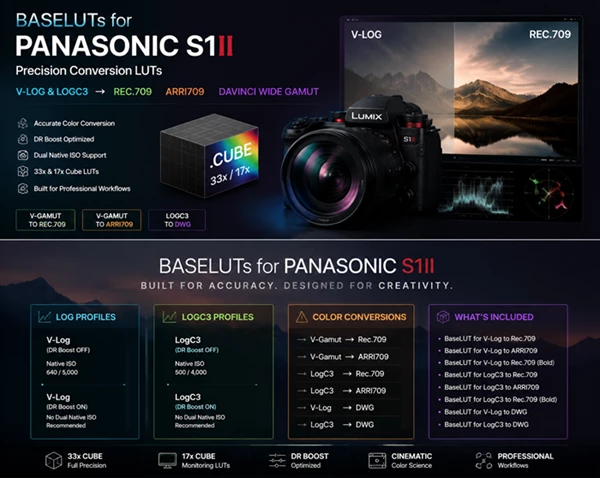
The included LUTs will allow for the conversion of your footage from:
- V-Log to Rec. 709 / ARRI709 / DaVinci Wide Gamut
- LogC3 to Rec.709 / ARRI709 / DaVinci Wide Gamut
This will allow you to easily avoid the flat appearance of your recorded footage and get right into color grading.
For example:
If you have recorded footage in V-Log, the LUT will allow you to instantly view footage in Rec. 709 to better judge your footage.
⚙️ Features of BaseLUTs for Panasonic S1II
📌 Camera & Log Support
- V-Log (DR Boost ON / OFF optimized versions)
- LogC3 (DR Boost ON / OFF optimized versions)
- Designed for Panasonic S1 II color science
📌 Color Space Conversions
- V-Gamut to Rec. 709
- V-Gamut to ARRI709
- LogC3 to ARRI Wide Gamut workflows
- Support for DaVinci Wide Gamut (DWG) pipelines
📌 Dynamic Range Optimization
- DR Boost-aware LUTs for accurate highlight handling
- Separate ISO behavior considerations (native ISO ranges included per mode)
- Clean tonal rolloff for cinematic highlight preservation
📌 LUT Formats Included
- 33x Cube LUTs for full precision grading
- 17x Cube LUTs for monitoring and on-set preview
📌 Creative Variants
- Standard Rec. 709 conversion
- ARRI709 cinematic conversion
- “Bold” Rec. 709 versions for higher contrast looks
- DWG-ready technical LUTs for advanced grading workflows
🎬 Why this improves your workflow
Without the BaseLUTs for Panasonic S1 II, you may find yourself struggling to have consistency between each of your video clips. With the BaseLUTs for Panasonic S1 II, you will have improved:
- workflow speed by having a consistent color between clips
- ability to control highlight and shadow values
- ease of integrating with different types of footage (V-Log/LogC3)
- foundation for color grading
🧠 Professional tips for best results
- Match your footage with the correct setting (DR Boost ON/OFF)
- Use DaVinci Wide Gamut LUTs if you plan on doing color grading in DaVinci Resolve
- Use Rec. 709 Bold versions if you are presenting your project to a client
- Match clips from different Log settings so they appear the same in your edit
- Small changes early to create the best results later in editing
🚀 Conclusion
The BaseLUTs for Panasonic S1 II were created to offer you accuracy in your color grading workflow. The LUTs will allow you to avoid color grading struggles and have more time to focus on your project.
Whether you are creating commercial, film, or social media content, the BaseLUTs for Panasonic S1 II will give your projects a solid color grading start.

Files Password : gfxplugin.com OR 123456