Downloadable Files
You can download Motion Upscaler for free at the end of this page.
Bring Your Animations to Life with Sharper Quality
Perhaps you have created some amazing motion graphics or animations that just have not come out to the resolution that you wanted for your delivery.
In such instances, re-rendering your project is often the go-to solution. However, many upscaling tools simply do not offer the same level of detail when it comes to upscaling PNG sequences and other images with transparency channels.
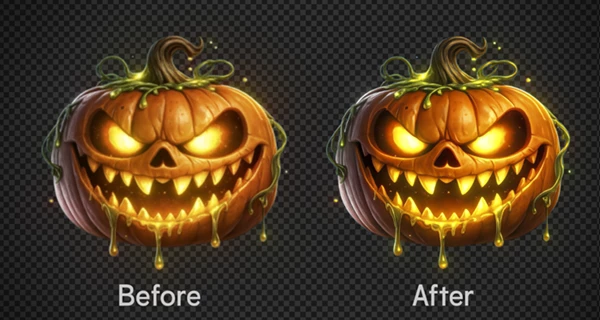
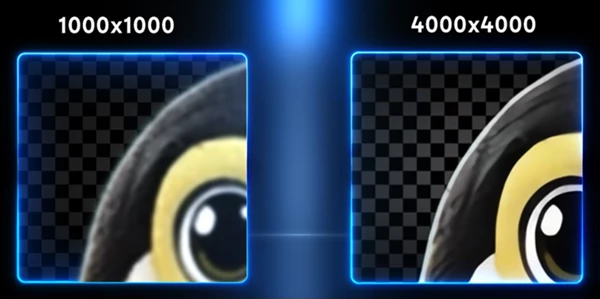
Motion Upscaler allows you to upscale your PNG sequences, images, and videos with AI technology that offers exceptional detail retention - especially for animated projects.
What Is AI-Based Motion Upscaling?
AI upscaling tools work by analyzing an image or video project and learning how to enhance it based on machine learning and training data.
For motion graphics and visual effects artists, motion upscaling tools offer the following benefits:
- Increase the resolution of your project without having to re-render your motion graphics project.
- Retain the edges and details of your project.
- Improve the visual quality of your motion graphic or video project.
- Maintain consistent visual quality across all frames of your project.
- Retain the transparency channels of your project.
The upscaler maintains the ability of your project to remain production-ready.
Meet Motion Upscaler
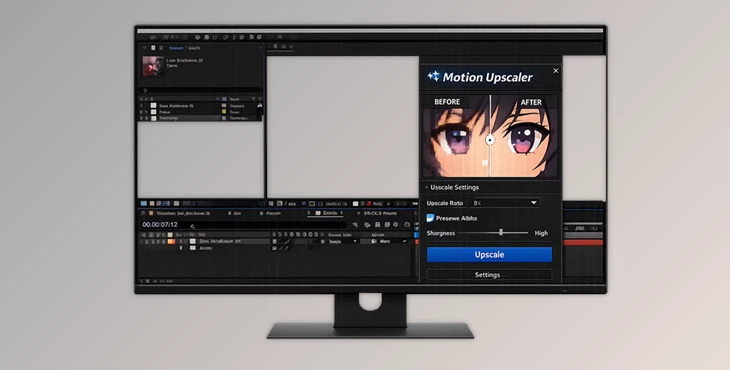
Motion Upscaler is a professional CEP panel for Adobe After Effects that allows you to upscale your PNG sequences, images, and videos.
Motion Upscaler is built for motion graphics designers and visual effects artists looking for an AI upscaler that works directly within their programs. As a result:
- No cloud processing is required for your motion projects.
- Your project files are private and cannot be accessed by third parties.
- No subscriptions are required for use with your After Effects projects.
- No tokens or limitations will interrupt your production process.
All of your motion graphic sequences will be processed on your machine.
Features
AI Model Optimized for Animated Content
Motion Upscaler includes an AI engine that is trained specifically for motion graphics projects, including the following:
- Anime projects
- Cartoon animations
- Motion graphics
- Sprite sheets
- 3D rendered sequences
- Visual effects assets
The engine understands the visual language of motion content and enhances it accordingly.
Preserve Alpha Transparency
One of the most powerful capabilities of Motion Upscaler is its ability to maintain alpha channels during PNG sequence upscaling. This is especially important for:
- VFX compositing
- Motion graphics overlays
- Particle effects
- Character renders
- Transparent animations
Instead of damaging transparency information, Motion Upscaler keeps alpha mattes sharp and production-ready, allowing assets to be immediately reused inside compositions.
Direct PNG Sequence Processing
Artists can load PNG sequences directly from their After Effects projects or from the file system. The software automatically processes every frame while preserving transparency and detail. This eliminates the need for complicated export and import workflows, reducing production time and simplifying project management.
Multiple Upscaling Factors
Depending on project requirements, users can choose from:
- 2× Upscaling
- 3× Upscaling
- 4× Upscaling
This flexibility makes it easy to prepare content for HD, 4K, social media, digital signage, and large-screen presentations.
Batch Image Processing
Working with hundreds of images can be repetitive and time-consuming. Motion Upscaler includes batch processing capabilities that allow multiple images to be enhanced automatically. This feature is ideal for:
- Concept art libraries
- Marketing assets
- Product renders
- Game textures
- Storyboard frames
Video Upscaling Support
Beyond image sequences, Motion Upscaler also supports direct video enhancement.
Creators can upscale entire clips while benefiting from the same AI technology used for PNG sequences. This makes it useful for improving archived footage, animated videos, promotional content, and motion design projects.
Local Processing and Complete Privacy
Since all processing takes place on your computer:
- No cloud uploads are required.
- Sensitive project files remain private.
- No subscriptions are needed.
- No token systems or usage limits apply.
This approach is particularly valuable for studios and professionals handling confidential client projects.
Live Progress Monitoring
Keep tabs on your project as it is being enhanced using the built-in System Log.
Real-World Creative Uses
Motion Upscaler can work on projects of all kinds and for all industries. For instance:
- Motion designers may use it to upscale their logo animations for large screens.
- VFX artists can upscale their particles for more detailed renders while preserving transparency.
- Game developers can upscale their game sprites and animations.
- As an anime creator, you can upscale your projects to stream on high-definition platforms.
All of these and other creative industries can benefit from the use of this product.
Pro Tips for Better Results
Always work with the highest-quality PNG file available.
Choose a scaling factor that meets your project’s resolution requirements.
Organize any project elements that involve alpha channels to easily access them in the upscaler.
Always test the upscaler on a few frames of your animation before upscaling your final project.
Use color correction and sharpening tools to enhance your upscaled project files.
Final Thoughts
Motion Upscaler is a powerful AI upscaler specifically for motion graphics designers, visual effects producers, and animators.
With its ability to upscale PNG sequences with alpha channels, batch images, and videos, this tool can improve your projects in a variety of ways.
By maintaining your projects on your local machine with complete privacy and by allowing you to work with AI technology that understands motion content, Motion Upscaler can significantly improve your resolution-free projects.
Whether you are enhancing motion graphics, 3D renders, anime projects, or video content, Motion Upscaler will significantly improve the resolution and quality of your projects.

Files Password : gfxplugin.com OR 123456