Downloadable Files
You can download Filmbox for free at the end of this page.
Bring the Magic of Real Film to Digital Footage
Have you ever noticed the unique look of film footage? For many filmmakers, film stock is a source of inspiration that produces a unique look for the cinematography of the film. The challenge for digital filmmakers is to replicate this look in post-production as closely as possible to evoke the same emotions from the audience.
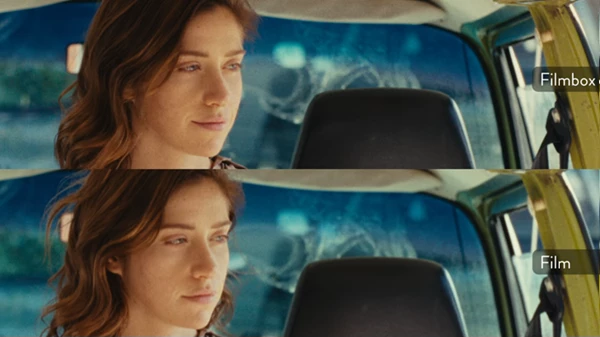
Filmbox recreates the behavior of real film stocks. It was created by professionals for professionals working in digital post-production environments to deliver a faithful recreation of the behavior and look of all film stocks ever released.
From documentaries to music videos, Filmbox delivers a unique look to all types of projects.
Understanding Film Emulation and Why It Matters
Film emulation creates the visual characteristics of film within a digital editing environment. This is done to replicate the unique look of film by recreating the various physical characteristics of film stock.
These physical characteristics include:
- Color response
- Film grain
- Halanation around bright areas of the image
- Contrast of the image
- Exposure of the film
- Print film interaction
- Camera gate movement
- Dust and aging characteristics of the film
Film emulation allows digital editors and filmmakers to include many of these characteristics in their projects so they have the same look as film footage.
Depending on the type of project a filmmaker is creating, these characteristics can add value to the editing process. For instance, a feature film or commercial can use film emulation to produce a premium look. On the other hand, a music video can emulate the look of older film stocks such as Kodak film. Even documentaries can use the look of film stock, or social media content can feature an edited look that stands out from other content uploaded online.
Filmbox enables editors and filmmakers to emulate these characteristics to achieve the look of film footage using their editing software.
Meet Filmbox
Filmbox is a professional-grade emulation plugin for several of the most popular digital editing software packages in existence today. Whether you use DaVinci Resolve, Adobe Premiere Pro, After Effects, Final Cut Pro, or Baselight, Filmbox will work with your editing software so that you can achieve the look of real film within your project.
Filmbox uses data from real film stocks to emulate these look characteristics so that users get an exceptionally accurate recreation of the look of film within their editing software.
Filmbox features a collection of seventy photochemical systems and ninety-eight individual film stocks to choose from to give your editing project a unique look.
Features
Exceptionally Accurate Film Rendering
Filmbox reproduces the subtle qualities that make film unique. These include:
- Realistic halation around highlights
- Natural acutance and micro-contrast
- Organic detail rendering
- Authentic tonal rolloff
- Accurate color response across exposure latitude
The result is footage that feels softer, richer, and more cinematic without losing important image detail.
Massive Library of Film Stocks
Filmbox includes a wide range of professionally profiled film stocks and processes. Available categories include:
- Kodak Vision3 ECN-2
- Bleach Bypass ECN-2
- Ektachrome ECN-2
- Color Photo C-41
- Vintage Cinema Stocks
- Reversal E6 Films
- Black & White Photo Films
Each stock delivers its own unique color palette, grain structure, contrast profile, and emotional character.
Advanced Grain and Texture Simulation
Film grain is much more than random noise. Filmbox recreates:
- Tonal grain distribution
- Dye cloud behavior
- Grain structure and softness
- Temporal variation
- Film development characteristics
This produces grain that behaves naturally across shadows, midtones, and highlights.
Realistic Halation Controls
One of the most recognizable traits of film is halation. Filmbox allows users to control:
- Halation size
- Intensity
- Color balance
- Saturation
- Aura effects
This enables creators to achieve anything from subtle cinematic glow to highly expressive vintage aesthetics.
Professional Color and Tone Controls
Filmbox offers analog-inspired controls that feel similar to working with real film. Key adjustments include:
- Print Style
- Gauge Selection
- Acutance
- Push and Pull Processing
- Color Density
- Vibrance
- Contrast
- Split Toning
- Printer Lights
- True Exposure Controls
These tools provide precise creative control while preserving the natural behavior of film.
Authentic Film Imperfections
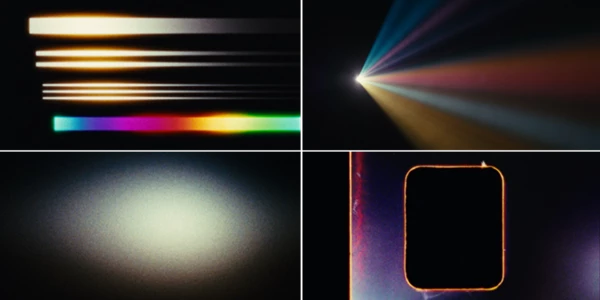
Perfect footage is not always desirable. Filmbox can simulate:
- Gate Weave
- Dust Particles
- Exposure Flicker
- Camera Instability
- Film Aging Characteristics
These details help create footage that feels genuinely captured on film rather than digitally processed.
Modern Professional Workflow Support
This product integrates seamlessly into professional post-production environments. It supports:
- ACES 1.3 and ACES 2.0
- Resolve Color Management
- HDR workflows
- Multi-node grading setups
- LUT export
- User preset export
- Real-time on-set preview
- Multiple camera input color spaces
This makes it suitable for everything from independent productions to high-end cinema projects.
More Than 100 Ready-to-Use Looks
For creators who need quick results, Filmbox includes over one hundred professionally designed presets. These presets range from:
- Clean commercial looks
- Modern cinema styles
- Vintage film aesthetics
- Documentary grades
- High-contrast creative looks
- Experimental film treatments
They provide an excellent starting point for further customization.
Pro Tips for Better Film Emulation
Start With the Right Film Stock
Choose a stock that matches the mood of your project before adjusting any settings. The stock selection often has a bigger impact than extensive tweaking.
Use Halation Conservatively
Subtle halation usually appears more realistic. Excessive glow can quickly make footage look artificial.
Match Grain to Resolution
Higher-resolution footage often benefits from finer grain structures, while lower-resolution projects can support more visible texture.
Experiment With Print Style
The Print Style control dramatically changes the final image. Testing different print and scan combinations can reveal unique looks that fit your project perfectly.
Combine Push/Pull Processing With Exposure
Small exposure adjustments paired with push or pull processing often produce more authentic film-like results than aggressive contrast manipulation.
Preserve Dynamic Range
Film is known for its graceful highlight rolloff. Avoid crushing shadows or clipping highlights before applying Filmbox.
Final Thoughts
This tool is more than just a simple emulation plugin for various editing projects. It recreates the physical characteristics of film stocks that have been used in the motion picture and photographic industry for decades.
Filmbox includes a wide range of features and functions to allow filmmakers of all experience levels to successfully add the look and feel of film to their editing projects.
With Filmbox, filmmakers can create projects that emulate classic film stocks or edit projects to feature a more customized analog look. It is a complete solution for all film emulation needs and one of the best available in the editing software industry today.

Files Password : gfxplugin.com OR 123456