Downloadable Files
You can download JAY’s CineKit for free at the end of this page.
Turn Ordinary Footage Into Cinematic Visuals
For filmmakers and content creators who aspire to cut through the production noise and produce content that stands out from the rest of the sea of video content flooding social media platforms, achieving a cinematic look is one of the biggest goals.
For most editors, achieving that look can be overwhelming due to the vast difference in color grading requirements between projects and the time it takes to make each adjustment from scratch.
JAY’s CineKit was created to eliminate the guesswork behind color grading, providing editors with a professional system that makes it easier for them to work quickly and efficiently to achieve professional results.
Whether you are editing short films, commercials, YouTube videos, or content for social media, JAY’s CineKit will give you the tools and workflow to easily achieve a cinematic color grade.
Understanding Structured Color Grading
Color grading is an essential part of post-production that can drastically impact the final look and feel of a film or piece of content.
A professional color grading system involves a particular workflow to ensure that even creative colorists can produce a consistent result. The color grading process can help editors save time and produce results that are efficient and suited to their editorial projects.
Here are some of the benefits of using a structured color grading system:
- It will allow you to save time with pre-set nodes and adjustments.
- You can create professional color grading results.
- It allows for even the most complex color grading projects to be created with ease.
- It will allow you to have consistency between projects.
- It can improve the editing and color grading workflow that you use daily.
By using a structured color grading system, editors can save themselves the time it would otherwise take to produce the same result from the beginning of each project. Instead, editors can focus on the aspects of color correction that matter to their editing projects.
Meet JAY’s CineKit
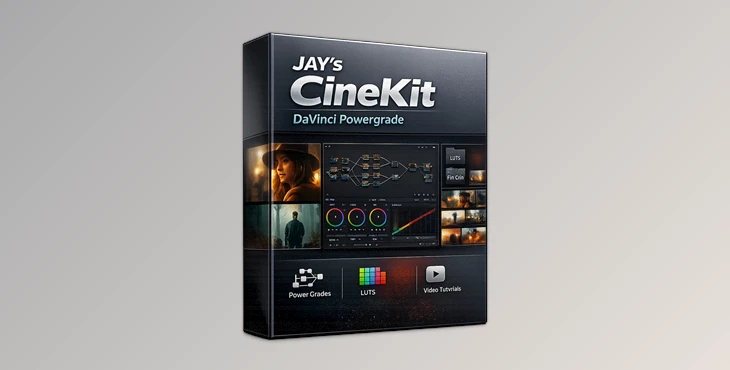
JAY’s CineKit was built specifically for editors using DaVinci Resolve to produce cinematic color grading results. Based on the exact same node tree structure that JAY uses in his editing projects, this color grading system will save editors time and provide a solid foundation for even the most complex editing projects.
Additionally, it includes both creative and technical LUTs that can be used in DaVinci Resolve and other editing software.
Features
Professional DaVinci Resolve Node Tree
At the core of CineKit is a carefully designed Powergrade node structure that helps organize every stage of color grading. Benefits include:
- Faster workflow setup.
- Cleaner grading structure.
- Improved consistency between projects.
- Easier troubleshooting and adjustments.
- Better organization for complex grades.
Structured Color Workflow
The system maps out each step of the grading process, helping users move logically from technical corrections to creative styling. This workflow helps:
- Reduce mistakes.
- Speed up grading sessions.
- Improve visual consistency.
- Create repeatable professional results.
Creative and Technical LUTs
The download package includes:
- 2 new Rec.709 Creative LUTs.
- Technical conversion LUTs.
- Combination LUTs.
These tools provide additional creative flexibility while supporting a solid technical workflow.
Comprehensive Learning Resources
The included grading short course covers:
- What a Powergrade is.
- Installation process.
- DaVinci Resolve project settings.
- Understanding the node tree.
- Real grading sessions.
- Export settings.
This makes the kit valuable for both beginners and experienced editors looking to refine their workflow.
Sample Footage Included
Having sample footage available allows users to immediately practice grading techniques and understand how the system performs in real-world scenarios.
Lifetime Updates
Purchasing the kit provides access to future updates, ensuring users continue to benefit from improvements and additions over time.
Real-World Uses
JAY’s CineKit can be used across many types of projects, including:
- Short films.
- Commercial advertisements.
- Documentary productions.
- Music videos.
- YouTube content.
- Travel videos.
- Social media campaigns.
- Brand storytelling projects.
For example, a content creator working with footage from different cameras can use the CineKit workflow to create a unified and consistent visual style across an entire project.


Professional Tips for Better Results
Start With Technical Corrections
Always establish a clean technical foundation before applying creative looks. Proper exposure and color balance lead to more natural cinematic results.
Learn the Node Structure
Take time to understand how each node functions. Knowing the purpose of every stage will help you customize grades more effectively.
Stay Consistent Across Projects
Use the same workflow structure whenever possible. Consistency improves both efficiency and visual quality.
Use LUTs as Creative Enhancements
The included LUTs work best when combined with proper grading techniques rather than being used as one-click solutions.
Practice With Sample Footage
Experimenting with the included footage is a great way to understand the grading system before applying it to important client projects.
Final Thoughts
For editors, color grading can be one of the most overwhelming aspects of editing. With JAY’s CineKit, editors can finally have an easy-to-use color grading system that will ultimately allow them to produce the results they need in their editing projects.
From its structured node tree to the included LUTs and learning resources, this system is an ideal solution for editors looking to produce cinematic results without the complexity of creating their own color grading system from the beginning.
For both beginners and experienced editors, this color grading system can help colorists of all skill levels master color grading within DaVinci Resolve and produce the best results for their editing projects.

Files Password : gfxplugin.com OR 123456