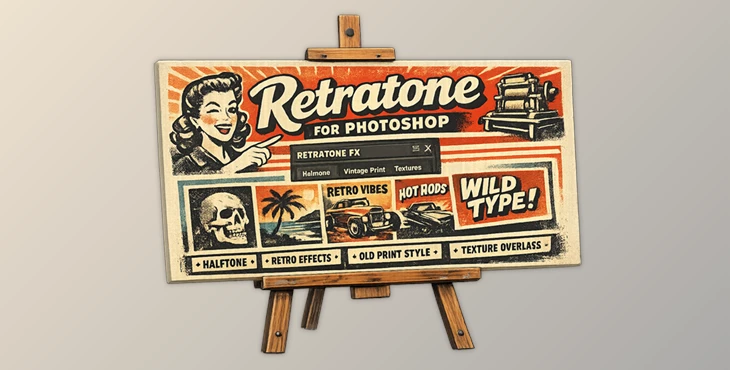
Downloadable Files
You can download Retratone for Photoshop for free at the end of this page.
Turn Digital Artwork into Classic Print Designs
If you are drawn to vintage aesthetics, then you will find Retratone for Photoshop to be of great interest to you. Whether you are a designer, an illustrator, a photographer, or a print artist, Retratone for Photoshop will allow you to gain that authentic print media look in your projects.
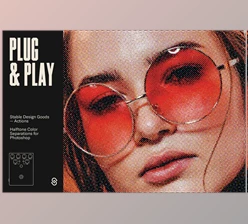
Unlike other halftone plugins out there, Retratone does simulate the way in which inks react on paper when printed. With customizable inks, multiple pattern styles, and print controls, you can design everything from subtle artwork to bold, retro-inspired designs for your projects.
What Is a Halftone Effect and Why Does It Matter?
Halftone printing is a process that is used in newspapers, magazines, comics, and other forms of print media. With halftone printing, the image is represented as a series of tiny dots of varying sizes.
Some benefits of halftone design include:
- Creates a unique, vintage appearance to the printed media.
- Adds texture to static digital media.
- Creates print-ready color separations for printing.
- Performs screen-print and risograph effects on digital media.
- Creates a handcrafted look to digital illustrations and photographs.
Halftone effects can instantly transform digital designs to look as though they are from a vintage print medium. Retratone for Photoshop allows your designs to stand out from the crowd.
Meet Retratone for Photoshop
Created with Adobe Photoshop 2024 and newer versions in mind, Retratone will give you a panel within Photoshop that will allow you to recreate halftone printing processes. The effect will remain editable throughout your project.
From creating small design elements to professional print designs, Retratone for Photoshop allows you to have a realistic result within Photoshop that meets your own standards.
Features
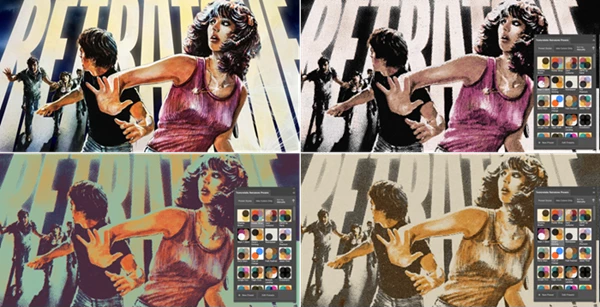
Realistic Print-Style Halftones
Retratone recreates the appearance of traditional printed media by generating authentic halftone patterns inspired by real-world printing techniques. This allows designers to create:
- Vintage posters
- Comic book artwork
- Editorial illustrations
- Screen-print-inspired graphics
- Retro branding materials
Multiple Pattern Styles
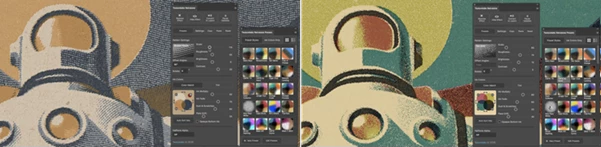
The plugin includes several pattern styles modeled after traditional print methods. Different pattern structures can dramatically change the mood of a design, making it easy to switch between clean commercial looks and heavily stylized vintage aesthetics.
Custom Ink System
One of the most powerful aspects of Retratone is its customizable ink workflow. Users can:
- Select custom ink colors.
- Simulate overlapping ink behavior.
- Build unique color combinations.
- Recreate real printing processes.
This results in more believable and visually rich artwork compared to standard digital color effects.
100 Built-In Presets
Retratone comes with a large collection of professionally designed presets that provide instant starting points. Benefits include:
- Faster workflow.
- Easy experimentation.
- Learning through example settings.
- Consistent results across projects.
Users can also save their own presets for future use.
Fully Adjustable Live Effects
Once applied, the halftone effect remains editable. You can continue refining:
- Pattern settings
- Ink choices
- Print behavior
- Color mapping
without restarting the process or rebuilding the effect from scratch.
Ink Separation Creation
Retratone can convert complex artwork into clean, separated ink plates. This feature is particularly valuable for:
- Screen printing
- Risograph workflows
- Commercial printing preparation
- Multi-color print projects
The ability to generate organized separations helps reduce production errors and improve printing accuracy.
Real-World Creative Uses
Retratone fits naturally into many creative workflows. Examples include:
- Designing vintage concert posters.
- Creating retro-style social media graphics.
- Producing comic book illustrations.
- Building packaging concepts with print aesthetics.
- Enhancing editorial artwork.
- Developing unique branding materials.
- Preparing artwork for physical screen printing.
Because the plugin works directly inside Photoshop, it integrates smoothly into existing production pipelines.
Pro Tips for Better Results
Start with Presets
One of the best ways to get started with Retratone is to start with one of the built-in presets and then to make changes to the settings to meet your own design needs.
Use Limited Color Palettes
Many print media use limited colors. Try to use fewer colors than your project normally would require.
Experiment with Ink Overlaps
The inks will interact with one another on your screen. Do not restrict the way in which inks interact; experiment with this setting to find your ideal outcome.
Combine with Typography
Retratone works best with typography. Try to combine your text elements and your halftone elements to create visually interesting designs.
Create Separate Versions
You can create multiple versions of the same design. If you experiment with the pattern settings, you may be surprised at how different the outcome is from your designs.
Final Thoughts
Retratone for Photoshop effectively allows Photoshop users to transform their designs to include the look of traditional print media. From creating print elements to allowing users to prepare their designs to be printed as screen printing designs, Retratone includes just about everything that you will need.
Regardless of your digital design goals, whether they are subtle designs with texture elements or bold retro designs, Retratone will allow you to have a professional-looking result within Photoshop.
If you are looking to give your digital designs the same look and character as print media, then Retratone is a plugin worth considering and exploring.

Files Password : gfxplugin.com OR 123456