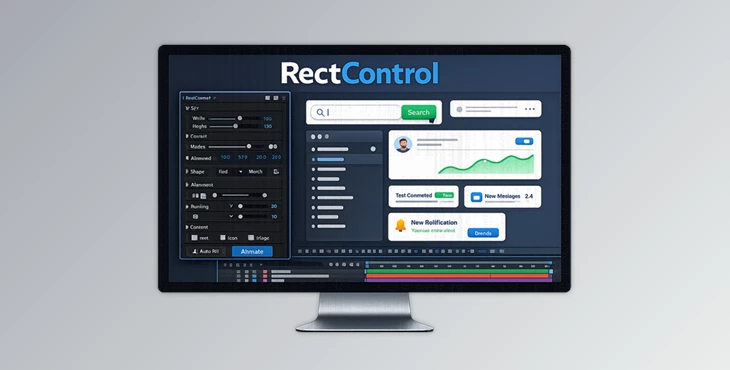
Downloadable Files
You can download RectControl for free at the end of this page.
Bring Your UI Animations to Life
If you create UI animations, SaaS product demos, dashboards, or mobile app previews in After Effects, you’ve likely spent countless hours adjusting rectangle shapes to achieve your desired results. While After Effects includes several options for creating basic shapes, it can be frustrating to precisely control the features of rounded rectangles.
This tool was created to give After Effects users complete control over rectangle shapes in their compositions to make their most complex UI animations easier, faster, and more flexible.
Why Rectangle Control Matters
Rounded rectangles are some of the most common elements within modern user interfaces. From buttons and cards to dashboards and panels, they are an essential part of almost every modern interface.
After Effects shape tools do not offer much flexibility when animating rounded rectangles, which can present challenges to designers looking to create more natural-looking and visually compelling interfaces.
RectControl was created to address these pain points by giving motion designers more control over their rounded rectangle shapes.
By giving users the ability to animate commonly challenging elements like rounded corners and dynamic shapes, RectControl can take the tedious task of manually animating each corner of a rounded rectangle and automate it for designers to focus on other project aspects.
Furthermore, as more designers and developers employ modern design systems with rounded interface elements throughout their SaaS and mobile applications, motion designers need the ability to precisely control the elements within these modern interfaces.
Meet RectControl
This product is a powerful extension for After Effects that allows designers to have complete control over the most common element in UI animations: the rectangle.
This plugin enhances standard rectangle tools with additional controls for alignment, corner radius, and null creation to help streamline the UI animation process for After Effects users.
Whether you are creating app animations, SaaS product demos, onboarding videos, or motion design presentations for clients, RectControl can significantly streamline your UI animation process.
Features
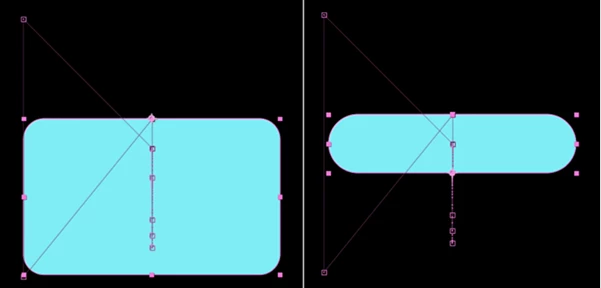
Advanced Rectangle Morphing
RectControl allows control over several different properties for rectangles:
- Width
- Height
- Alignment
- Corner roundness (linked or independent)
- Corner curvature
- Convex and concave corners
- Squircle support for Apple designs
All of these features allow designers to create impressive transformations from one type of rectangle to another.
Real-World Example
A SaaS dashboard panel can smoothly transform into a floating notification card while preserving perfect corner behavior throughout the animation.
Dynamic 9-Point Null Creation
One of RectControl’s most powerful features is its ability to generate null objects across nine different regions of a rectangle with a single click. These nulls can be used for:
- Pinning icons inside panels
- Anchoring text dynamically
- Connecting external UI elements
- Driving gradient start and end points
- Building responsive interface animations
This dramatically reduces manual positioning work and helps maintain consistency when designs change.
One-Click Figma Conversion
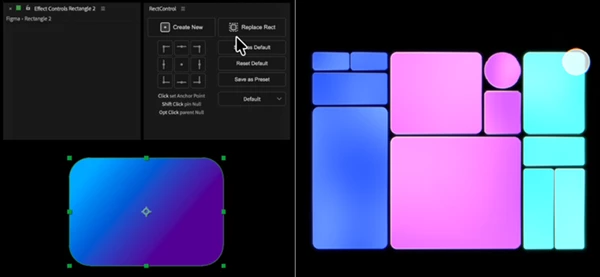
For designers working between Figma and After Effects, RectControl simplifies the workflow. Rectangles imported from Figma through Overlord can be instantly converted into RectControl shapes while preserving:
- Fill settings
- Stroke settings
- Linked corner radius values
This means less rebuilding and more time animating.
Built for SaaS and UI Animation
Modern software interfaces often contain dozens of animated cards, menus, forms, and panels. This tool makes it easier to:
- Animate responsive layouts
- Create expanding panels
- Design interactive dashboard elements
- Build onboarding animations
- Produce polished product demonstrations
The result is cleaner animation with greater flexibility and control.
Easy-to-Use Interface
All controls are accessible through simple Effect Controls and an intuitive extension panel. Users can:
- Create RectControl layers
- Generate pinned nulls
- Adjust alignment
- Save presets
- Create reusable rectangle styles
This keeps workflows organized and easy to manage.
Works Across Different Layer Types
The built-in 9-point grid system isn’t limited to rectangles. It can also be used with:
- Shape layers
- Text layers
- Images
- Solids
- Precompositions
This allows users to adjust anchor points, create parent-child relationships, and maintain positioning without disrupting existing animations.
Pro Tips for Better Results
Use Preset Shapes
RectControl allows designers to save their project’s rectangle shapes as presets. These can then be quickly selected and applied to other areas of the project for consistency.
Combine With Motion Design Tools
RectControl works particularly well with other After Effects motion design tools like easing, glow, and chromatic aberration tools for even more advanced control over the UI elements.
Build Responsive Layouts
Use the dynamic null points RectControl creates to build animations that automatically adapt to changes to the project’s other elements.
Animate Corner Properties
Beyond animating the width and height of rectangle objects, RectControl allows designers to animate the corners for even more flexible and modern-looking animations.
Keep UI Elements Connected
Use the null points RectControl creates to keep other elements of your composition connected to your rectangles for consistent animations.
Final Thoughts
This tool is an essential tool for After Effects designers who create UI and motion graphics.
This plugin significantly improves control over rectangle shapes and overcomes many of the limitations of After Effects’ native shape tools.
Whether you work on SaaS product videos, app animations, UI prototypes, or motion graphics, this tool can streamline your process and give you the flexibility and control you need over your most common design elements. As such, it is a valuable addition to any After Effects designer’s toolkit.
 RectControl for Ae by Aescripts (v1.1.1).rar (Size: 1.2 MB - Date: 7/22/2026 10:35:55 AM)
- RectControl for Ae by Aescripts (v1.1.0).rar (Size: 1.2 MB - Date: 7/15/2026 2:43:11 PM)
- RectControl for Ae by Aescripts (v1.0.3).rar (Size: 34.7 MB - Date: 6/20/2026 10:45:00 AM)
- RectControl for Ae by Aescripts (v1.0.2).rar (Size: 1.1 MB - Date: 6/17/2026 4:52:08 PM)
- RectControl for Ae by Aescripts (v1.0.1).rar (Size: 34.4 MB - Date: 6/15/2026 11:31:16 AM)
- Aescripts - RectControl v1.0.rar (Size: 1.1 MB - Date: 6/10/2026 1:51:24 PM)
Files Password : gfxplugin.com OR 123456